
Ration Card Search Telangana – Search by Name, Mobile Number & Aadhaar
Last Updated: June 25, 2026
Information Source: Based on publicly available information from official EPDS Telangana portal
Learn how to search your ration card in Telangana using three different methods: Aadhaar-based search, mobile number search, and name-based verification. This comprehensive guide covers step-by-step instructions for each search method to help you check TS ration card details, find family member names, and verify FSC status online.
⚡ Quick Answer
Best Search Methods: (1) Aadhaar-based search is the most reliable – works for 95% of users. (2) Mobile number search requires registered mobile linked with FSC. (3) Name-based direct search is not available, but you can find names through Aadhaar/mobile search results which display all family members.
Compare All Ration Card Search Methods
Choose the best search method based on what information you have available:
| Search Method | What You Need | Success Rate | Shows Names? | Best For |
|---|---|---|---|---|
| 🆔 Aadhaar Number | 12-digit Aadhaar number | 95% | ✓ Yes | Most users, most reliable method |
| 📱 Mobile Number | Registered mobile + OTP | 70% | ✓ Yes | When mobile is linked with FSC |
| 👤 Name Search | Cardholder name | Not Available | ✗ N/A | Use Aadhaar instead |
| 🔢 UID Number | FSC UID number | 90% | ✓ Yes | When UID is known/linked |
| 📝 FSC Number | Ration card number | 100% | ✓ Yes | Direct search when card available |
| 📋 Application ID | MeeSeva application number | 85% | ✓ Yes | New application tracking |
3 Ways to Search Ration Card in Telangana
Method 1: Aadhaar Search
Most Recommended
Search using 12-digit Aadhaar number. Works for any family member. Shows all names automatically.
✓ Fastest & Most Reliable
Method 2: Mobile Search
Requires Registration
Search using registered mobile number. Requires OTP verification. Mobile must be linked with FSC.
⚠️ Only if Mobile Registered
Method 3: Name-Based
Indirect Method
Direct name search unavailable. Use Aadhaar/mobile search – results will show all family member names.
ℹ️ Use Other Methods
Method 1: Ration Card Search by Aadhaar Number
🆔 How to Search Ration Card Using Aadhaar in Telangana
This is the most popular and reliable method to search ration card in Telangana. When you search using Aadhaar, you’ll see all family member names automatically.
✅ Why Aadhaar Search Works Best
- 95% success rate – highest among all methods
- Shows all names – complete family member list displayed
- No card needed – works even if physical card is lost
- Instant results – details appear within seconds
- Works for any member – use any family member’s Aadhaar
📝 Step-by-Step: Aadhaar-Based Ration Card Search
-
Visit EPDS Telangana Portal
Open your web browser and go to epds.telangana.gov.in
The portal works on desktop, mobile phones, and tablets. Ensure stable internet connection.
-
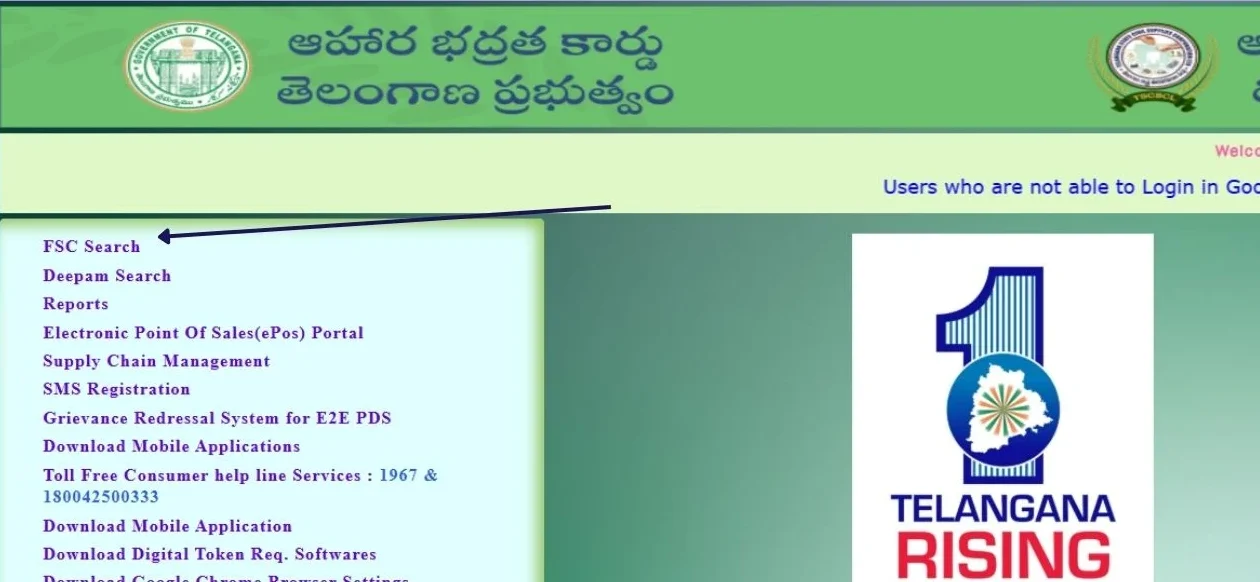
Select FSC Search Option
Click on “FSC Search” or “Food Security Card Search” from the main menu.
You may see this option in the top navigation or homepage shortcuts.
-
Choose “Search by Aadhaar”
From the available search options, select “Search by Aadhaar Number” or “Aadhaar-based Search”.
-
Enter Your Aadhaar Number
Type your 12-digit Aadhaar number in the input field.
Important: Enter without spaces or dashes. Example: 123456789012
You can use Aadhaar of head of family or any registered family member.
-
Select Your District
Choose your registered district from the dropdown menu.
Common districts: Hyderabad, Warangal, Nizamabad, Karimnagar, Khammam, etc.
Wrong district selection will show “No records found” – so select carefully.
-
Complete Captcha Verification
Enter the security code (captcha) shown on screen to verify you’re human.
If captcha is unclear, click the refresh icon to get a new one.
-
Click Search & View Results
Click the “Search” or “Submit” button.
Results will display within 3-10 seconds showing:
- FSC/Ration card number
- Names of all family members (this answers “ration card search by name”)
- Head of family details
- Card type (PHH or AAY)
- Assigned Fair Price Shop
- Address and district
- Aadhaar linking status for each member
Complete Aadhaar Search Guide with Screenshots
Visit our detailed Aadhaar search guide for visual walkthrough
View Full Aadhaar Search Guide →
Method 2: Ration Card Search with Mobile Number
📱 How to Search Ration Card Using Mobile Number in Telangana
If your mobile number is registered and linked with your FSC card, you can use this method to search ration card details and view all family member names.
⚠️ Important Prerequisites for Mobile Search
- Your mobile number must be registered with your ration card
- Mobile must be linked in EPDS database
- You need OTP access – must receive SMS on this number
- Number should be active and working
- If not registered, use Aadhaar search instead or visit MeeSeva to register mobile
📝 Step-by-Step: Mobile Number-Based Ration Card Search
-
Open EPDS Telangana Portal
Navigate to epds.telangana.gov.in in your web browser.
-
Select Mobile Number Search
Click on “FSC Search” and choose “Search by Mobile Number” option.
Note: This option may be labeled as “Mobile-based Search” or similar.
-
Enter Registered Mobile Number
Type your 10-digit mobile number that is registered with your ration card.
Format: 9xxxxxxxxx or 8xxxxxxxxx (without +91 or 0)
-
Select District
Choose the district where your FSC is registered from the dropdown menu.
-
Request OTP
Click “Send OTP” or “Get OTP” button.
You should receive a 4-digit or 6-digit OTP on your mobile within 1-2 minutes.
Check SMS inbox. If not received, wait 2 minutes and try “Resend OTP”.
-
Enter OTP Code
Type the OTP you received in the verification field.
OTP is usually valid for 10-15 minutes.
-
Submit & View Results
Click “Verify” or “Submit” button.
If OTP is correct, your ration card details will display showing:
- Complete FSC card information
- All family member names
- Ration card number
- Fair Price Shop assignment
- Card status and validity
🔧 What If Mobile Number Search Doesn’t Work?
Common reasons and solutions:
- Mobile not registered: Visit MeeSeva center to register your mobile number with FSC
- OTP not received: Check network signal, wait 2-3 minutes, or try resend OTP
- Wrong district selected: Verify and select correct registered district
- Number changed: If you changed mobile, old number may still be registered. Visit MeeSeva to update
- Alternative: Use Aadhaar-based search which works without mobile registration
For detailed mobile search guide: FSC Search by Mobile Number Telangana
Method 3: Ration Card Search by Name in Telangana
👤 Can I Search Ration Card by Cardholder Name?
Many users search for “ration card search Telangana by name” or “how to find ration card using name”. Here’s the current status:
⚠️ Important: Direct Name Search Not Available
The EPDS Telangana portal does not offer direct search by cardholder name as a primary search method. This is because:
- Names can be common and create multiple matches
- Name spelling variations cause confusion
- Aadhaar and UID are unique identifiers ensuring accuracy
- Security concerns with name-based public search
✅ Alternative: How to Find Names Through Other Methods
While direct name search isn’t available, you can find all family member names using these methods:
✓ Use Aadhaar-Based Search
Best Method to See Names:
- Search using any family member’s Aadhaar number
- Results will show complete list of names of all members
- Works even if you don’t know FSC number
- Most reliable method
Result displays: Head of family name, all member names, relationships, and Aadhaar status for each person.
✓ Use Mobile Number Search
If Mobile is Linked:
- Search using registered mobile number
- Complete OTP verification
- View full family details including all member names
- Requires mobile to be registered with FSC
Result shows: Complete family roster with names, ages, and member details.
🏢 Offline Name-Based Inquiry at MeeSeva
If you need to search by name and don’t have Aadhaar/mobile details:
- Visit nearest MeeSeva FSC service center
- Provide cardholder name, address, and locality details
- Operator can manually search in system using name + location
- Carry any ID proof showing name and address
- May require additional verification
💡 Pro Tip: Finding Names Without Direct Search
If you want to find ration card names but don’t have access to online search:
- Locate any family member’s Aadhaar card
- Use that Aadhaar for search on EPDS portal
- Results will show all family names registered on that ration card
- This answers “ration card names” query indirectly but effectively
What Family Member Names Information is Shown
📋 Complete Name Details Displayed in Search Results
When you perform ration card search using Aadhaar or mobile number, the results display comprehensive family member information:
| Information Type | Details Shown | Example |
|---|---|---|
| Head of Family Name | Full name of primary cardholder | Ramesh Kumar |
| Member Names | Names of all family members registered | Ramesh Kumar, Lakshmi, Ravi, Priya |
| Relationship | Relation to head of family | Self, Spouse, Son, Daughter |
| Age/DOB | Age or date of birth of members | 45 years, 42 years, 18 years, 15 years |
| Gender | Male/Female designation | Male, Female, Male, Female |
| Aadhaar Status | Linked or Not Linked for each member | Linked ✓, Linked ✓, Linked ✓, Not Linked ✗ |
| Member Count | Total number of family members | 4 members |
📝 Understanding Name Display Format
- Names appear as registered in Aadhaar database (so spelling should match Aadhaar)
- Order typically: Head of family first, then spouse, then children in age order
- If name mismatch: Aadhaar name and FSC name should match. If different, update at MeeSeva
- Adding/removing names: Requires application at MeeSeva with supporting documents
Other Ration Card Search Methods
Search by UID
Use UID number if linked with your ration card. Shows all member names in results.
UID Search Guide →Search by FSC Number
Direct search using your ration card number. 100% accuracy if card number is known.
Check FSC Status →Application Status
Track new ration card application and check if names are approved correctly.
Track Application →Common Ration Card Search Problems & Solutions
❌ Problem 1: “No Records Found” During Search
Common causes:
- Aadhaar not linked: If Aadhaar is not linked with FSC, search will fail. Visit Aadhaar linking guide
- Wrong district selected: Always select the district where FSC is registered
- Typing errors: Double-check Aadhaar/mobile number entered correctly
- Card not approved yet: If application is pending, search may not work
Solution: Verify Aadhaar linking status, confirm district, check for typos, or visit MeeSeva for verification.
❌ Problem 2: Names Showing Incorrectly
Issue: Family member names displayed are incorrect, misspelled, or outdated.
Why this happens:
- Name in Aadhaar differs from ration card registration
- Old name not updated after marriage
- Spelling mistakes during initial application
- Minor/major name discrepancies
Solution: Visit MeeSeva center with correct documents (Aadhaar, birth certificate, etc.) to request name correction in FSC database.
❌ Problem 3: Missing Family Members
Issue: Some family members’ names not showing in search results.
Reasons:
- Members not added during initial application
- Newborn baby not yet added to card
- Newly married spouse not updated
- Aadhaar of member not linked
Solution: Apply for adding family members at MeeSeva with relationship proof and Aadhaar cards of all members.
❌ Problem 4: Mobile Number Search Not Working
Issue: Search by mobile number shows no results or OTP not received.
Causes & Solutions:
- Mobile not registered: Register mobile at MeeSeva center
- Number changed: Update new mobile in FSC database
- Network issues: Check mobile network signal and try again
- Use alternative: Try Aadhaar-based search instead
❌ Problem 5: Portal Not Loading or Errors
Technical issues with EPDS portal:
- Server busy: Try during off-peak hours (early morning or late night)
- Browser issues: Clear cache, try different browser (Chrome, Firefox)
- Internet problems: Check connection speed and stability
- Maintenance: Portal may be under maintenance temporarily
For comprehensive troubleshooting: FSC Search Problems Telangana
Offline Ration Card Search at MeeSeva
🏢 When to Visit MeeSeva for Ration Card Search
Visit MeeSeva service centers for ration card search if:
- Online search methods are not working
- You don’t have internet access
- Aadhaar is not linked and needs immediate linking
- You want to search by name + address combination
- Need official printed copy of ration card details
- Want to update mobile number or member names
📋 What to Bring to MeeSeva
| Document | Why Needed | Original/Copy |
|---|---|---|
| Aadhaar Card | For search and verification | Original required |
| Old Ration Card | If available for reference | Original if available |
| Mobile Number | For registration/OTP | Active number |
| Address Proof | For corrections/updates | Original + copy |
| Name Change Docs | If updating names | Original + copy |
💰 MeeSeva Service Charges
- Search/Verification: Usually free or nominal fee (₹10-20)
- Printout: ₹10-30 per copy
- Name corrections: ₹30-50 processing fee
- Aadhaar linking: Free in most centers
Find MeeSeva centers: Visit MeeSeva FSC Search Telangana for locations and services.
District-Wise Ration Card Search
🗺️ Search Ration Card by District in Telangana
Ration card search works across all 33 districts of Telangana. Select your district correctly during search:
For complete district list and status: Ration Card Status Telangana District Wise
📍 Special Note for Hyderabad Residents
If you live in Hyderabad, always select “Hyderabad” district, not Rangareddy or Medchal even if nearby. For Hyderabad-specific guide: FSC Search Hyderabad
🔍 Search Your Ration Card Now
Visit official EPDS Telangana portal to search ration card by Aadhaar, mobile, or other methods
Related FSC Services & Guides
Frequently Asked Questions (FAQs)
Direct name-based search is not available on EPDS Telangana portal. However, you can search using Aadhaar number, UID, or mobile number linked to the cardholder’s name. The search results will display all family member names automatically. Alternatively, visit MeeSeva center where staff can search using name + address combination manually.
Yes, if your mobile number is registered and linked with your FSC card, you can search using mobile number on EPDS Telangana portal. Select mobile number search option, enter your registered 10-digit number, complete OTP verification, and view your complete ration card details including all family member names.
Aadhaar-based search is the easiest and most reliable method with 95% success rate. Visit epds.telangana.gov.in, select FSC Search by Aadhaar, enter your 12-digit Aadhaar number and district, then click Search to view complete ration card details including all family member names, card type, FPS assignment, and status.
Perform FSC search using Aadhaar number, UID, or mobile number on EPDS portal. The search results automatically display complete family details including names of all registered members, their relationship to head of family (spouse, son, daughter, etc.), age, gender, and Aadhaar linking status for each member.
If mobile number is not registered, you have two options: (1) Use Aadhaar-based search which works without mobile registration, or (2) Visit nearest MeeSeva center with your Aadhaar card and ration card to register your mobile number in FSC database. Mobile registration is free and takes 5-10 minutes.
Direct name search is not provided because names are not unique identifiers – multiple people can have same or similar names causing confusion. Aadhaar and UID are unique 12-digit numbers ensuring accurate search results. The system prioritizes accuracy and security, hence requires unique identifiers for public search.
Yes, you can search without Aadhaar using: (1) Mobile number if registered with FSC, (2) UID number if available, (3) FSC/ration card number if you know it, or (4) MeeSeva application number for new applications. However, Aadhaar search is most reliable as Aadhaar linking is mandatory for FSC.
To update or correct names: Visit MeeSeva center with (1) Aadhaar cards showing correct names, (2) Existing ration card, (3) Supporting documents for name change (marriage certificate, gazette notification, etc.), and (4) Application fee. Operator will submit correction request. Processing takes 7-15 days. Check updated names through FSC search after approval.
If search results show incorrect family members or missing members, this indicates database error. Visit MeeSeva center with all family members’ Aadhaar cards and existing ration card. Submit request to add missing members or remove incorrectly listed persons with proper documentation. Corrections usually take 10-20 days.
EPDS Telangana offers 5 main search methods: (1) Aadhaar number – most reliable, (2) Mobile number – requires OTP, (3) UID number – if linked, (4) FSC/Ration card number – direct search, and (5) Application number – for new applications. Additionally, offline search by name is available at MeeSeva centers.
Hyderabad city residents should select “Hyderabad” district only, not Rangareddy or Medchal-Malkajgiri even if living in border areas. Your FSC is registered under the district shown on your existing ration card. Wrong district selection will show “No records found”. For Hyderabad-specific guide, visit FSC Search Hyderabad page.
Aadhaar linking is mandatory for FSC as per government rules. If Aadhaar is not linked, Aadhaar-based search won’t work. However, you can still search using FSC number or application number. To link Aadhaar, visit MeeSeva center with Aadhaar cards and ration card. Linking is free and mandatory for receiving rations.
Online FSC search on EPDS portal takes 3-10 seconds to display results if details are correct. Mobile number search may take slightly longer (15-30 seconds) due to OTP verification. If portal is slow due to heavy traffic, try during off-peak hours (early morning or late night).
No, one Aadhaar can be linked to only one FSC ration card. If you search with Aadhaar linked to FSC, only that specific ration card details will be displayed. Having multiple ration cards for same person is not allowed under NFSA. If duplicate found, one will be cancelled.
For mobile number search you need: (1) 10-digit registered mobile number that is linked with your FSC, (2) District selection, (3) Access to receive OTP SMS on that mobile, and (4) Active mobile network to receive verification code. If mobile not registered, use Aadhaar search or visit MeeSeva to register mobile.
No, online FSC search on EPDS Telangana portal is completely free. You can search unlimited times at no cost. Only internet data charges from your service provider apply. MeeSeva centers may charge nominal fee (₹10-30) for printed copies or offline search assistance.
Yes, after successful FSC search, you can download digital copy of your ration card from EPDS portal. The downloaded PDF contains all family member names, FSC number, FPS assignment, and other details. For step-by-step download guide, visit Ration Card Download Telangana page.
If you forgot FSC number, don’t worry – use Aadhaar-based search instead. Search results will display your ration card number along with all other details. You can note it down or download the card for future reference. Aadhaar search works even when you don’t know FSC number.
To add new member (newborn, spouse after marriage, etc.): Visit MeeSeva with (1) Existing ration card, (2) New member’s Aadhaar card, (3) Relationship proof (birth certificate, marriage certificate), (4) All existing members’ Aadhaar cards, and (5) Application fee. New member’s name will appear in search results after approval (10-20 days).
For FSC search issues, contact Civil Supplies Department Telangana: Toll-free helpline 1967 or 1800-4250-0333. Available during working hours (10 AM – 6 PM). For technical issues with EPDS portal, email support.epds@telangana.gov.in. For MeeSeva services, visit nearest center or check meeseva.telangana.gov.in.
About This Guide
Editorial Standards
- Accuracy: All information verified against official EPDS Telangana portal data
- Comprehensiveness: Covers all available search methods with step-by-step instructions
- No Speculation: Only documented features and procedures included
- Regular Updates: Content reviewed when EPDS portal features change
- User-Focused: Written in simple language for easy understanding
Information Sources
- Official EPDS Telangana Portal (epds.telangana.gov.in)
- Civil Supplies Department, Government of Telangana
- MeeSeva Service Centers Documentation
- National Food Security Act (NFSA) Guidelines
📅 Content Review
Last Reviewed: June 25, 2026
Methodology: Manual verification against official sources
⚠️ Important Disclaimer
This is an independent informational website created to help users understand ration card search methods in Telangana. We are not affiliated with, endorsed by, or connected to the Government of Telangana, Department of Civil Supplies, EPDS Telangana, or any government authority.
We do not:
- Process ration card applications or searches
- Access government databases
- Store or collect Aadhaar, mobile, or personal data
- Provide official ration cards or certificates
- Guarantee search results or accuracy
For official services:
epds.telangana.gov.in (Official EPDS Portal)
All searches must be performed on official government portal. Information here is for educational guidance only.
Search Your Ration Card Now
Choose your preferred search method and find your ration card details