
FSC Search Hyderabad – Complete Guide to Check Ration Card Status
Last Updated: June 25, 2026
Information Source: Based on publicly available information from the official EPDS Telangana (.gov.in) portal
Coverage: All GHMC zones, circles, and mandals in Hyderabad district
If you live in Hyderabad and want to check your Food Security Card details, this guide explains how to perform FSC search in Hyderabad correctly through the official EPDS Telangana portal.
This comprehensive guide is specifically created for Hyderabad district residents covering local FSC search procedures, Fair Price Shop locations across all GHMC zones, mandal-specific information, Civil Supplies office details, and troubleshooting for common Hyderabad issues.
🎯 Quick Answer: How to Search FSC in Hyderabad?
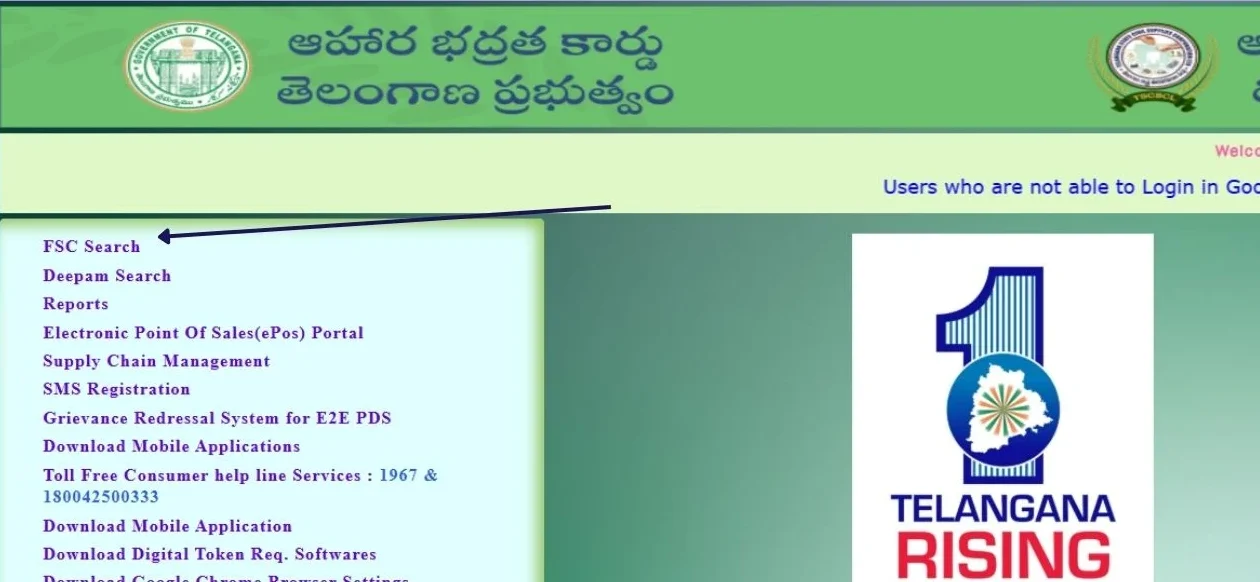
Visit epds.telangana.gov.in → Click “FSC Search” → Select “Hyderabad” from district dropdown → Enter Aadhaar or FSC number → View your ration card details. Ensure you select Hyderabad district specifically, as wrong district selection will show no results even if you live in GHMC limits.
Quick Hyderabad FSC Services
What Is FSC Search in Hyderabad?
FSC search in Hyderabad refers to checking Food Security Card details specifically for residents registered under the Hyderabad district in Telangana.
Hyderabad, being the largest urban district and capital city of Telangana, has a significant number of FSC cardholders distributed across the Greater Hyderabad Municipal Corporation (GHMC) area. The district includes historical areas of Old City, modern developments in Secunderabad, and all localities within GHMC jurisdiction.
🔍 What You Can Check for Hyderabad District
- FSC card status for Hyderabad residents across all GHMC zones
- Ration card beneficiary details and family member list
- Card type (PHH or AAY) assigned in Hyderabad
- Fair Price Shop (FPS) allocation in your specific zone/circle/ward
- Family member list and Aadhaar linking status for each member
- Monthly ration entitlement based on card type
- Application status for new Hyderabad FSC applications
- Current address as registered in FSC database
- FPS dealer contact information
- Ration card download option
🏙️ Why District Selection Matters for GHMC Residents
When searching FSC online, you must select “Hyderabad” from the district dropdown. Many searches fail because users select wrong districts like Rangareddy, Medchal-Malkajgiri, or Sangareddy even though they live in GHMC limits.
Important: GHMC area spans multiple administrative boundaries. If you live in areas like Kukatpally, Serilingampally, or other border areas, check your existing ration card to confirm which district you’re registered under. Always select the district shown on your card.
Hyderabad District FSC Overview
📊 Hyderabad FSC Statistics & Coverage
Hyderabad district has the highest FSC cardholder population in Telangana, distributed across various zones, circles, and localities within the Greater Hyderabad Municipal Corporation area:
Urban Coverage
Covers entire GHMC area including Old City, Secunderabad, and all major Hyderabad localities across 6 zones and 30 circles
FPS Network
1,000+ Fair Price Shops strategically located across all zones, circles, and wards for easy accessibility
Beneficiary Base
Lakhs of FSC cardholders across all socio-economic segments, highest density in urban and semi-urban areas
🗺️ GHMC Zone-Wise FSC Coverage
Hyderabad district FSC services are organized according to GHMC administrative zones:
Central Zone
Circles: Charminar, Golconda, Bandlaguda, Chandrayangutta, Bahadurpura
- Old City heritage areas
- High-density residential localities
- Multiple FPS shops per circle
- MeeSeva centers in all circles
South Zone
Circles: Chaitanyapuri, Malakpet, LB Nagar, Rajendranagar, Saroornagar
- Dilsukhnagar commercial hub
- LB Nagar IT corridor
- Residential colonies
- Well-connected FPS network
East Zone
Circles: Uppal, Kapra, Malkajgiri, Alwal, Secunderabad
- Uppal and Nacharam areas
- Secunderabad Cantonment
- Rapidly growing residential areas
- Modern FPS infrastructure
North Zone
Circles: Kukatpally, Quthbullapur, Gajularamaram, Medchal
- KPHB and Miyapur localities
- Fast-developing suburbs
- Mixed residential areas
- Expanding FPS coverage
West Zone
Circles: Serilingampally, Khairatabad, Secunderabad (parts)
- Gachibowli IT hub
- Jubilee Hills, Banjara Hills
- Corporate and residential mix
- Modern service delivery
Central (Admin) Zone
Circles: Amberpet, Nampally, Musheerabad, Asifnagar
- City administrative center
- Mixed commercial-residential
- Well-established FPS network
- Easy MeeSeva access
📍 Find Your GHMC Zone & Circle
Not sure which zone or circle you belong to? Check your property tax bill, electricity bill, or existing ration card. Alternatively, visit your nearest MeeSeva center or contact the Hyderabad Civil Supplies office for zone/circle verification.
Step-by-Step: FSC Search Hyderabad Online
Follow these steps carefully to search FSC details for Hyderabad district. This process works for all GHMC zones and circles:
-
Visit EPDS Telangana Portal
Open your browser and go to epds.telangana.gov.in. Always verify the URL ends with .gov.in for security. Bookmark this official portal for future use.
The portal works on desktop, mobile, and tablets. Ensure you have stable internet connection.
-
Click on FSC Search
Locate and click the “FSC Search” or “Food Security Card Search” option on the homepage. You may also see options like “Ration Card Search” which lead to the same search interface.
-
Select Search Method
Choose your preferred search method based on available information:
- Search by Aadhaar Number – Most common and reliable method
- Search by FSC/Ration Card Number – If you have existing card
- Search by Application Number – For new applications
- Search by UID Number – Alternative unique identifier
-
Select Hyderabad District (CRITICAL STEP)
This is the most important step for Hyderabad residents! From the district dropdown menu, select “Hyderabad”.
Common mistakes to avoid:
- ❌ Do NOT select Rangareddy (even if you live in border areas)
- ❌ Do NOT select Medchal-Malkajgiri (even if nearby)
- ❌ Do NOT select Sangareddy
- ✅ Always select “Hyderabad” if registered in GHMC area
If you recently moved from another district, select the district where your FSC is currently registered (check existing card).
-
Enter Your Details Accurately
Enter your Aadhaar number, FSC number, or application number carefully:
- Type without spaces or hyphens (12 digit Aadhaar)
- Double-check each digit
- Ensure no copy-paste formatting errors
- Match the number format shown in example
-
Complete Captcha Verification
Enter the security code (captcha) shown on screen. If unclear, click refresh icon to get new code. This prevents automated searches.
-
Click Search and View Results
Click the Search button and wait 3-10 seconds for results to load. Your Hyderabad FSC details will be displayed including:
- FSC card number
- Card type (PHH/AAY)
- Family members with Aadhaar status
- Assigned Fair Price Shop details
- Zone, circle, and ward information
- Monthly ration entitlement
- Card active status
-
Download or Print (Optional)
If needed, you can take screenshot of the results or use browser print function. For official ration card download, visit MeeSeva center.
Ready to Search Your Hyderabad FSC?
Visit the official EPDS portal and select Hyderabad district
Go to EPDS Portal →Information Displayed for Hyderabad FSC Search
When your FSC search for Hyderabad is successful, the EPDS portal displays comprehensive card information:
| Information Type | Details Shown | Hyderabad Specific Notes |
|---|---|---|
| FSC Number | Unique ration card identification number | Format: TS/HYD/[Zone]/[Number] |
| Head of Family | Primary cardholder name | Name as per Aadhaar |
| Family Members | Complete list of registered members | Up to 6 members per card typically |
| Card Type | PHH or AAY category | Most Hyderabad cards are PHH |
| District | Hyderabad | Must show “Hyderabad” district |
| GHMC Zone | Zone (Central/South/East/North/West) | Determines administrative jurisdiction |
| Circle/Mandal | Specific circle within zone | Example: Charminar, Secunderabad, LB Nagar |
| FPS Shop Number | Assigned Fair Price Shop code | Zone-specific FPS allocation |
| FPS Shop Name | Dealer name and shop location | Address within your circle/ward |
| Address | Registered residential address | Must be within Hyderabad district limits |
| Aadhaar Status | Linked or Not Linked per member | All members should show “Linked” |
| Card Status | Active, Inactive, or Under Process | Must be “Active” to collect rations |
| Mobile Number | Registered contact number | For SMS notifications |
| Monthly Entitlement | Rice quantity per month | Based on family size and card type |
📋 Verifying Your Hyderabad FSC Information
After viewing results, verify that:
- District shows “Hyderabad” (not other districts)
- Zone and circle match your actual residence location
- FPS shop is reasonably accessible from your area
- All family members are listed correctly
- Aadhaar shows “Linked” for all members
- Card status is “Active”
If any information is incorrect, visit MeeSeva center with supporting documents for corrections.
FSC Coverage Across Hyderabad Circles & Mandals
FSC search is available for all administrative circles and mandals within Hyderabad district. Below is comprehensive coverage across GHMC area:
🗺️ Complete Circle/Mandal List (Hyderabad District)
📍 Find Your Circle/Mandal
Not sure which circle or mandal you belong to? Here’s how to find out:
- Check your existing ration card (circle mentioned on card)
- Check GHMC property tax notice or receipt
- Check electricity bill (ward/circle information)
- Visit nearest MeeSeva center for verification
- Contact Hyderabad Civil Supplies office
- Ask at your nearest Fair Price Shop
🏘️ Popular Locality-wise Circle Mapping
Common Hyderabad localities and their corresponding circles:
Old City Areas
- Charminar, Gulzar Houz, Pathergatti → Charminar Circle
- Yakutpura, Dabirpura, Moghalpura → Charminar Circle
- Falaknuma, Shaheen Nagar → Bahadurpura Circle
- Chandrayangutta, Mailardevpally → Chandrayangutta Circle
- Talabkatta, Shalibanda → Charminar Circle
Central Hyderabad
- Abids, Koti, Narayanguda → Nampally Circle
- Himayatnagar, Basheerbagh → Nampally Circle
- Sultan Bazar, Afzalgunj → Goshamahal Circle
- Kachiguda, Barkas → Amberpet Circle
- Malakpet, Santhosh Nagar → Malakpet Circle
Secunderabad Zone
- Secunderabad Cantonment, Picket → Secunderabad Circle
- Trimulgherry, Bowenpally → Secunderabad Circle
- Marredpally, Chilkalguda → Secunderabad Circle
- Alwal, Bollarum → Alwal Circle
- Malkajgiri, Safilguda → Malkajgiri Circle
West Hyderabad
- Kukatpally, KPHB → Kukatpally Circle
- Miyapur, Hafeezpet → Kukatpally Circle
- Kondapur, Madhapur → Serilingampally Circle
- Gachibowli, Nanakramguda → Serilingampally Circle
- Mehdipatnam, Tolichowki → Mehdipatnam Circle
East Hyderabad
- Uppal, Nagole → Uppal Circle
- Habsiguda, Nacharam → Uppal Circle
- LB Nagar, Dilsukhnagar → LB Nagar Circle
- Kothapet, Chaitanyapuri → Chaitanyapuri Circle
- Saroornagar, Meerpet → Saroornagar Circle
Premium Areas
- Jubilee Hills, Film Nagar → Khairatabad Circle
- Banjara Hills, Road No. 12 → Khairatabad Circle
- Begumpet, Prakash Nagar → Begumpet Circle
- Somajiguda, Panjagutta → Khairatabad Circle
Fair Price Shops (FPS) in Hyderabad District
After FSC search, the system displays your assigned Fair Price Shop number and location. Hyderabad district has 1,000+ FPS locations distributed across all GHMC zones, circles, and wards.
🏪 Zone-Wise FPS Distribution in Hyderabad
Central Zone FPS
- 200+ Fair Price Shops
- High density in Old City
- Multiple shops per ward
- Easy walking distance
South Zone FPS
- 180+ Fair Price Shops
- Coverage in LB Nagar corridor
- Dilsukhnagar multiple outlets
- Well-connected network
East Zone FPS
- 170+ Fair Price Shops
- Uppal and Nacharam coverage
- Secunderabad multiple shops
- Cantonment area access
North Zone FPS
- 160+ Fair Price Shops
- Kukatpally and KPHB
- Rapidly expanding network
- Modern shop infrastructure
West Zone FPS
- 140+ Fair Price Shops
- Gachibowli and Kondapur
- Growing suburban coverage
- Tech-enabled shops
Central Admin FPS
- 150+ Fair Price Shops
- Nampally and Amberpet
- Established network
- Easy accessibility
🔍 How to Find Your Assigned FPS in Hyderabad
-
Complete FSC Search
Perform FSC search as explained above. Your assigned FPS shop number and name will be displayed in the results.
-
Note FPS Details
Write down the FPS shop code, dealer name, and approximate location shown in your FSC details.
-
Use FPS Search Tool
Visit FPS Search Telangana page for detailed shop information including exact address, contact number, and operating hours.
-
Verify Location
Use the address to locate the shop using Google Maps or ask local residents. FPS shops usually have signboard with shop number.
⚠️ Important FPS Rules for Hyderabad Residents
- Always collect rations from your assigned FPS shop only
- You cannot collect from other shops even if closer to your location
- Carry Aadhaar card for biometric verification
- Visit during shop operating hours (usually morning and evening)
- If shop is too far, request FPS transfer at MeeSeva center
- Check RO Status FP Shop for shop operational status
📞 FPS Related Queries
For FPS-related issues in Hyderabad:
- Shop not operating: Report to Civil Supplies helpline 1967
- Dealer misbehavior: Complaint at MeeSeva or online grievance portal
- Ration quality issues: Contact District Civil Supplies Officer
- Wrong quantity: Verify with shop dealer and report if issue persists
- Shop relocation: Updated information available through FPS search
Hyderabad District Civil Supplies Offices
For official FSC services, grievances, and in-person assistance in Hyderabad district, contact these Civil Supplies Department offices:
🏛️ District Civil Supplies Office – Hyderabad
District Civil Supplies Officer (DCSO) – Hyderabad
Office Location: Civil Supplies Office, Hyderabad District, Near Government Buildings, Central Hyderabad
Working Hours: Monday to Saturday, 10:30 AM to 5:00 PM (Closed on Sundays and Government Holidays)
Services Offered:
- FSC application verification and approval
- Grievance redressal for Hyderabad residents
- FPS dealer coordination and supervision
- FSC corrections and modifications
- Policy implementation and monitoring
- Complaint registration against FPS dealers
📍 Zone-Wise Civil Supplies Sub-Offices
Hyderabad district has zone-level offices for localized services:
Central Zone Office
Coverage: Charminar, Golconda, Bahadurpura, Chandrayangutta circles
Services: FSC verification, FPS monitoring, grievances
Visit for: Old City area issues, FPS complaints, card corrections
South Zone Office
Coverage: LB Nagar, Malakpet, Rajendranagar, Saroornagar circles
Services: Application processing, FPS transfers, Aadhaar linking
Visit for: South zone localities, LB Nagar corridor issues
East Zone Office
Coverage: Uppal, Secunderabad, Kapra, Malkajgiri, Alwal circles
Services: FSC search assistance, status verification, complaints
Visit for: Secunderabad and Uppal area residents
North Zone Office
Coverage: Kukatpally, Quthbullapur, Gajularamaram circles
Services: New applications, FPS allocation, grievance handling
Visit for: KPHB, Kukatpally, Miyapur localities
West Zone Office
Coverage: Serilingampally, Khairatabad circles
Services: FSC services, FPS coordination, status checks
Visit for: Gachibowli, Kondapur, Jubilee Hills areas
Central Admin Zone Office
Coverage: Amberpet, Nampally, Musheerabad, Asifnagar circles
Services: All FSC related services, headquarters coordination
Visit for: Central Hyderabad localities
📞 Hyderabad Civil Supplies Helpline
Toll-Free Number: 1967 (Civil Supplies Department Telangana)
Toll-Free Alternate: 1800-4250-0333
Timings: 10:00 AM to 6:00 PM (Working days)
Languages: Telugu, Urdu, Hindi, English
Call for FSC search issues, FPS complaints, application status, Aadhaar linking problems, and general queries specific to Hyderabad district.
🏢 MeeSeva Centers in Hyderabad
MeeSeva centers provide comprehensive FSC services across all Hyderabad localities:
Services at MeeSeva Centers
- FSC Search Assistance: Offline search if online portal not accessible
- New FSC Applications: Apply for new ration card with document verification
- Application Status Check: Track your application progress
- Aadhaar Linking: Link Aadhaar with FSC for all family members
- FSC Corrections: Update name, address, add/remove members
- FPS Transfer: Request change of Fair Price Shop
- Card Download: Official ration card download and print
- Duplicate Card: Apply for duplicate if lost/damaged
- Status Upgrade: Request card type change (subject to eligibility)
📋 Documents Required for MeeSeva Visit
When visiting MeeSeva centers in Hyderabad, carry:
- Aadhaar cards of all family members (original + photocopy)
- Existing ration card (if available)
- Address proof showing Hyderabad locality (electricity bill, rent agreement, property tax receipt)
- Mobile number (active)
- Application receipt number (if checking status)
- Passport size photos (for new applications)
- Income certificate (if required for card type)
To find nearest MeeSeva center in Hyderabad: Visit meeseva.telangana.gov.in and select Hyderabad district, or search “MeeSeva near me” in Google Maps.
FSC Application Status for Hyderabad Residents
If you recently applied for a new ration card in Hyderabad, you can track your application status online through the EPDS portal or visit MeeSeva centers.
📋 How to Check Hyderabad FSC Application Status Online
-
Visit EPDS Portal
Go to epds.telangana.gov.in and click “Application Status” or “FSC Application Search”
-
Select Hyderabad District
From dropdown menu, select “Hyderabad” as your district. This is critical for Hyderabad applications.
-
Enter Application Details
Enter MeeSeva application number (receipt number), Aadhaar number, or reference ID received during application submission.
-
View Application Status
Your current application status will be displayed showing processing stage.
📊 Application Status Types in Hyderabad
| Status | Meaning | What to Do | Typical Timeline |
|---|---|---|---|
| Submitted | Application received by system | Wait for verification to begin | Day 0-2 |
| Under Review | Being verified by Civil Supplies officials | Wait for processing (no action needed) | Day 3-15 |
| Field Verification | Inspector visiting your Hyderabad address | Be available at registered address | Day 7-20 |
| Pending Documents | Additional documents required | Submit missing documents at MeeSeva immediately | Action required |
| Approved | FSC card has been approved | Collect card from MeeSeva or designated office | Day 20-30 |
| Rejected | Application not approved | Visit MeeSeva to know rejection reason and reapply if eligible | Varies |
| Card Printed | Physical card has been generated | Card being sent to collection point | Day 25-30 |
| Ready for Collection | Card available for pickup | Visit specified MeeSeva/office to collect | Day 30+ |
⏱️ Expected Processing Time in Hyderabad
Normal Processing: 15-30 working days for Hyderabad district applications
With Field Verification: 20-35 working days if address verification required
Document Issues: Processing paused until documents submitted
Note: Processing times may be longer during peak application periods or festival seasons. Hyderabad district handles high volume of applications, so slight delays are normal.
For complete application tracking guide: Visit FSC Application Search Telangana page for detailed information and troubleshooting.
Aadhaar Linking Issues in Hyderabad
Many Hyderabad residents face Aadhaar linkage issues when searching FSC online. If your search shows “No records found” or “Aadhaar not linked,” follow these Hyderabad-specific solutions:
🔗 How to Link Aadhaar with FSC in Hyderabad
Method 1: MeeSeva Centers (Recommended)
Steps:
- Locate nearest MeeSeva center in your Hyderabad locality
- Carry Aadhaar cards of all family members (original)
- Carry existing ration card (if available)
- Visit during working hours (10:30 AM – 5:00 PM)
- Request “Aadhaar-FSC linking” service
- Verification typically takes 2-7 working days
- SMS confirmation sent to registered mobile
Method 2: Fair Price Shops
Steps:
- Visit your assigned FPS shop in Hyderabad
- Contact shop dealer during operating hours
- Request Aadhaar seeding/linking
- Provide Aadhaar cards for verification
- Biometric authentication may be done
- Linking reflected within 3-5 days
- Verify online after few days
⚠️ Common Aadhaar Linking Problems in Hyderabad
| Problem | Common in Hyderabad | Solution |
|---|---|---|
| Name Mismatch | Aadhaar shows different spelling than ration card | Update name in Aadhaar to match ration card, or vice versa. Visit MeeSeva for name correction. |
| Address Mismatch | Old Hyderabad address on Aadhaar vs current GHMC address | Update Aadhaar address online or at Aadhaar center. Then link with FSC at MeeSeva. |
| Mobile Number Issues | Mobile not updated in Aadhaar database | Update mobile in Aadhaar first, then proceed with FSC linking. |
| Multiple Aadhaar Cards | Duplicate Aadhaar detected by system | Surrender duplicate Aadhaar, retain only one. Contact UIDAI helpline 1947. |
| Biometric Failure | Fingerprint not matching at FPS | Try iris scan if available, or update biometrics at Aadhaar center. |
| Family Member Not Listed | New member Aadhaar not seeded | Add member to FSC first, then link their Aadhaar separately. |
📱 Aadhaar Linking Status Verification
After linking Aadhaar at MeeSeva or FPS, verify status:
-
Wait 3-7 Days
Aadhaar linking takes few days to reflect in EPDS system. Don’t check immediately after linking.
-
Perform FSC Search
Do FSC search by Aadhaar number. If successful, linking is complete.
-
Check Family Members
Verify that all family members show “Aadhaar Linked” status in FSC details.
-
Visit FPS for Test
Try collecting ration using biometric authentication. Successful transaction confirms linking.
Complete Aadhaar linking troubleshooting guide: Aadhaar Not Linked with Ration Card Telangana
Common FSC Search Problems in Hyderabad & Solutions
❌ Problem 1: “No Record Found” When Searching
Common Causes in Hyderabad:
- Wrong District Selected: Selected Rangareddy, Medchal, or Sangareddy instead of Hyderabad
- Aadhaar Not Linked: Aadhaar seeding not completed
- Typing Error: Wrong Aadhaar/FSC number entered
- Application Pending: New application still under processing
- Registered in Neighboring District: Actually registered in Medchal or Rangareddy despite living in GHMC area
- Card Cancelled: FSC marked inactive due to duplicate or ineligibility
Solutions:
- Verify Hyderabad district is selected in dropdown
- Check Aadhaar linking status and link if needed
- Re-enter Aadhaar/FSC number carefully without spaces
- Try searching with FSC number if Aadhaar search fails
- Visit MeeSeva center to confirm registration district
- Check if card is active – How to Check FSC Status
❌ Problem 2: Portal Not Loading / Slow Response
Why This Happens in Hyderabad:
Hyderabad has highest population density in Telangana and heavy traffic on EPDS portal, especially during:
- Peak hours: 10 AM – 4 PM on weekdays
- Month-end and beginning (ration distribution time)
- After new scheme announcements
- Public holidays when people have free time
Solutions:
- Try Different Timing: Early morning (6-9 AM) or late evening (after 7 PM)
- Clear Browser Cache: Delete cookies, cache, and browsing history
- Try Different Browser: Use Chrome, Firefox, or Edge
- Use Mobile Data: If WiFi slow, try mobile data connection
- Restart Device: Close all apps and restart phone/computer
- Check Internet Speed: Ensure minimum 2 Mbps connection
- Visit MeeSeva: For offline search if online portal consistently fails
❌ Problem 3: Application Rejected in Hyderabad
Common Rejection Reasons in Hyderabad:
| Rejection Reason | Why Common in Hyderabad | How to Resolve |
|---|---|---|
| Income Above Limit | Higher earning households in urban Hyderabad | Verify income certificate, ensure it’s below threshold. Reapply if eligible. |
| Document Mismatch | Address proof doesn’t match application | Submit correct address proof showing Hyderabad locality. Use electricity bill or rent agreement. |
| Duplicate Card Exists | Family member already has FSC | Surrender old card, ensure no duplicate registration. Check existing cards in family. |
| Address Verification Failed | Inspector couldn’t verify Hyderabad address | Be available during field verification. Provide correct house number and locality details. |
| Eligibility Issues | Not meeting priority household criteria | Review FSC eligibility criteria and reapply with correct category. |
| Incomplete Documents | Missing required documents | Submit all documents as per checklist. Visit MeeSeva for document verification before reapplying. |
What to Do After Rejection:
- Visit MeeSeva center with application receipt
- Get detailed rejection reason from officials
- Correct the issues mentioned
- Gather required documents
- Reapply with corrections
- Track new application status regularly
❌ Problem 4: Wrong FPS Allocation
Issue:
Assigned FPS shop is too far from your Hyderabad residence (different zone or circle)
Why This Happens:
- System allocated shop based on old address
- You moved within Hyderabad to different zone
- Nearest FPS is full (beneficiary limit reached)
- Ward/circle boundaries changed
Solution – FPS Transfer Process:
- Visit MeeSeva center with FSC card
- Carry current address proof (electricity bill showing Hyderabad address)
- Request FPS transfer to nearest shop in your circle
- Application processed within 7-15 working days
- New FPS details updated in FSC database
- Verify updated FPS through FSC search
❌ Problem 5: FSC Card Shows Inactive Status
Reasons for Inactive Status:
- Aadhaar not linked for 6+ months
- Rations not collected for 3+ consecutive months
- Duplicate card detected by system
- Income verification failed
- Address verification pending
- Death of head of family (not updated)
How to Reactivate:
- Visit MeeSeva center in your Hyderabad locality
- Inquire about inactivation reason
- Link Aadhaar if that’s the issue
- Submit required verification documents
- Request reactivation of FSC card
- Wait 7-10 days for reactivation
- Verify status online after processing
❌ Problem 6: Family Member Name Missing
Solution:
- Visit MeeSeva with all family members’ Aadhaar cards
- Request “Add Family Member” service
- Submit required documents (birth certificate for children, marriage certificate for spouse)
- Processing takes 10-15 days
- Updated FSC card issued with all members
More troubleshooting help: Visit FSC Search Problems Telangana for comprehensive problem-solving guide.
Offline FSC Search Options in Hyderabad
If online search is not working or you don’t have internet access, Hyderabad residents can use these offline options available across all GHMC zones:
🏢 Option 1: MeeSeva Centers Across Hyderabad
MeeSeva centers are available in every circle and major locality in Hyderabad. Services offered:
FSC Search Services
- Offline FSC search by Aadhaar
- Search by FSC card number
- Application status verification
- Print FSC details on paper
- SMS service for future reference
Additional Services
- Aadhaar linking assistance
- New FSC applications
- FSC corrections and updates
- FPS transfer requests
- Card download and print
📋 What to Bring to MeeSeva Hyderabad
- Aadhaar card (original) – Mandatory
- Existing ration card (if available)
- Mobile number (for SMS and future communication)
- Address proof showing Hyderabad locality (if applying for corrections)
- Application receipt (if checking application status)
- Small fee (₹10-50 for printouts and certain services)
🏪 Option 2: Fair Price Shops (FPS)
Your assigned FPS shop dealer can help verify (limited services):
- FSC card status: Confirm if your card is active in system
- Monthly entitlement: Check how much ration you’re entitled to
- Family member list: Verify members registered on card
- Aadhaar linking status: Check if Aadhaar biometric works (indicates linking)
- Last collection date: When rations were last collected
⚠️ FPS Limitations
FPS shops cannot provide complete FSC search results or modify card details. For comprehensive search or any modifications, visit MeeSeva centers or Civil Supplies office.
🏛️ Option 3: Civil Supplies Office Hyderabad
For complex issues, grievances, or official verification:
- District Civil Supplies Officer office: For major complaints and policy-level issues
- Zone-level offices: For localized problems and faster resolution
- Circle offices: For ward-specific or FPS-related issues
Visit during working hours (10:30 AM – 5:00 PM, Monday-Saturday). Carry all relevant documents and be prepared to explain your issue clearly.
📞 Option 4: Helpline Number
Call Civil Supplies helpline for phone assistance:
- Toll-Free: 1967 (Civil Supplies Department)
- Alternate: 1800-4250-0333
- Timings: 10:00 AM to 6:00 PM (Working days)
- Services: FSC search assistance over phone, complaint registration, status inquiry
FSC Benefits for Hyderabad Residents
Holding a valid FSC card in Hyderabad provides access to multiple welfare schemes and subsidized benefits:
Subsidized Rice
Monthly allocation of rice at ₹1 per kg for eligible families. PHH cards get 5-6 kg per member.
Identity Proof
Valid ID for GHMC services, municipal schemes, and Telangana state welfare programs.
Healthcare Access
Eligibility for Arogyasri health insurance and free treatment at government hospitals in Hyderabad.
Utility Benefits
LPG subsidy, electricity bill concessions, and water supply subsidies in GHMC area.
Education Schemes
School admission priority, scholarship eligibility, and fee concessions for children.
Housing Schemes
Preference in 2BHK housing allotment, Indiramma houses, and housing loan subsidies.
Child Nutrition
Anganwadi benefits, nutritional support programs, and child welfare schemes.
Financial Inclusion
Bank account opening, loan applications, and financial assistance scheme eligibility.
📋 Hyderabad-Specific Benefits
Additional benefits available to FSC cardholders in Hyderabad/GHMC area:
- GHMC Property Tax Relief: Certain concessions for FSC cardholders
- RTC Bus Pass Subsidy: Discounted travel passes in some categories
- Municipal Service Priority: Birth/death certificate, trade licenses
- Election Services: Voter ID linkage and priority processing
- Police Verification: Faster verification for passport, job applications
- Court Fee Exemption: Reduced fees for legal services (subject to income)
💡 Maximizing Your FSC Benefits in Hyderabad
To fully utilize your FSC card benefits:
- Ensure card is active and Aadhaar linked
- Collect rations regularly every month
- Keep card safe and updated with current details
- Register for SMS alerts for schemes
- Check eligibility for additional Telangana government schemes
- Link with bank account for direct benefit transfers
FSC Card Types in Hyderabad
Hyderabad residents receive FSC cards in different categories based on eligibility. Understanding your card type helps you know your entitlements:
Priority Household Card (PHH)
Color: Pink/Rose color card
Eligibility: Families with annual income below specified limit
Benefits:
- 5-6 kg rice per member per month
- Rice at ₹1 per kg
- Most common card type in Hyderabad
- Covers majority of beneficiaries
Antyodaya Anna Yojana (AAY)
Color: Yellow color card
Eligibility: Poorest of poor families, priority categories
Benefits:
- 35 kg rice per family per month
- Rice at subsidized rate
- For extremely poor households
- Additional welfare benefits
Note: Limited to specific eligibility criteria
To learn about all card types and their benefits: Visit Types of Ration Cards in Telangana
🏙️ Card Distribution in Hyderabad
Most Hyderabad residents hold PHH (Pink) cards as the city has diverse socio-economic population. AAY cards are allocated to specific vulnerable groups like homeless, disabled persons, widows, and other priority categories.
White cards (for above poverty line) are being phased out in Telangana. Check White Ration Card Benefits for more information.
Frequently Asked Questions (Hyderabad)
Visit EPDS Telangana portal (epds.telangana.gov.in), select FSC Search, choose Hyderabad district from dropdown menu, and enter your Aadhaar number or FSC card number. Ensure Hyderabad district is selected correctly – this is the most critical step for GHMC area residents.
Yes, Hyderabad residents can check ration card status online through EPDS Telangana portal 24/7. Select Hyderabad district, enter Aadhaar or FSC number, and view complete card details including active/inactive status. For detailed guidance, visit How to Check Ration Card Status Telangana Online.
Common reasons include wrong district selection (ensure Hyderabad is selected), Aadhaar not linked with FSC, typing errors in number, or portal server overload during peak hours (10 AM – 4 PM). Try searching during early morning or late evening. For comprehensive troubleshooting, visit FSC Search Not Working Telangana.
You can link Aadhaar at any MeeSeva center across Hyderabad (available in all zones and circles) or at your designated Fair Price Shop. Visit MeeSeva for reliable service – carry Aadhaar cards of all family members and existing ration card. Linking typically takes 2-7 working days to reflect in the system.
FSC approval in Hyderabad typically takes 15-30 working days depending on document verification workload, field verification requirements, and application completeness. During peak periods, it may take slightly longer. Track status online using your application number through FSC Application Search.
Hyderabad district FSC covers all GHMC area including 6 zones and 30 circles: Old City (Charminar, Bahadurpura, Chandrayangutta), Secunderabad, Khairatabad, Kukatpally, LB Nagar, Mehdipatnam, Uppal, Malakpet, Amberpet, Musheerabad, Nampally, Serilingampally, and all other circles within Greater Hyderabad Municipal Corporation limits.
Yes, Old City areas including Charminar, Gulzar Houz, Yakutpura, Dabirpura, Falaknuma, Shaheen Nagar, Bahadurpura, Moghalpura, and all surrounding localities are part of Hyderabad district. Always select “Hyderabad” district when searching – never select any other district for Old City areas.
Visit nearest MeeSeva center with your FSC card and current address proof (electricity bill or rent agreement showing Hyderabad locality). Request FPS transfer to the nearest shop in your circle/ward. Transfer processing typically takes 7-15 working days. New FPS details will be updated in your FSC record.
Yes, Secunderabad is administratively part of Hyderabad district for FSC purposes. All Secunderabad Cantonment and civilian area residents registered under Hyderabad district should select “Hyderabad” district when searching. Do not select any other district.
Your FSC may be registered under Rangareddy district if: (1) You live in border areas that fall under Rangareddy administratively, (2) Registration was done before district reorganization, (3) Your address technically falls outside GHMC limits. Always select the district shown on your existing ration card when searching. For transfer to Hyderabad district, visit MeeSeva with address proof.
MeeSeva centers are available in all major Hyderabad localities across all 6 zones – Central Zone (Old City areas), South Zone (LB Nagar, Dilsukhnagar), East Zone (Uppal, Secunderabad), North Zone (Kukatpally, KPHB), West Zone (Gachibowli, Kondapur), and Central Admin Zone (Nampally, Amberpet). Search “MeeSeva near me” in Google Maps or visit meeseva.telangana.gov.in to find nearest center.
Contact Civil Supplies Department helpline: 1967 (toll-free) or 1800-4250-0333. Available 10:00 AM to 6:00 PM on working days. For Hyderabad-specific issues, mention your zone/circle. You can also contact Hyderabad District Civil Supplies office directly for local matters and grievances.
Yes, when you search FSC using any family member’s Aadhaar number, the complete ration card with all registered family members will be displayed. You’ll see names, Aadhaar linking status, and other details for each member on the card.
Gachibowli area falls under different administrative boundaries – some parts are in Hyderabad district (Serilingampally circle) while some may be in neighboring districts. Check your existing ration card, electricity bill, or property tax document to confirm which district you’re registered under. Always select the district shown on your official documents.
Visit MeeSeva center in your Hyderabad locality with FSC card and Aadhaar. Request mobile number update service. Ensure the same mobile number is registered in your Aadhaar card for verification purposes. Update reflects within 3-5 working days, and you’ll receive confirmation SMS.
Hyderabad district has 1,000+ Fair Price Shops distributed across all GHMC zones, circles, and wards. Central Zone (Old City) has highest concentration with 200+ shops, followed by South Zone (180+), East Zone (170+), North Zone (160+), and West Zone (140+). For specific FPS details, use FPS Search tool.
PHH (Priority Household – Pink card) provides 5-6 kg rice per member at ₹1/kg, issued to most eligible families in Hyderabad. AAY (Antyodaya Anna Yojana – Yellow card) provides 35 kg rice per family at subsidized rate, issued only to poorest of poor and specific vulnerable groups. Most Hyderabad residents hold PHH cards. Learn more at Types of Ration Cards in Telangana.
You can view FSC details online through EPDS portal and take screenshot for reference. For official ration card download and print, visit MeeSeva center in your Hyderabad locality with Aadhaar card. They will provide printed copy for small fee. Complete guide available at How to Download Ration Card Telangana.
If you lost your FSC card in Hyderabad: (1) Visit nearest MeeSeva center, (2) Carry Aadhaar card and family members’ Aadhaar, (3) Request duplicate FSC card, (4) Pay prescribed fee (usually ₹50-100), (5) Receive acknowledgment receipt, (6) Collect duplicate card within 7-15 days. Your FSC number and data remain same – only physical card is reissued.
To check FSC eligibility for Hyderabad residents: Must be residing in Hyderabad/GHMC limits, have valid address proof, family income below specified threshold, and not own property/vehicle above certain value. Complete eligibility criteria available at Who is Eligible for FSC Card in Telangana. Visit MeeSeva for eligibility verification before applying.
Check your GHMC zone by: (1) Property tax receipt/notice (mentions zone and circle), (2) Electricity bill (shows ward/division), (3) Existing ration card (displays circle), (4) GHMC website ward finder tool, (5) Visit nearest MeeSeva or GHMC office. Hyderabad has 6 zones: Central, South, East, North, West, and Central Admin zones covering all GHMC area.
If you have One Nation One Ration Card (ONORC) enabled on your Hyderabad FSC, you can collect rations from any FPS shop across India using Aadhaar biometric authentication. Check your FSC search results for ONORC status. If not enabled, you can only collect from your assigned FPS in Hyderabad. For portability, visit MeeSeva to activate ONORC feature.
UID (Unique Identification) is an alternative identifier for FSC cards in Telangana, different from FSC number and Aadhaar. You can search FSC using UID number on EPDS portal. For detailed information about UID search, visit FSC Search by UID in Telangana.
To add newborn to FSC in Hyderabad: (1) Get baby’s Aadhaar card first (available for newborns), (2) Visit MeeSeva with birth certificate, baby’s Aadhaar, parents’ Aadhaar, and existing FSC card, (3) Request “Add Family Member” service, (4) Submit documents, (5) Processing takes 10-15 days, (6) Updated FSC card issued with baby’s name.
To check Fair Price Shop stock status in Hyderabad: (1) Visit RO Status FP Shop Telangana page, (2) Select Hyderabad district and your circle, (3) View stock availability and last rice distribution date, (4) Check FPS operational status. Alternatively, call your FPS dealer directly or visit Civil Supplies helpline 1967 for stock information.
About This Hyderabad FSC Guide
Editorial Standards for Local Content
- Hyderabad-Specific Information: All content focused exclusively on Hyderabad district procedures, GHMC area coverage, and local requirements
- Accuracy: Information verified against EPDS Telangana portal data for Hyderabad district, cross-referenced with GHMC administrative records
- Local Relevance: Detailed coverage of all Hyderabad zones, circles, mandals, FPS locations, MeeSeva centers, and Civil Supplies offices
- No Speculation: Only verified Hyderabad district information included; no assumptions or generic content
- Regular Updates: Content reviewed when Hyderabad-specific procedures, zone boundaries, or FPS allocations change
- User-Focused: Written for actual Hyderabad residents with practical, actionable guidance for local issues
Information Sources
- EPDS Telangana Portal – Hyderabad District Official Data
- Civil Supplies Department – Hyderabad District Office Records
- Greater Hyderabad Municipal Corporation (GHMC) – Zone & Circle Information
- MeeSeva Hyderabad Centers – Service Procedures and Guidelines
- Hyderabad FPS Network Information – Fair Price Shop Database
- Public Distribution System – Telangana State Guidelines
What Makes This Guide Hyderabad-Specific
- GHMC zone-wise breakdown (Central, South, East, North, West, Central Admin)
- Circle and mandal mapping with popular locality names
- 1,000+ FPS coverage information across Hyderabad
- Hyderabad Civil Supplies office contact details (district and zone-level)
- Common problems specific to Hyderabad residents (district confusion, GHMC boundary issues)
- Local MeeSeva center availability across all zones
- Old City, Secunderabad, and other major area-specific guidance
📅 Content Review
Last Reviewed: June 25, 2026
Focus: Hyderabad District Only (GHMC Area)
Next Review: When significant policy or administrative changes occur in Hyderabad district
💡 How to Use This Guide Effectively
- Identify your GHMC zone and circle (check electricity bill or property tax)
- Follow step-by-step FSC search process ensuring “Hyderabad” district selection
- Note your assigned FPS shop details from search results
- If issues occur, refer to troubleshooting section for Hyderabad-specific solutions
- Use provided MeeSeva or Civil Supplies office contacts for offline assistance
- Bookmark this page for future reference and updates
⚠️ Important Disclaimer
This is an independent informational website created to help Hyderabad residents understand the FSC search process and access public distribution system services. We are not affiliated with, endorsed by, or connected to the Government of Telangana, Hyderabad District Administration, Greater Hyderabad Municipal Corporation (GHMC), Civil Supplies Department, or any government authority.
We do not:
- Process FSC applications for Hyderabad or any district
- Access government databases or official records
- Provide official ration cards or FSC certificates
- Represent Hyderabad district Civil Supplies office
- Handle MeeSeva services or FPS operations
- Guarantee approval of FSC applications
- Resolve official government grievances
For official Hyderabad FSC services, visit:
epds.telangana.gov.in (Official EPDS Telangana Portal)
meeseva.telangana.gov.in (Official MeeSeva Portal)
Helpline Numbers: 1967 (Civil Supplies) | 1800-4250-0333 (Toll-Free)
All information on this page is for educational and informational purposes only. Hyderabad residents should verify all details through official government portals and contact authorized MeeSeva centers or Civil Supplies offices for official services. We are not responsible for any decisions made based on this information.
Ready to Search Your Hyderabad FSC?
Select Hyderabad district and check your ration card status now
Available 24/7 | All GHMC Zones Covered | 1,000+ FPS Network
Need Help? Call Civil Supplies Helpline: 1967