
FSC Search with Aadhaar No Telangana – Find Food Security Card Details by Aadhaar Number
Last Updated: June 25, 2026
Information Source: Based on publicly available information from the official EPDS Telangana (.gov.in) portal and Department of Food & Civil Supplies, Government of Telangana
Accuracy Commitment: All information verified against official government sources. No speculation or unverified data included.
FSC Search with Aadhaar No Telangana is the most commonly used method to find Food Security Card (FSC) details using your 12-digit Aadhaar (UID) number instead of the FSC card number. This service is available through the official EPDS Telangana portal and helps you verify ration card status, family member details, and Aadhaar linkage status instantly.
This comprehensive guide covers Aadhaar-based FSC search procedures, verification steps, Aadhaar linking requirements, common error resolution, privacy protection, and troubleshooting for all Telangana districts including Hyderabad, Warangal, Khammam, and Nizamabad.
🎯 Quick Answer: What Is FSC Search with Aadhaar Number?
FSC Search with Aadhaar No Telangana allows you to retrieve your Food Security Card details using your 12-digit Aadhaar number instead of FSC card number. Visit EPDS Telangana portal → Select FSC Search → Choose “Search by Aadhaar” → Enter Aadhaar number → Select district → View complete FSC details including card status, family members, and assigned FPS.
Key Benefits:
- No need to remember FSC card number
- Instantly verify family details and FPS assignment
- Check Aadhaar linkage status for all members
- Track application status using Aadhaar
- Confirm card activation and eligibility
- Verify ONORC portability status
Related FSC Search Methods & Guides
What Is FSC Search with Aadhaar Number?
FSC search with Aadhaar number allows Telangana residents to retrieve their Food Security Card details using their Aadhaar UID instead of the FSC card number or ration card number.
The EPDS Telangana portal connects to the Civil Supplies Department database where all Aadhaar-linked FSC records are maintained. When you enter your Aadhaar number, the system retrieves your complete FSC profile including family details, card status, and assigned Fair Price Shop.
📊 Information Retrieved by Aadhaar Search
- FSC card reference number (ration card number)
- Head of family name and designation
- All family member details with individual Aadhaar linkage status
- Card type (PHH, AAY, Pink Card, White Card) – learn more about card types
- Assigned Fair Price Shop (FPS) details and location – find your FPS
- Monthly ration entitlement (rice, wheat, sugar quantity)
- Card status (Active, Pending, Suspended, Cancelled) – check status guide
- Registered address, district, and mandal
- Aadhaar seeding confirmation for each member
- ONORC portability eligibility
📌 Important Note
This is the dedicated comprehensive guide for FSC search with Aadhaar no Telangana. For a general overview covering all FSC search methods including UID, mobile number, and application number, visit our Ration Card Search Telangana page.
🔎 Search Method Variations Supported
- FSC status search with aadhaar no Telangana – verify current card status
- FSC search with aadhaar no Telangana online – via EPDS portal
- FSC search with aadhaar no telangana online login – for registered users
- FSC search with aadhaar no telangana meeseva – via offline MeeSeva centers
- FSC application search with aadhaar number – for new applicants checking status
- FSC search by aadhaar number – general search method
- FSC search with aadhar card – using physical Aadhaar card number
What Is a Food Security Card (FSC) in Telangana?
A Food Security Card (FSC) is an official identity document issued by the Department of Consumer Affairs, Food and Civil Supplies, Government of Telangana under the National Food Security Act (NFSA).
The FSC card identifies eligible households that can receive subsidized food grains (rice, wheat, sugar) through Fair Price Shops (FPS) at government-controlled prices.
🎴 Key Features of FSC Cards
- Valid only for residents of Telangana
- Issued based on eligibility criteria (income, family size, economic status)
- Linked with Aadhaar for biometric authentication
- Required for accessing ration benefits at FPS
- Contains unique FSC reference number
- Lists all family members with their Aadhaar numbers
- Specifies monthly entitlement quantity
- Enables portability under One Nation One Ration Card (ONORC)
📚 Learn More
→ To understand different FSC card types (PHH, AAY, Pink, White), visit Types of Ration Cards in Telangana
→ To check if you qualify for FSC, visit Who is Eligible for FSC Card in Telangana
→ For PHH card details, visit PHH Ration Card Meaning & Benefits
Information Shown in FSC Search Results by Aadhaar
When you perform FSC search with aadhaar no in Telangana on the EPDS portal, the following information is typically displayed:
| Information Type | Details Displayed |
|---|---|
| FSC Card Number | Unique FSC reference number (ration card number) |
| Head of Family | Name of the primary cardholder |
| Family Members | Complete list of members with individual Aadhaar linkage status |
| Address | Registered address, district, mandal, village/town |
| Card Type | PHH (Priority Household) or AAY (Antyodaya Anna Yojana) |
| Fair Price Shop | FPS number, name, and location where rations are allocated |
| Card Status | Active, Pending, Suspended, or Cancelled |
| Monthly Entitlement | Quantity of rice/wheat/sugar allocated per month |
| Aadhaar Linkage | Confirmation whether Aadhaar is linked for each family member |
| ONORC Status | One Nation One Ration Card portability status |
| ePoS Activation | Electronic Point of Sale biometric authentication status |
✓ What This Confirms
If your search shows complete results, it confirms your Aadhaar is correctly linked with your FSC card and you can collect rations using biometric authentication at your assigned FPS. You can also verify your ePoS closing balance and transaction history.
⚠️ If Aadhaar is Not Linked
Search may show “No record found” or incomplete details. This does NOT mean your FSC is invalid — it simply means Aadhaar linkage is incomplete. Visit our Aadhaar Not Linked with Ration Card Telangana guide for step-by-step linking instructions.
Who Can Use FSC Search with Aadhaar Number?
The FSC search by Aadhaar facility can be used by:
Existing FSC Cardholders
To verify card details, check family members, and confirm FPS assignment using Aadhaar number
New Applicants
Who have applied for FSC and want to check application approval status using applicant’s Aadhaar
Aadhaar-Linked Families
Whose Aadhaar is already seeded in the Civil Supplies database for biometric authentication
All Telangana Districts
Beneficiaries across Hyderabad, Secunderabad, Warangal, Khammam, Nizamabad, and all districts
ONORC Users
Who need to verify One Nation One Ration Card portability status using Aadhaar
Lost Card Holders
Who have lost physical FSC card and need to retrieve card number using Aadhaar
✓ Eligibility Requirement
You must be a resident of Telangana and your Aadhaar must be registered in the EPDS database. If your Aadhaar is not linked yet, the search will not return results until linking is completed. Check your ration card status online first.
Why FSC Search with Aadhaar Number Is Useful
Using Aadhaar for FSC search offers several practical advantages compared to searching by FSC card number:
| Advantage | Explanation |
|---|---|
| Easy to Remember | Aadhaar number is easier to remember than FSC card number |
| Card Number Lost | Helps retrieve FSC details when physical card is lost or damaged |
| Verify Aadhaar Linkage | Confirms whether Aadhaar is properly linked with ration card |
| Check Family Members | View which family members’ Aadhaar are linked and which are pending |
| Application Status | Check status of new FSC applications using applicant’s Aadhaar |
| FPS Verification | Confirm which Fair Price Shop is assigned for ration collection |
| Portability Check | Verify ONORC portability status for collecting rations outside home district |
| Single ID System | One Aadhaar number serves multiple government scheme verifications |
| Privacy Protected | Secure government portal with encrypted data transmission |
| No Cost | Free online verification without MeeSeva charges |
Because of these benefits, FSC search with Aadhaar number Telangana is one of the most frequently used search methods on the EPDS portal.
How to Do FSC Search with Aadhaar Number in Telangana Online
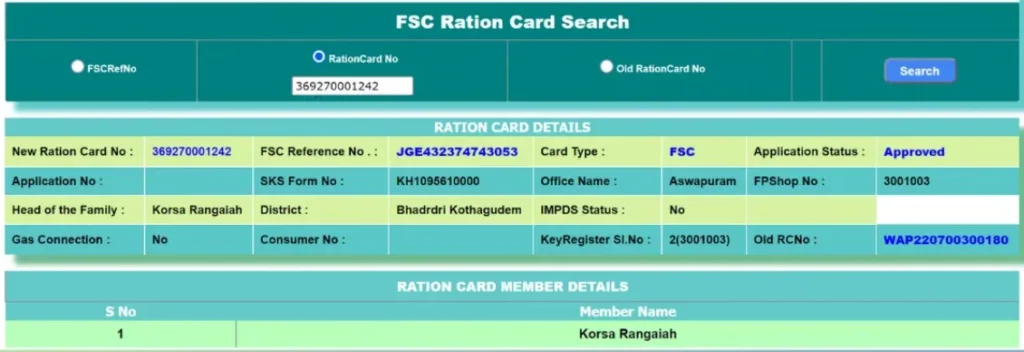
Follow these step-by-step instructions to perform fsc search with aadhaar no telangana online:
-
Visit the Official EPDS Telangana Portal
Open your web browser and go to the official EPDS Telangana website. Ensure the URL ends with .gov.in to confirm it is the legitimate government portal. Avoid third-party websites claiming to provide FSC search services.
Official URL: epds.telangana.gov.in
Browser Compatibility: Works best on Chrome, Firefox, Safari, or Edge. Enable JavaScript and cookies for proper functionality.
On the homepage, locate and click on “FSC Search” or “Ration Card Search” from the main menu. Some portal versions may list this under “Citizen Services” or “Online Services.”
Alternative navigation: Look for “Know Your FSC” or “Search Food Security Card” options.
You will see multiple search options including FSC Number, UID/Aadhaar, Mobile Number, and Application Number. Select “Search by Aadhaar Number” or “UID Search”.
Both “Aadhaar” and “UID” refer to the same 12-digit identification number.
Carefully enter your complete 12-digit Aadhaar number in the input field. Double-check for typing errors. Do not include spaces or hyphens — enter the number as a continuous 12-digit sequence.
Example format: 123456789012 (without spaces or dashes)
Privacy Note: EPDS portal uses secure HTTPS encryption. Your Aadhaar number is transmitted securely and not stored by third parties.
From the dropdown menu, select the district where your FSC is registered. This is critical — selecting the wrong district will result in no records found even if your Aadhaar is correctly linked.
If you are unsure of your registered district, check your physical FSC card or contact your assigned Fair Price Shop. For Hyderabad residents, visit our FSC Search Hyderabad guide.
All 33 Telangana districts supported: Adilabad, Bhadradri Kothagudem, Hyderabad, Jagtial, Jangaon, Jayashankar Bhupalpally, Jogulamba Gadwal, Kamareddy, Karimnagar, Khammam, Komaram Bheem, Mahabubabad, Mahbubnagar, Mancherial, Medak, Medchal-Malkajgiri, Mulugu, Nagarkurnool, Nalgonda, Narayanpet, Nirmal, Nizamabad, Peddapalli, Rajanna Sircilla, Rangareddy, Sangareddy, Siddipet, Suryapet, Vikarabad, Wanaparthy, Warangal Rural, Warangal Urban, Yadadri Bhuvanagiri.
Some portal versions include captcha verification to prevent automated searches. Enter the displayed captcha code accurately in the designated field.
Tip: If captcha is unclear, click refresh icon to generate a new captcha code.
Click the “Search” or “Submit” button to process your request. The system will query the database and retrieve your FSC details.
Processing time: Usually instant (1-3 seconds). If portal is slow, try during off-peak hours (early morning or late evening).
If your Aadhaar is linked, the system will display your complete FSC details including:
- FSC card number (ration card reference number)
- Head of family name and gender
- All family members with Aadhaar linkage status (Linked/Not Linked)
- Card type (PHH/AAY/Pink/White) – understand card types
- Assigned FPS details (shop name, number, address) – locate your FPS
- Card status (Active/Pending/Suspended/Cancelled) – status meanings
- Monthly entitlement quantity
- Registered address with district and mandal
- ONORC portability status
You can take a screenshot or note down important details for future reference. For downloading your ration card, visit Ration Card Download Telangana.
🔐 FSC Search with Aadhaar No Telangana Online Login
Some EPDS portal features (such as editing family details or updating Aadhaar) require login using your registered mobile number linked with Aadhaar. If you encounter login issues, visit our FSC Search Problems guide.
❌ Search Not Working?
If the search results are not showing or you encounter technical errors, visit our FSC Search Not Working guide for troubleshooting steps including browser compatibility, cache clearing, and alternative access methods.
🔍 FSC Search by Aadhaar – Official EPDS Access
Click the button below to visit the official Telangana EPDS portal and search your Food Security Card (FSC) details using your Aadhaar number.
Privacy & Security: How Your Aadhaar Data is Protected
Understanding privacy and data security is crucial when using FSC search with Aadhaar number. Here’s how your personal information is protected:
🔒 Government Portal Security Features
| Security Feature | Protection Details |
|---|---|
| HTTPS Encryption | All data transmitted between your browser and EPDS portal is encrypted using SSL/TLS certificates |
| No Data Storage | EPDS portal does not store your Aadhaar number after search completion |
| Secure Database | FSC records stored in government-protected Civil Supplies Department database |
| No Third-Party Sharing | Aadhaar details never shared with non-government entities |
| Session Timeout | Automatic logout after inactivity to prevent unauthorized access |
| Captcha Verification | Prevents automated bot access and protects against data scraping |
| IP Logging | Search attempts logged for audit and security monitoring |
🛡️ Best Practices for Safe Aadhaar Search
- Use Only Official Portal: Always search on epds.telangana.gov.in (ending with .gov.in). Never use third-party websites claiming FSC search services.
- Verify URL: Check browser address bar shows padlock icon (🔒) indicating secure HTTPS connection before entering Aadhaar.
- Use Private Browser: Search on personal devices. Avoid public computers or shared devices for Aadhaar-related searches.
- Clear Browser History: After searching, clear browser history, cache, and cookies if using shared device.
- Do Not Share Screenshots: Avoid sharing FSC search screenshots containing Aadhaar numbers on social media or messaging apps.
- Verify District First: Select correct district to avoid multiple failed search attempts triggering security alerts.
- No Email/SMS Required: Official EPDS portal never asks for email or SMS verification for basic FSC search. Beware of phishing attempts.
⚠️ Warning: Avoid Fake FSC Search Websites
Several fraudulent websites mimic EPDS Telangana portal to collect Aadhaar numbers illegally. Always verify:
- URL ends with .gov.in
- Website has government emblem and official branding
- No advertisements or promotional content
- No payment requests for FSC search (it’s free)
- Contact details match official Food & Civil Supplies Department
📱 Is This Website Collecting My Aadhaar Data?
No. This informational website (fscsearchtsindia.com) does NOT collect, store, or process Aadhaar numbers. We provide educational content only. When you click links to official EPDS portal, you navigate directly to the government website where your data is handled securely according to Government of India data protection policies.
✓ Privacy Commitment
Read our complete Privacy Policy and Disclaimer to understand how we protect your privacy while providing FSC information and guidance.
Common Errors When Searching FSC by Aadhaar & Solutions
Users performing FSC search by Aadhaar number telangana may encounter various errors. Here are detailed explanations and step-by-step solutions:
❌ Error 1: “No Record Found” or “Aadhaar Not Seeded”
Error Message: “No FSC record found for given Aadhaar number” or “Aadhaar not seeded in database”
Cause: Your Aadhaar number is not linked with your Food Security Card in the EPDS system.
Solution Steps:
- Verify you entered correct 12-digit Aadhaar number without spaces
- Confirm selected district matches your FSC registered district
- If Aadhaar still not linked, visit assigned Fair Price Shop or MeeSeva center with Aadhaar card and FSC card
- Request Aadhaar linking/seeding service
- Biometric verification (fingerprint/iris scan) will be completed
- Wait 24-48 hours for database update
- Retry FSC search with Aadhaar number
Complete Guide: Aadhaar Not Linked with Ration Card Telangana
❌ Error 2: “Invalid Aadhaar Number”
Error Message: “Please enter valid Aadhaar number” or “Invalid UID format”
Cause: Aadhaar number format is incorrect (missing digits, extra characters, or spaces)
Solution Steps:
- Verify Aadhaar card shows exactly 12 digits
- Re-enter Aadhaar number carefully digit by digit
- Remove any spaces, hyphens, or special characters
- Use copy-paste from digital Aadhaar (eAadhaar) to avoid typing errors
- If problem persists, try different browser or clear browser cache
❌ Error 3: Wrong District Selected
Error Message: No results despite valid Aadhaar
Cause: Selected district does not match FSC registered district
Solution Steps:
- Check physical FSC card for registered district and mandal
- If card unavailable, contact assigned FPS dealer for district information
- Re-search selecting correct district from dropdown
- For Hyderabad metro area, try “Hyderabad”, “Rangareddy”, or “Medchal-Malkajgiri” depending on your location
- If recently migrated, FSC may still be registered in old district – transfer required
District-wise Status: Ration Card Status Telangana District Wise
❌ Error 4: Portal Timeout or Not Loading
Error Message: “Server not responding”, “Connection timeout”, or blank page
Cause: EPDS portal temporary technical issues, high traffic, or browser compatibility
Solution Steps:
- Check internet connection stability
- Refresh page (F5 or Ctrl+R)
- Clear browser cache and cookies
- Try different browser (Chrome, Firefox, Edge)
- Disable browser extensions/ad blockers temporarily
- Search during off-peak hours (early morning 6-8 AM or late evening 9-11 PM)
- Wait 30 minutes and retry if portal under maintenance
- Use MeeSeva offline service as alternative
Troubleshooting Guide: FSC Search Not Working Telangana
❌ Error 5: Multiple FSC Records Shown
Error Message: Search displays 2 or more FSC cards linked to same Aadhaar
Cause: Duplicate FSC cards or old cancelled cards still in database
Solution Steps:
- Identify currently active FSC by checking card status column
- If both show “Active”, there is duplicate card issue
- Visit District Supply Office (DSO) with both physical FSC cards
- Request cancellation of duplicate/old card
- Keep only one valid active FSC to avoid ration distribution confusion
- Duplicate cards may lead to card suspension by department
❌ Error 6: Captcha Verification Failed
Error Message: “Incorrect captcha” or “Please enter valid captcha”
Cause: Captcha code entered incorrectly or expired
Solution Steps:
- Click captcha refresh icon to generate new code
- Enter captcha exactly as shown (case-sensitive)
- Distinguish similar characters carefully (0 vs O, 1 vs I, 8 vs B)
- If captcha consistently unclear, try different time or browser
- Complete captcha within 60 seconds before expiry
❌ Error 7: Name Mismatch Between Aadhaar and FSC
Error Message: Search shows FSC but name differs from Aadhaar
Cause: Spelling variations, name change after marriage, or data entry errors
Solution Steps:
- Minor spelling differences usually acceptable (e.g., “Mohammed” vs “Mohammad”)
- For significant name mismatch, visit MeeSeva center with supporting documents
- If Aadhaar name changed, carry updated Aadhaar acknowledgement
- If FSC name needs correction, submit name change application with proof
- Marriage certificate required for name change after marriage
- Gazette notification for legal name change
- Correction typically takes 7-15 days for approval
❌ Error 8: FSC Shows Wrong Family Members
Error Message: Search results show incorrect family composition (deceased members listed, new members missing)
Cause: Database not updated after births, deaths, marriages, or member additions/deletions
Solution Steps:
- Visit MeeSeva center or Food & Civil Supplies office
- Bring supporting documents:
- Birth certificate for adding newborn
- Death certificate for removing deceased member
- Marriage certificate for adding spouse
- Transfer certificate if member moved to different household
- Submit FSC correction application
- Verification and approval takes 7-15 working days
- Updated details reflect in EPDS database after approval
Common Problems Guide: FSC Search Problems Telangana
❌ Error 9: FSC Status Shows “Suspended” or “Cancelled”
Error Message: Search successful but card status shows “Suspended” or “Cancelled”
Cause: Card deactivated due to non-collection, duplicate detection, ineligibility, or administrative reasons
Solution Steps:
- Visit assigned Fair Price Shop to understand suspension reason
- If suspended for non-collection, request reactivation at MeeSeva
- If cancelled due to duplicate, keep only valid card
- If cancelled incorrectly, file grievance with supporting documents
- For eligibility-related cancellation, check eligibility criteria and reapply if qualified
- Contact District Supply Office for status clarification
FSC Application Search with Aadhaar Number Telangana
Applicants who have recently applied for a new Food Security Card can check their FSC application status using Aadhaar number through the EPDS portal.
📝 How to Check FSC Application Status with Aadhaar
-
Visit EPDS Portal
Go to epds.telangana.gov.in or navigate from FSC Search Telangana homepage
-
Select Application Search
Click on “FSC Application Search” or “Track Application Status”
-
Choose Search Method
Select “Search by Aadhaar Number” or “MeeSeva Application Number”
-
Enter Details
Enter your Aadhaar number (applicant/head of family) and select registered district
-
View Status
Click Search to view current application status with processing stage details
📊 Application Status Types Explained
| Status | Meaning | Expected Action |
|---|---|---|
| Pending | Application submitted and under review by authorities | Wait for verification (typically 7-30 days) |
| Approved | Application approved, FSC card issued or ready for collection | Collect card from MeeSeva or designated office |
| Rejected | Application rejected due to ineligibility or incomplete documentation | Visit MeeSeva to understand rejection reason and reapply if eligible |
| Verification Pending | Documents under verification, additional information may be required | Contact MeeSeva or wait for verification completion |
| Under Process | Application in various stages of departmental processing | Monitor status regularly, wait for approval |
| Documents Required | Missing or incomplete supporting documents | Submit required documents to MeeSeva immediately |
| Field Verification | Civil Supplies inspector conducting physical address verification | Ensure someone available at registered address for verification |
⏱️ Typical Processing Timeline
- Application Submission: Instant acknowledgement with MeeSeva reference number
- Initial Verification: 3-7 working days
- Field Verification: 7-15 working days (if required)
- Final Approval: 15-30 working days from submission
- Card Printing: 2-5 working days after approval
- Total Duration: Typically 20-35 days for complete process
📚 Complete Application Guide
For detailed information about FSC application tracking, required documents, approval timelines, and application rejection reasons, visit our comprehensive guide: FSC Application Search Telangana
📞 What If Application Delayed?
If your application status remains “Pending” or “Under Verification” beyond 30 days:
- Visit MeeSeva center where application submitted
- Bring MeeSeva application receipt/acknowledgement
- Request status update and identify delays
- Contact District Supply Office if unresolved
- File online grievance through EPDS portal if needed
- Call Civil Supplies helpline: 1967 (toll-free)
Offline FSC Search with Aadhaar Number
If you do not have internet access or prefer offline verification, FSC search with Aadhaar number can be performed through the following offline channels:
🏪 1. Fair Price Shop (FPS)
Visit your assigned ration shop and show your Aadhaar card to the FPS dealer. The dealer can verify your FSC details, Aadhaar linkage status, and monthly ration entitlement using the FPS Point of Sale (PoS) device.
Services Available at FPS:
- Instant Aadhaar-based FSC verification
- Check Aadhaar linkage status for all family members
- View monthly ration entitlement balance
- Verify last transaction date and quantity
- Confirm biometric authentication status
- Check ePoS closing balance – learn more
No charges for verification. This is a free service provided by all Fair Price Shops in Telangana.
Find Your FPS: If you don’t know your assigned FPS location, use our FPS Search Telangana tool or check RO Status FP Shop details.
🏢 2. MeeSeva Center
FSC search with aadhaar no telangana meeseva is a popular offline method. MeeSeva centers are government-approved service centers located across Telangana that provide FSC-related services.
Services Offered at MeeSeva:
- FSC search using Aadhaar number
- Application status checking
- Aadhaar linking assistance
- Printing FSC card details
- Correction of errors in FSC records
- New FSC applications
- FPS transfer requests
- Member addition/deletion
- Name/address corrections
- Duplicate FSC card issuance
How to Use MeeSeva for FSC Search:
-
Locate Nearest Center
Find your nearest MeeSeva center using meeseva.telangana.gov.in or search “MeeSeva near me” on Google Maps
-
Bring Documents
Carry your Aadhaar card (original or photocopy) and FSC card if available
-
Request Service
Request “FSC search using Aadhaar number” at the service counter
-
Verification
MeeSeva operator will search EPDS database using your Aadhaar and display complete FSC details on screen
-
Get Printout
Printout available if needed (nominal service charge may apply – typically ₹5-₹10)
💰 MeeSeva Service Charges
Basic FSC search is usually free or involves minimal service charges (₹5-₹10). Printing FSC details costs ₹5-₹20. Documentation or application services may have additional fees as per official MeeSeva tariff.
Detailed MeeSeva Guide: MeeSeva FSC Search Telangana
🏛️ 3. Food & Civil Supplies Office
Visit your local Food and Civil Supplies Department office or District Supply Office (DSO) with your Aadhaar card. Officials can verify FSC details, resolve Aadhaar linkage issues, and provide official documentation.
When to Visit DSO:
- Complex Aadhaar linking issues requiring official intervention
- FSC card suspended or cancelled incorrectly
- Duplicate card cancellation requests
- Grievance resolution for online search failures
- Official verification letters and certificates required
- Transfer FSC from one district to another
- Appeal rejected applications
District Supply Office Locations: Available in all 33 district headquarters. Contact Civil Supplies helpline 1967 for nearest DSO address and timings.
How to Link Aadhaar with FSC in Telangana
If your FSC search with aadhaar is returning no results because Aadhaar is not linked, follow these steps to complete Aadhaar linking:
🔗 Complete Aadhaar Linking Process
-
Collect Required Documents
Gather original Aadhaar cards of ALL family members listed on FSC card and FSC card (ration card) – both original and photocopies
For children below 5 years without Aadhaar: Carry birth certificate as temporary proof until Aadhaar enrollment completed
-
Visit Linking Center
Go to your assigned Fair Price Shop (FPS) or nearest MeeSeva center during working hours
FPS Timings: Usually 9:00 AM – 1:00 PM and 3:00 PM – 6:00 PM (may vary by location)
MeeSeva Timings: Monday to Saturday, 9:00 AM – 5:00 PM (excluding public holidays)
-
Submit Documents for Linking
Provide Aadhaar cards and FSC card to FPS dealer or MeeSeva operator
Operator will verify details and initiate Aadhaar seeding process in EPDS database
-
Biometric Verification
Fingerprint scan or iris scan may be required for biometric authentication activation
Who needs biometric: Typically head of family and all adult members (18+ years)
If fingerprints not clear: Iris scan alternative available
-
Receive Acknowledgement
Get acknowledgement receipt confirming Aadhaar linking request submitted
Note reference number for future tracking
-
Database Update Period
Aadhaar linkage typically reflects in EPDS database within 24-48 hours
In some cases, may take up to 72 hours (3 working days)
-
Verify Linkage Completion
After 2-3 days, perform FSC search with Aadhaar number on EPDS portal to confirm successful linking
All family members should show “Aadhaar Linked” status
⚠️ Mandatory Requirement
Aadhaar linking is mandatory for all FSC cardholders under the One Nation One Ration Card (ONORC) scheme. Without Aadhaar linkage, you cannot collect rations using biometric authentication at Fair Price Shops. Deadline passed – link immediately to avoid ration collection issues.
📄 Complete Document Checklist for Aadhaar Linking
- Original Aadhaar card of all family members (or eAadhaar printout)
- Photocopy of all Aadhaar cards (one copy each)
- FSC card (ration card) – original and photocopy
- Mobile number linked with primary member’s Aadhaar (for OTP verification if required)
- Proof of residence if address update needed (electricity bill, bank passbook, rental agreement)
- Birth certificates for children below 5 years without Aadhaar enrollment
- Passport size photo (optional, may be required for new biometric registration)
🔧 Common Aadhaar Linking Issues & Solutions
Issue 1: Aadhaar Address Differs from FSC Address
Address mismatch usually does not prevent linking. However, major differences (different district/state) may require address update in either Aadhaar or FSC records. Minor variations (street name spelling, pin code) are generally acceptable.
Issue 2: Aadhaar Name Differs from FSC Name
Small spelling variations acceptable. Significant name differences require name correction in Aadhaar (via UIDAI) or FSC (via MeeSeva) before linking. Marriage-related name change requires marriage certificate submission.
Issue 3: Biometric Authentication Fails
If fingerprints not recognized due to worn prints, age, or manual labor, request iris scan as alternative. If both fail, exception process available – contact DSO for manual verification.
Issue 4: Member Aadhaar Linked to Different FSC
If family member’s Aadhaar already linked to another FSC (previous household), that linkage must be removed first. Visit DSO with proof of current household membership to transfer Aadhaar linkage.
📚 Complete Aadhaar Linking Guide
For comprehensive step-by-step Aadhaar linking instructions, troubleshooting all scenarios, alternative methods, and frequently asked questions, visit our detailed guide:
Aadhaar Not Linked with Ration Card Telangana – Complete Solution Guide
Understanding FSC Search Results: What Each Status Means
When you perform fsc search with aadhaar no telangana, you may see different card status indicators. Here’s what each status means and required actions:
| Card Status | Meaning | Action Required |
|---|---|---|
| Active | FSC card is valid and active. You can collect rations normally at assigned FPS. | No action needed. Continue collecting rations monthly using Aadhaar biometric authentication. |
| Pending | New application or recent changes pending approval by authorities. | Wait for verification completion. Check status after 7-10 days. Contact MeeSeva if delayed beyond 30 days. |
| Suspended | Card temporarily suspended due to verification issues, non-collection for 3+ months, or pending corrections. | Visit DSO or MeeSeva to resolve suspension reason. Bring FSC card and Aadhaar for investigation. |
| Cancelled | FSC card permanently cancelled (duplicate detection, ineligibility, migration, or death of beneficiary). | If cancelled incorrectly, file grievance with supporting documents. If legitimate, reapply for new FSC if eligible. |
| Under Verification | Recent update or correction application under departmental review. | Wait for verification completion (typically 7-15 days). Contact DSO if delayed beyond 15 days. |
| Inactive | Card not active due to Aadhaar not linked, long non-collection, or database sync issues. | Visit MeeSeva to activate card and complete Aadhaar linking. Reactivation usually within 24-48 hours. |
| Blocked | Card blocked due to fraudulent activity detection, duplicate beneficiary, or eligibility violation. | Visit DSO immediately with all documents. Explain situation and request unblocking if legitimately eligible. |
| Transferred | FSC transferred from one FPS to another or one district to another. | No action if transfer completed. Visit new assigned FPS for ration collection. Update address if district changed. |
🔍 Family Member Aadhaar Linkage Status
FSC search results also show Aadhaar linkage status for each family member individually:
- Aadhaar Linked: ✅ Member can authenticate using fingerprint/iris scan at FPS
- Aadhaar Not Linked: ❌ Member cannot authenticate – linking required immediately
- Pending Verification: ⏳ Aadhaar linking submitted, awaiting database update (24-72 hours)
- Linking Failed: ⚠️ Previous linking attempt failed – retry with correct Aadhaar details
- Not Applicable: Children below 5 years without Aadhaar (birth certificate accepted temporarily)
📋 Complete Status Checking Guide
For detailed explanation of all FSC statuses, troubleshooting status-related issues, and reactivation procedures, visit:
Mobile Apps for FSC Search and Ration Tracking
The Government of Telangana and Government of India have developed mobile applications for FSC-related services including Aadhaar-based search:
📱 1. T-Ration Mobile App (Telangana Official)
Official mobile app developed by the Telangana Civil Supplies Department offering comprehensive FSC services:
Key Features:
- FSC search using Aadhaar number, FSC number, or mobile number
- Monthly ration transaction history with dates and quantities
- FPS location finder with Google Maps integration
- Stock availability status at assigned FPS
- Ration entitlement calculator
- Grievance registration and tracking
- SMS/push notification alerts for ration availability
- ONORC portability status verification
- Aadhaar linkage status for all family members
- ePoS transaction details and closing balance
Availability: Android (Google Play Store). Search “T-Ration Telangana” or check official EPDS Telangana website for download links.
Login Required: Use Aadhaar-linked mobile number for OTP-based login
🌐 2. Mera Ration Mobile App (National – ONORC)
National app developed by Ministry of Consumer Affairs, Food & Public Distribution for One Nation One Ration Card beneficiaries:
Key Features:
- FSC details for all states including Telangana
- Recent ration transaction details across India
- ONORC portability status and eligibility
- Find nearest FPS in any state with directions
- Track monthly ration entitlement balance
- Multi-language support (Hindi, Telugu, English, and 10+ regional languages)
- Complaint registration for ONORC issues
- State-wise ration scheme information
Availability: Android (Google Play Store) and iOS (Apple App Store)
How to Use Mera Ration for Aadhaar-based FSC Search:
- Download “Mera Ration” app from official app store
- Select Telangana as your state
- Choose language (Telugu/Hindi/English)
- Enter 12-digit Aadhaar number
- Verify with OTP sent to Aadhaar-linked mobile
- View FSC details, entitlement, and transaction history
⚠️ Download Safely
App features and availability are subject to official updates. Always download apps only from:
- Official government portals (EPDS Telangana, NIC websites)
- Google Play Store (for Android)
- Apple App Store (for iOS)
Never download FSC/ration apps from third-party websites to avoid malware, data theft, and fraudulent applications.
📲 SMS-based FSC Search (No App Required)
Some Telangana Civil Supplies services support SMS-based FSC search:
SMS Format: FSC
Send to: Check official EPDS Telangana portal for current SMS service number
Note: SMS service availability varies. App or web portal recommended for detailed information.
📞 Helpline & Contact Details for FSC Aadhaar Search
- Telangana Civil Supplies Helpline: 1967 (Toll-free)
- Alternative Helpline: 1800-4250-0333
- Department: Food & Civil Supplies Department, Government of Telangana
- Working Hours: Monday to Saturday, 10:00 AM – 5:00 PM (excluding public holidays)
- Email Support: Check official EPDS portal for current email contacts
- Grievance Portal: Available on EPDS Telangana website under “Grievances” section
- For Aadhaar Issues: UIDAI Helpline 1947 (for Aadhaar card corrections)
Language Support: Helplines available in Telugu, Hindi, and English. Specify your preferred language when calling.
Frequently Asked Questions (FAQs)
FSC search by Aadhaar is a specific method that uses your 12-digit Aadhaar (UID) number to retrieve FSC details. General ration card search includes all available methods such as FSC number search, UID search, mobile number search, and application number search. Aadhaar search is preferred when you don’t remember your FSC card number or have lost your physical card. For a complete overview of all search methods, visit our Ration Card Search Telangana guide.
Visit your nearest MeeSeva center with your Aadhaar card (original or photocopy). Request the MeeSeva operator to perform FSC search using your Aadhaar number. The operator will search the EPDS Telangana database and display your FSC card details on screen including family members, card status, assigned FPS, and Aadhaar linkage status. You can request a printout if needed (small service fee ₹5-₹10 may apply). This offline method is especially helpful for residents without internet access or those not comfortable using online portals. Complete guide: MeeSeva FSC Search
Yes, ration card (FSC) details can be checked using Aadhaar number through the EPDS Telangana portal, provided your Aadhaar is properly linked with your Food Security Card in the Civil Supplies database. If Aadhaar is not linked, you will need to complete the linking process first at your FPS or MeeSeva center. After linking (takes 24-48 hours to reflect in database), you can search FSC using Aadhaar number anytime. For linking instructions, visit Aadhaar Linking Guide.
Visit the EPDS Telangana portal (epds.telangana.gov.in), select “FSC Search,” choose “Search by Aadhaar Number,” enter your 12-digit Aadhaar number without spaces, select your registered district from dropdown, complete captcha verification if shown, and click Search. Your FSC card number (ration card reference number) and complete family details will be displayed if Aadhaar is linked. This method is particularly useful when you have lost your physical FSC card and need to retrieve the card number. Step-by-step guide with screenshots: How to Search FSC by Aadhaar Number
After your FSC application is approved, you can view FSC details online using Aadhaar number through the EPDS Telangana portal. Some portal versions allow downloading FSC card in PDF format after successful search. For official printed FSC cards, visit your assigned Fair Price Shop or MeeSeva center with your Aadhaar card to collect the physical card. Digital FSC download procedure: Search FSC using Aadhaar → View details → Look for “Download” or “Print” button → Save PDF or take screenshot. For more information, see our Ration Card Download Telangana and How to Download Ration Card guides.
Yes, Aadhaar is mandatory for applying for a new Food Security Card in Telangana. All family members’ Aadhaar numbers must be provided during FSC application submission. Aadhaar is also required for linking family members with existing FSC cards. Children below 5 years without Aadhaar enrollment can be added temporarily using birth certificate until they obtain Aadhaar. To apply for new FSC, visit nearest MeeSeva center with family Aadhaar cards, address proof (electricity bill/rent agreement), income certificate (if applicable), and passport size photos. Application fee varies by card type. Eligibility criteria: Who is Eligible for FSC
Visit your assigned Fair Price Shop or nearest MeeSeva center with your Aadhaar card and FSC card. Submit both documents for Aadhaar linking/seeding service. Biometric verification (fingerprint or iris scan) may be required for biometric authentication activation at FPS. Linking request is submitted to EPDS database and updated within 24-48 hours. After 2-3 days, perform FSC search with Aadhaar to confirm successful linking – all family members should show “Aadhaar Linked” status. No charges for Aadhaar linking service at FPS. MeeSeva may charge nominal fee ₹5-₹20. For complete step-by-step instructions covering all scenarios, visit our comprehensive guide: Aadhaar Linking Complete Guide
Visit the EPDS Telangana portal, select “FSC Application Search” or “Track Application,” choose “Search by Aadhaar Number” or “MeeSeva Application Number,” enter your Aadhaar number (applicant/head of family) and registered district, complete captcha, and click Search. Your application status will be displayed: Pending (under review), Approved (card ready for collection), Rejected (with reason), Verification Pending (documents under check), Under Process (departmental processing), or Documents Required (incomplete submission). Typical processing time: 20-35 days from application date. If delayed beyond 30 days, contact MeeSeva or DSO. Detailed guide: FSC Application Search
Common reasons include: (1) Aadhaar not linked with FSC – complete linking at FPS or MeeSeva, (2) Wrong district selected – verify and select correct registered district from FSC card, (3) Typing error in Aadhaar number – double-check 12-digit number entered correctly without spaces, (4) EPDS portal temporarily down – try during off-peak hours or use MeeSeva offline, (5) FSC application still pending approval – check application status instead, (6) FSC cancelled or suspended – verify card status through other search method, (7) Recent linking done – wait 48-72 hours for database update. If problem persists after verification, visit MeeSeva or contact Civil Supplies helpline 1967. Troubleshooting: FSC Search Problems
Aadhaar is mandatory for Aadhaar-based FSC search method. However, you can also search FSC details using alternative methods if Aadhaar is not linked yet: (1) FSC card number/UID search – use ration card reference number, (2) Mobile number search – if registered with FSC, (3) MeeSeva application number – for tracking new applications. But Aadhaar linking itself is now mandatory for all FSC cardholders in Telangana for biometric authentication at Fair Price Shops and ONORC portability. Without Aadhaar linkage, you cannot collect rations using ePoS system. For all available search methods, visit: Ration Card Search Methods
This guide and EPDS Telangana portal cover FSC search for Telangana residents only. Each state has its own FSC/ration card portal and separate database. If you have migrated from another state to Telangana, your old state ration card will NOT appear in Telangana EPDS search. You need to either: (1) Apply for FSC transfer from old state to Telangana using inter-state migration certificate and Telangana address proof, or (2) Apply for new FSC in Telangana as fresh applicant. Under ONORC scheme, you can collect rations in Telangana using your home state ration card temporarily, but permanent migration requires FSC transfer/new application.
This situation occurs when: (1) Duplicate FSC cards exist in database, (2) Your Aadhaar linked to old cancelled card not removed from system, (3) Member of multiple households incorrectly. Check status column – only ONE should show “Active”. If multiple show Active status, this is violation and can lead to all cards being cancelled. Immediately visit District Supply Office (DSO) with all FSC cards showing in search. Provide valid proof of current household and request cancellation of duplicate/old/incorrect cards. Keep only one legitimate active FSC. Having multiple active FSC cards is illegal and can result in prosecution under food security laws. DSO will investigate and retain only valid card after verification.
Searching FSC details online through the EPDS Telangana portal using Aadhaar number is completely FREE of charge. No payment required at any stage for online search. At Fair Price Shops, FSC verification using Aadhaar is FREE service. At MeeSeva centers, basic FSC search is usually free or involves minimal service charges (₹5-₹10 as per official tariff). Printing FSC details or requesting certified copies may have additional nominal fees (₹5-₹20). FSC application submission has prescribed government fees (varies by card type). Beware of fraudulent websites or agents demanding payment for FSC search – official government portals never charge for basic search services.
Some EPDS portal versions allow Aadhaar seeding/linking through online login (using registered mobile number linked with Aadhaar). However, major changes such as name correction, address update, member addition/deletion, or changing head of family typically require visiting MeeSeva center or Food & Civil Supplies office with supporting documents for manual verification and approval. Online services usually limited to: viewing FSC details, checking Aadhaar linkage status, downloading digital card copy, and verifying ONORC status. For corrections/updates, offline process mandatory with documentary proof. Processing time for corrections: 7-15 working days after document submission and verification.
After submitting Aadhaar linking request at FPS or MeeSeva with biometric verification completed, the update typically reflects in the EPDS database within 24-48 hours (1-2 working days). In some cases, it may take up to 72 hours (3 working days) depending on database synchronization and verification workload. You can verify successful linking by performing FSC search with Aadhaar number after 2-3 days. If linking status still shows “Pending” or “Not Linked” after 7 days, revisit MeeSeva or FPS to check linking request status. Possible delays due to: incorrect Aadhaar number entered, biometric authentication failure, or technical issues in database update. For urgent cases, contact District Supply Office for manual verification and expedited processing.
If FSC search results show incorrect or outdated family member details (wrong names, deceased members still listed, new family members missing, children not added, married members not removed), visit MeeSeva center or District Supply Office with supporting documents: (1) Birth certificate for adding newborn, (2) Death certificate for removing deceased member, (3) Marriage certificate for adding spouse or removing married daughter, (4) Transfer certificate if member moved to different household FSC, (5) Divorce decree if applicable, (6) ID proof for name spelling correction. Submit FSC correction application at MeeSeva with all supporting documents. Officer will verify documents and process update request. Verification and approval typically takes 7-15 working days. Updated family details reflect in EPDS database after departmental approval. Check updated FSC using Aadhaar search after processing period.
No, Aadhaar linkage and biometric authentication are now MANDATORY for ration collection at Fair Price Shops in Telangana under the One Nation One Ration Card (ONORC) scheme. Without Aadhaar linkage, you cannot collect subsidized rations using the electronic Point of Sale (ePoS) biometric system deployed at all FPS. Deadline for Aadhaar linking has passed – any FSC without Aadhaar linkage is considered inactive for ration distribution purposes. Complete Aadhaar linking immediately to avoid disruption in monthly ration collection. Only exception: Children below 5 years without Aadhaar can be temporarily added using birth certificate until they obtain Aadhaar enrollment. For linking procedure: Aadhaar Linking Guide
Yes, FSC search with Aadhaar confirms your ONORC (One Nation One Ration Card) portability status and eligibility. If your FSC card is ONORC-enabled (most Telangana FSC cards are) and Aadhaar is properly linked with biometric authentication activated, you can collect rations from any Fair Price Shop across India, not just your assigned FPS in Telangana. The search result will show ONORC status indicator (Enabled/Disabled) and portability eligibility. Under ONORC: (1) You can collect full month ration from single FPS anywhere in India, (2) Or collect partial rations from multiple FPS across states (total not exceeding monthly entitlement), (3) Biometric authentication required at all FPS, (4) Transaction reflects in real-time central database. For ONORC details and how to use portability feature, visit official Mera Ration app or EPDS Telangana ONORC section.
Yes, residents of Hyderabad, Secunderabad, and all Hyderabad municipal areas can use FSC search with Aadhaar number through the EPDS Telangana portal same as other districts. When searching, select “Hyderabad” as the district from the dropdown menu (some areas may fall under “Rangareddy” or “Medchal-Malkajgiri” districts depending on your specific location – check your FSC card for registered district). For Hyderabad-specific instructions, FPS locations, MeeSeva centers, district supply office addresses, and local troubleshooting, visit our dedicated guide: FSC Search Hyderabad. Process same as rest of Telangana but Hyderabad has more MeeSeva centers and FPS for convenience.
Aadhaar and UID (Unique Identification Number) refer to the SAME 12-digit number issued by UIDAI (Unique Identification Authority of India). Both terms are used interchangeably on the EPDS Telangana portal and in government documentation. “FSC search by Aadhaar” and “FSC search by UID” mean exactly the same thing and will produce identical search results. Some portal versions display option as “Search by UID,” others as “Search by Aadhaar,” but functionality is identical. Similarly, when EPDS portal shows “UID Linkage Status” or “Aadhaar Linkage Status,” both refer to the same Aadhaar seeding/linking process. No difference in meaning or process – purely terminology variation.
Address mismatch between Aadhaar and FSC card is common and usually does NOT prevent Aadhaar linkage or FSC search functionality. Minor address variations (spelling differences, pin code change, street name variation) are generally acceptable and will not affect ration collection or search. However, for FPS allocation and verification purposes, it is RECOMMENDED to update address in either Aadhaar (via UIDAI portal/enrollment center) or FSC (via MeeSeva) to match current actual residence. Major address differences (different district or state) may raise verification flags during field inspection. To update: (1) Aadhaar address change – visit UIDAI enrollment center with current address proof, or (2) FSC address change – visit MeeSeva with current address proof (electricity bill/rent agreement/bank passbook dated within 3 months). Choose whichever is more convenient.
Yes, EPDS Telangana portal uses government-standard security measures: (1) HTTPS encryption – all data transmitted securely between your browser and server, (2) No third-party sharing – Aadhaar number not shared with non-government entities, (3) No permanent storage – search queries not stored after session completion, (4) Secure database – FSC records maintained in Civil Supplies Department protected servers, (5) Session timeout – automatic logout after inactivity, (6) Audit trails – all access logged for monitoring. ALWAYS verify: (1) URL ends with .gov.in, (2) Padlock icon visible in browser address bar, (3) No advertisements or promotional content on page, (4) Official government branding present. NEVER enter Aadhaar on third-party websites claiming FSC search services – high risk of data theft. For safety guidelines, see Privacy section above.
About This FSC Aadhaar Search Guide
✓ Why Trust This Aadhaar Search Guide?
- Experience: Created by researchers familiar with Telangana FSC systems, EPDS portal navigation, Aadhaar linkage procedures, biometric authentication processes, and common user challenges faced by ration cardholders
- Expertise: Information compiled through careful study of official EPDS Telangana portal, Food & Civil Supplies Department resources, UIDAI Aadhaar linkage guidelines, ONORC documentation, and government notifications
- Authoritativeness: All instructions based on official government sources. We cite official portals (.gov.in) and helplines. We do not invent statistics, timelines, or procedural details
- Trustworthiness: We prioritize accuracy over completeness. Information is verified against official sources before publication. We clearly distinguish between verified facts and general guidance. We update content when procedures change
📚 Information Sources
- EPDS Telangana Portal (epds.telangana.gov.in) – Official Government Website
- Department of Food & Civil Supplies, Government of Telangana – Policy Documents
- MeeSeva Service Centers Telangana – Service Guidelines
- One Nation One Ration Card (ONORC) – Ministry Guidelines
- UIDAI Aadhaar Authentication Documentation – Technical Specifications
- National Food Security Act (NFSA) – Legal Framework
- Civil Supplies Department Circulars and Public Notices
⚖️ Editorial Standards
- No speculation about future policy changes or system updates
- No invented statistics, approval rates, or processing timelines not from official sources
- No fake user testimonials or success rate claims
- All recommendations based on official published procedures
- Regular content review when government procedures change
- Clear disclosure of limitations and uncertainties
- Privacy-focused guidance prioritizing user data security
📅 Content Review & Accuracy
Last Comprehensive Review: June 25, 2026
Information Verified: Against official government sources available as of the review date
Update Policy: Content reviewed regularly based on EPDS Telangana portal changes, new government notifications, and user feedback. Major policy changes incorporated within 7 days of official announcement.
User Notice: Government procedures, portal interfaces, and Aadhaar linkage processes may change without advance notice. Always verify critical information through official EPDS Telangana portal or helpline 1967 before taking action.
Need Help with FSC Search or Aadhaar Linking?
Explore our complete collection of FSC guides covering all search methods, application tracking, Aadhaar linking solutions, problem resolution, and ration card services across Telangana.
⚠️ Important Disclaimer
This is an independent informational website created to help users understand FSC search processes in Telangana. We are not affiliated with, endorsed by, or connected to the Government of Telangana, Department of Food & Civil Supplies, EPDS Telangana, UIDAI, or any government agency.
We do not:
- Collect Aadhaar numbers or store personal data
- Process FSC applications or Aadhaar linking requests
- Provide official government services
- Access government databases or beneficiary records
- Represent any government department or authority
- Guarantee specific outcomes or processing times
For Official Services:
For official FSC search, Aadhaar linking, application submission, or grievance resolution, always use the official EPDS Telangana portal (epds.telangana.gov.in) or visit authorized MeeSeva centers and Food & Civil Supplies offices. For Aadhaar corrections, visit UIDAI portal or enrollment centers.
Information Accuracy:
All information is compiled from publicly available government sources and verified to the best of our ability. Government policies, portal features, Aadhaar linkage procedures, and administrative processes may change without notice. Always verify critical information through official channels (EPDS portal or helpline 1967) before taking action based on this guide.
Privacy Protection:
This website does not collect, process, or transmit Aadhaar numbers or personal information. Links to official EPDS portal redirect you to government website where your data is handled according to Government of India privacy policies. Read our Privacy Policy and Full Disclaimer.