
EPOS Telangana Closing Balance — How to Check Online
Complete guide to checking your EPOS closing balance, understanding sales transactions, and resolving balance discrepancies in Telangana’s Electronic Public Distribution System
Quick Summary
The EPOS closing balance shows the remaining quantity of ration commodities (rice, wheat, sugar, kerosene) available for you to collect from your Fair Price Shop. This balance is updated in real-time through the Electronic Point of Sale (EPOS) device after each biometric-authenticated transaction. Understanding your closing balance helps you track monthly ration entitlements, verify collections, and identify any unauthorized or incorrect transactions.
What You’ll Learn
- How to check EPOS closing balance online using FSC or Aadhaar number
- Understanding what closing balance means (zero vs pending)
- Viewing complete EPOS sales transaction history
- Troubleshooting wrong balance display errors
- Difference between EPOS and manual ration distribution
- Resolving “0 balance but not collected” issues
Table of Contents
What is EPOS Closing Balance in Telangana?
EPOS closing balance refers to the remaining quantity of ration commodities that are still pending for distribution to a particular ration card holder in Telangana. When you collect your monthly ration allocation, the EPOS device at the Fair Price Shop (FPS) deducts the distributed quantity from your total entitlement using biometric authentication linked to your Aadhaar.
The closing balance represents the difference between your monthly quota and what you’ve already collected. For example, if your rice entitlement is 6 kg per month and you’ve collected 4 kg, your EPOS closing balance will show 2 kg remaining.
Key Components of EPOS Closing Balance
Opening Balance
Your total monthly entitlement at the beginning of each month based on family size and card type
Distributed Quantity
Amount already collected through EPOS device with biometric verification
Closing Balance
Remaining uncollected quantity available for you to collect
Transaction Date
Timestamp of last collection with EPOS device ID and FPS details
EPOS Closing Balance Example
| Commodity | Monthly Quota | Collected | Closing Balance | Status |
|---|---|---|---|---|
| Rice (Fine) | 6.000 Kg | 6.000 Kg | 0.000 Kg | Fully Collected |
| Sugar | 1.000 Kg | 0.500 Kg | 0.500 Kg | Partial |
| Kerosene | 3.000 Liters | 0.000 Liters | 3.000 Liters | Pending |
The EPOS system operates through the official EPDS (Electronic Public Distribution System) portal maintained by the Telangana Civil Supplies Department. Every transaction is recorded digitally, creating a transparent and tamper-proof record of ration distribution.
How to Check EPOS Telangana Closing Balance Online
You can check your EPOS closing balance online through the official EPDS Telangana portal in just a few simple steps. The process is free, requires no registration, and works on any device with internet connection.
Visit EPDS Telangana Official Portal
Open your web browser and navigate to epdstelangana.cgg.gov.in — the official Electronic Public Distribution System portal for Telangana state.
This is the same portal used for FSC search by Aadhaar number and other ration card services.
Note: Make sure you’re on the official .cgg.gov.in domain to avoid fake websites.
Select “FSC Search” or “EPOS Transaction” Menu
On the homepage, look for menu options such as:
- “FSC Search” — to view current closing balance
- “EPOS Transaction Details” — for sales history
- “Beneficiary Details” — for complete card information
Click on the appropriate option based on what information you need to check.
Enter Your FSC Number or Aadhaar Number
The portal accepts multiple search methods:
| Search Method | Format | Example |
|---|---|---|
| FSC Number | 10-12 digits | 31001234567 |
| Aadhaar Number | 12 digits | xxxx-xxxx-1234 |
| Mobile Number | 10 digits | 9xxxxxxxxx |
Enter the number carefully without spaces or special characters, then click “Search” or “Submit”.
Learn more about FSC search by UID in Telangana for detailed instructions.
View EPOS Closing Balance Details
After successful search, the system displays comprehensive information:
- Cardholder name and family member details
- FSC card type (White/Pink/AAY/PHH) — see types of ration cards in Telangana
- Assigned Fair Price Shop ID and dealer name
- Current month closing balance for each commodity
- Last transaction date and time
- EPOS device ID used for distribution
Tip: Take a screenshot of the closing balance display for your records. This can serve as proof if any disputes arise.
Check Transaction History (Optional)
To view detailed EPOS sales history:
- Look for “Transaction History” or “EPOS Sales Details” link on the result page
- Select date range (current month, last 3 months, last 6 months)
- Click “View Details” to see itemized distribution records
- Download or print the transaction report if needed
This transaction history shows who collected ration, when they collected, how much quantity was distributed, and which EPOS device was used.
Understanding Your Closing Balance (Zero vs Pending)
The EPOS closing balance value indicates your collection status for the current month. Understanding what different balance readings mean helps you know when to visit your FPS and whether you need to take any action.
✓ Zero Balance (0.000 Kg)
What It Means:
- You have collected your full monthly quota
- All entitled commodities have been distributed
- No pending ration remaining for current month
- No action needed — wait for next month’s allocation
Normal Status: This is the expected balance after you’ve collected all your ration for the month.
⚠ Pending Balance (Quantity Showing)
What It Means:
- Some quota remains uncollected
- You can still visit FPS to collect the balance
- Balance may carry forward for limited period
- Collect before month end to avoid lapse
Action Required: Visit your assigned Fair Price Shop to collect the remaining ration.
Common Closing Balance Scenarios
| Balance Display | What It Indicates | Action Required | Timeline |
|---|---|---|---|
| 0 Kg for all items | Full monthly quota collected successfully | None — collection complete | Wait for next month (1st-5th) |
| Partial (e.g., 2 Kg rice) | Incomplete collection, balance pending | Visit FPS to collect remaining | Within current month |
| Full quota (e.g., 6 Kg rice) | Nothing collected yet this month | Visit FPS immediately | Before month end |
| Previous month balance | Carried forward from last month | Check carry-forward policy | Limited validity period |
Important: Balance Validity Period
EPOS closing balance typically lapses at the end of each month. However, the Telangana government sometimes announces carry-forward facility allowing 1-2 additional months to collect pending ration.
Check with your local Fair Price Shop about current carry-forward policy. Uncollected ration after validity period gets cancelled and returns to government stock.
What Each Commodity Balance Tells You
Rice Balance
Most critical commodity. Zero balance means you’ve collected your staple food grain quota. Pending balance indicates you should visit FPS soon as rice is the primary ration item.
Sugar Balance
Usually distributed in smaller quantities (1 kg per month). Sometimes dealers distribute sugar only on specific days. Check with FPS about sugar distribution schedule.
Kerosene Balance
Only for cardholders who have kerosene entitlement. Not all card types receive kerosene. Zero balance is normal if you don’t have kerosene quota.
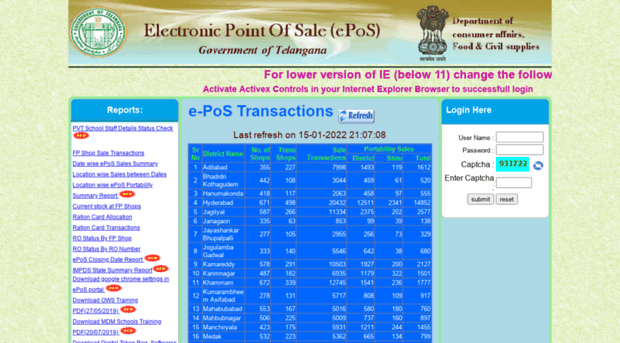
EPOS Telangana Sales Transaction History
EPOS sales transaction history provides a detailed, date-wise record of all ration distributions made through the Electronic Point of Sale device at your Fair Price Shop. This digital ledger captures every transaction with complete details including biometric authentication method, quantity distributed, and EPOS device information.
Information Included in EPOS Sales Records
| Data Field | Description | Example Value |
|---|---|---|
| Transaction Date & Time | Exact timestamp when ration was collected | 15-Jun-2026, 10:30 AM |
| FSC Number | Your ration card identification number | 31001234567 |
| Member Name | Family member who collected (authenticated via biometric) | RAJESH KUMAR |
| Commodity Type | Item distributed (Rice/Wheat/Sugar/Kerosene) | Rice (Fine) |
| Quantity Distributed | Amount given in current transaction | 6.000 Kg |
| FPS Shop ID | Fair Price Shop code where collection happened | FPS31001234 |
| EPOS Device ID | Unique device identifier used for transaction | EPOS31001234 |
| Authentication Method | Biometric verification type used | Fingerprint / Iris Scan |
Why Check EPOS Sales History?
Verification
- Confirm you actually collected what EPOS shows
- Verify quantities match what you received
- Check which family member collected
Error Detection
- Identify wrong entries or duplicate transactions
- Detect unauthorized collections
- Spot dealer manipulation attempts
Frequently Asked Questions (FAQs)
1. What exactly is EPOS closing balance in Telangana ration card system?
EPOS closing balance is the remaining quantity of ration commodities (rice, wheat, sugar, kerosene) that you are entitled to collect but have not yet collected for the current month. It represents the difference between your total monthly allocation and the amount already distributed to you through the EPOS device at your Fair Price Shop. Zero closing balance means you’ve collected your full quota; a pending balance indicates you can still collect more ration.
2. How can I check my EPOS Telangana closing balance online today?
Visit the official EPDS Telangana portal at epdstelangana.cgg.gov.in, click on “FSC Search” option, enter your Food Security Card number or Aadhaar number, and submit. The system will display your current closing balance for all commodities including rice, sugar, and kerosene. You can also check via Meeseva FSC search if available in your area.
3. My EPOS shows 0 balance but I haven’t collected ration this month — what should I do?
First, check the EPOS transaction history to see who collected the ration and when. Verify with all family members whether someone collected on behalf of the household. If no one collected, this indicates either dealer fraud or a system error. Immediately visit your FPS dealer with your Aadhaar card and ration card, request transaction receipts, and file an official complaint with the Civil Supplies Department through the EPDS grievance portal or by calling 1800-425-0082.
4. How do I check EPOS Telangana sales transaction history?
Go to the EPDS Telangana portal, navigate to “EPOS Transaction Details” or “Sales History” section, enter your FSC or Aadhaar number, select the desired date range (current month, last 3 months, last 6 months), and click “View Transactions”. The system displays detailed records including transaction dates, family member who collected, commodity types, quantities distributed, FPS shop details, EPOS device ID, and authentication method used for each collection.
5. Does EPOS closing balance carry forward to the next month if I don’t collect?
This depends on the current government policy which changes periodically. Normally, uncollected EPOS closing balance expires at the end of each month and is forfeited. However, the Telangana government sometimes announces carry-forward facilities allowing beneficiaries 1-2 additional months to collect pending balance. Check with your Fair Price Shop dealer or visit the official EPDS portal for the latest carry-forward policy applicable in your district.
6. Can I check closing balance without Aadhaar number?
Yes, you can check EPOS closing balance using your FSC (Food Security Card) number instead of Aadhaar. Some portals also allow search by registered mobile number. However, to physically collect ration at the Fair Price Shop, Aadhaar biometric authentication (fingerprint or iris scan) is mandatory under the EPOS system. If you haven’t linked your Aadhaar yet, learn how to do it through our Aadhaar linking guide.
7. What is the difference between EPOS closing balance and EPOS sales?
EPOS closing balance shows the remaining uncollected ration quantity that is still available for you to collect (forward-looking, pending amount). EPOS sales refers to the transaction history showing what you have already collected in the past (backward-looking, completed distributions). Together, EPOS sales plus closing balance equals your total monthly entitlement. Both can be checked on the same EPDS portal but in different sections.
8. How long does it take for EPOS balance to update online after I collect ration?
The EPOS device at the Fair Price Shop updates the balance immediately upon successful transaction. However, synchronization with the central server and online portal typically takes 2 to 24 hours depending on network connectivity at the FPS location. If you check the online portal immediately after collection, you might still see the old balance. Wait 24 hours and refresh the page to see the updated closing balance reflecting your latest collection.
9. Can I download or print my EPOS closing balance report?
Yes, most EPDS portal interfaces provide options to download or print your current balance status and transaction history. Look for “Download Report”, “Print”, or “Generate PDF” buttons on the balance display page. This downloaded report shows your FSC details, family members, commodity-wise closing balance, and recent transaction history. You can use this as official proof of your ration collection status if needed for any purpose.
10. What should I do if EPOS closing balance shows a wrong or negative quantity?
If the displayed closing balance shows incorrect quantities or negative values, first verify your EPOS transaction receipts from actual collections. Contact your FPS dealer immediately to check the device records and request correction if a data entry error occurred. If the dealer cannot resolve it within 3-5 days, file a written complaint at the nearest Meeseva center or through the EPDS portal grievance section. Call the Civil Supplies helpline at 1800-425-0082 for urgent issues. Always keep all transaction receipts, Aadhaar card, and FSC card copies as supporting evidence.
Related Guides & Resources
Need Help with EPOS Balance Issues?
If you’re facing persistent problems checking your EPOS closing balance or suspect incorrect transactions, don’t wait. Contact the Telangana Civil Supplies Department immediately.
Official Contact Information
Civil Supplies Toll-Free Helpline: 1800-425-0082
EPDS Portal: https://epdstelangana.cgg.gov.in/
Working Hours: Monday to Friday, 10:00 AM – 5:00 PM
Our Expertise
- EPDS & EPOS systems
- Ration card procedures
- Transaction troubleshooting
- Civil Supplies policies
Content Standards
- Verified with official sources
- Updated regularly (June 2026)
- Practical, actionable guidance
- User problem-focused
Last Updated: June 2026 | Content Review: Monthly
Important Disclaimer
This guide is provided for informational and educational purposes only. While we make every effort to ensure accuracy, EPOS closing balance data, EPDS portal features, transaction procedures, and government policies may change without prior notice.
Always verify critical information through the official EPDS Telangana portal (epdstelangana.cgg.gov.in) or by directly contacting the Telangana Civil Supplies Department. For official transactions, ration card applications, grievance filing, or legal matters, please contact authorized government offices.
We are not affiliated with: Government of Telangana, Civil Supplies Department, EPDS Administration, or any official government entity. All trademarks, logos, and official portal names mentioned belong to their respective government departments.