
FSC Application Search Telangana
Track your Food Security Card application status online using Aadhaar, MeeSeva number, or Application ID. Check approval status, download ration card, and resolve application issues through the official EPDS Telangana portal.
FSC Application Search Telangana is an online service on the official EPDS Telangana portal that allows residents to check the real-time status of their Food Security Card (FSC) or ration card application using Aadhaar number, MeeSeva application number, or Application ID. You can track whether your application is under review, approved, pending documents, or rejected — and take appropriate action based on the status shown.
What is FSC Application Search in Telangana?
FSC Application Search is an official online tracking facility provided by the Food, Civil Supplies and Consumer Affairs Department, Government of Telangana. It enables applicants who have applied for a new Food Security Card (ration card) or submitted requests for modifications to check the current processing status of their application through the EPDS Telangana portal.
What You Can Do with FSC Application Search:
- Track new FSC applications submitted via MeeSeva centers or online portal
- Check whether your ration card application is approved, rejected, or pending
- View reasons for rejection and understand what corrections are needed
- Identify missing documents or pending verification steps
- Download approved FSC ration card after successful processing
- Monitor applications for adding/removing family members
- Track status of address change or other modification requests
The service is available 24/7 online and can be accessed from any device with internet connectivity. Unlike traditional methods that required multiple visits to government offices, FSC Application Search Telangana provides instant updates on your application progress.

Why FSC Application Status Search is Important
Real-Time Progress Tracking
Know the exact stage of your application processing without making phone calls or visiting government offices. The status updates in real-time as your application moves through different verification stages.
Early Issue Detection
Identify missing documents, incorrect details, or verification issues before they cause delays or rejection. Early detection allows you to submit corrections promptly through MeeSeva FSC service centers.
Time & Cost Savings
Eliminates the need for repeated trips to MeeSeva centers or Civil Supplies offices just to inquire about status. Check from home or mobile phone anytime.
Ensures Food Security
Timely FSC approval ensures uninterrupted access to subsidized food grains under the National Food Security Act (NFSA) through designated Fair Price Shops.
Proactive Action
When status shows “Pending Documents” or specific issues, you can immediately take corrective action rather than waiting for official notification that may arrive late.
Transparency & Accountability
Online status tracking creates transparency in the application process and helps hold officials accountable for processing timelines.
How to Check FSC Application Status Online – Step by Step
Telangana residents can check FSC application status using three different methods depending on the information available. Choose the method that applies to your situation.
🪪 FSC Application Search Using Aadhaar Number / UID
- Open EPDS Telangana Portal
Visit the official website at epds.telangana.gov.in using any web browser on computer, tablet, or smartphone. - Navigate to FSC Application Search
Click on FSC Search in the main menu, then select FSC Application Search from the dropdown options. - Select Search Method
Choose Aadhaar Number / UID as your search option from the available methods. - Enter Details
Enter your 12-digit Aadhaar number (without spaces or dashes) and select your district from the dropdown menu. For more details, visit FSC Search by Aadhaar Number Telangana. - Complete Captcha
Enter the security code (captcha) shown on the screen to verify you’re not a robot. - Click Search & View Status
Click the Search button. Your application status will be displayed within seconds showing current stage and any actions needed.
Alternative: You can also use FSC Search by UID in Telangana if you have the unique identification number assigned to your FSC application.
🏛️ FSC Application Search Using MeeSeva Application Number
- Locate Your MeeSeva Receipt
Find the receipt you received when you submitted your FSC application at the MeeSeva center. The application number is printed on this receipt. - Visit EPDS Portal
Open epds.telangana.gov.in in your web browser. - Go to Application Search
Click FSC Search → FSC Application Search from the menu. - Select MeeSeva Number Option
Choose MeeSeva Application Number as the search method. - Enter Application Details
Type your MeeSeva application reference number exactly as shown on the receipt and select your district. - Submit & View Results
Complete the captcha verification and click Search to view detailed application status and processing information.
Note: MeeSeva number search provides the most detailed status information as it’s directly linked to your application record in the government database.
🔢 FSC Application Search Using Application ID
- Find Your Application ID
Locate the application ID from your email confirmation, SMS notification, or any document received when you submitted the application. - Access EPDS Portal
Navigate to epds.telangana.gov.in using any internet-enabled device. - Select Application Search
Click on FSC Search menu, then choose FSC Application Search. - Choose Application ID Method
Select Application Number / Application ID as your search option. - Enter ID and District
Type your application ID carefully and select the district where you applied. - Search & Check Status
Complete captcha and click Search to view your application status and next steps.
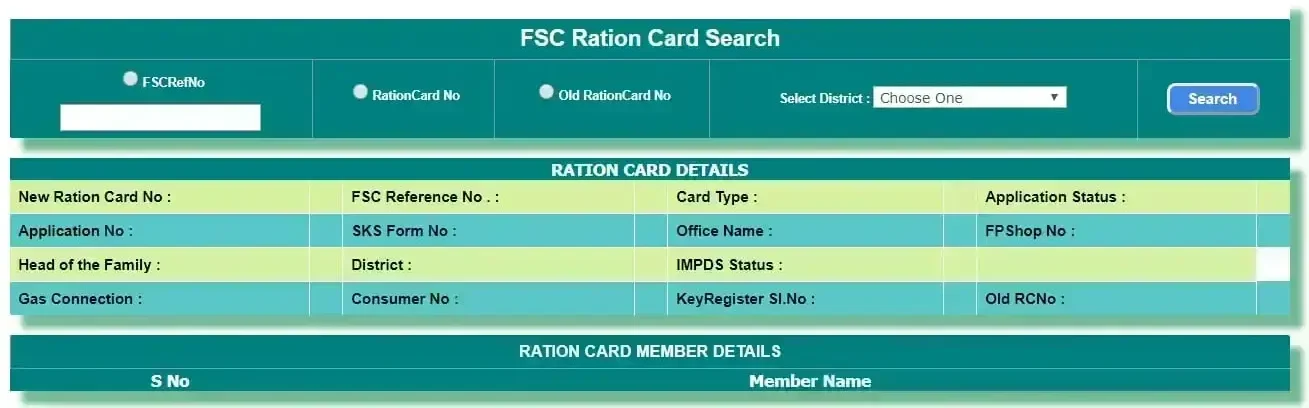
🔍 Check Your FSC Application Status Now
Click the button below to visit the official EPDS Telangana government portal and check your Food Security Card application status using Aadhaar number, MeeSeva reference number, or Application ID.
🏛️ Open Official EPDS Telangana PortalUnderstanding FSC Application Status – Complete Guide
When you perform FSC application search, the system displays one of several status messages. Understanding what each status means helps you take appropriate action. Here’s a comprehensive breakdown:
| Status | What It Means | Action Required | Typical Duration |
|---|---|---|---|
| Submitted | Application has been successfully received by the system and assigned a reference number | None. Wait for initial review to begin. | 1-2 days |
| Under Review | Civil Supplies Department is verifying your documents and checking eligibility criteria | No action needed. Department is processing. Check back periodically. | 7-15 days |
| Field Verification Pending | Inspector needs to physically verify your residence address as per application | Be available at your registered address during working hours. Contact local office if verification is delayed. | 5-10 days |
| Pending Documents | Application requires additional supporting documents to proceed with processing | ACTION NEEDED: Visit MeeSeva center with required documents. Check status details for specific document list. | Until submitted |
| Incomplete Information | Some mandatory fields are missing or contain errors that need correction | ACTION NEEDED: Visit MeeSeva to provide correct information or missing details. | Until corrected |
| Approved | Your FSC application has been approved and ration card is ready | Download your FSC card from portal or collect from MeeSeva center. See Ration Card Download Telangana. | Final stage |
| Card Printed | Physical FSC card has been printed and is ready for distribution | Visit designated collection point or MeeSeva center to collect your card with Aadhaar proof. | 2-5 days |
| Rejected | Application does not meet eligibility criteria or contains errors that cannot be corrected | ACTION NEEDED: Check rejection reason, visit MeeSeva for details, correct issues, and reapply if eligible. | Final (unless reapplied) |
| Cancelled | Application was withdrawn by applicant or cancelled due to duplicate submission | Contact Civil Supplies office if this is an error. Otherwise, submit fresh application if needed. | Final |
| On Hold | Processing temporarily paused due to system issues, policy updates, or pending clarification | Contact helpline for estimated resolution time. Usually resolved automatically. | Varies |
FSC Application Processing Timeline in Telangana
Understanding the typical timeline helps set realistic expectations. Processing times may vary based on district workload, application volume, and verification requirements.
Day 0-1: Application Submission
You submit FSC application at MeeSeva center or online portal. Application number generated and acknowledgment receipt issued. Status shows “Submitted”.
Day 1-3: Initial Data Entry
Application details entered into EPDS system if submitted offline. Preliminary validation of Aadhaar and basic information. Status may show “Under Review”.
Day 3-7: Document Verification
Civil Supplies officials verify submitted documents including Aadhaar cards, address proof, income certificate, and family details. Cross-checking against existing FSC database to prevent duplicates.
Day 5-12: Field Verification (if required)
Inspector visits registered address to verify residence. May request additional proof during visit. Status shows “Field Verification Pending”. Ensure someone is available at home.
Day 10-20: Eligibility Assessment
Officials verify income criteria, check if applicant already holds FSC elsewhere, and assess eligibility under NFSA guidelines. Learn more about FSC eligibility criteria.
Day 15-25: Final Review & Approval
Application reviewed by senior officials for final approval or rejection decision. If approved, details sent for card printing. Status changes to “Approved”.
Day 20-30: Card Generation
Approved FSC cards printed with unique number, photo, and family details. Digital copy made available on EPDS portal for download. Physical card prepared for distribution.
Day 25-35: Distribution
FSC card sent to designated collection point or MeeSeva center. Applicant notified via SMS (if mobile number provided). Status shows “Card Printed” or “Ready for Collection”.
What Happens at Each Application Stage
Detailed Breakdown of Processing Activities
🔍 During “Under Review” Stage
Department Activities: Officials verify Aadhaar authenticity with UIDAI database, check if Aadhaar is already linked to another FSC, validate address proof documents, verify income certificate (if submitted), cross-check family member details, and assess initial eligibility.
What You Should Do: Keep your mobile phone active to receive SMS updates. Ensure all family members’ Aadhaar cards are authentic and not linked to other ration cards. No active participation needed at this stage.
📋 During “Pending Documents” Stage
Why This Happens: Initial documents were insufficient, quality of scanned documents was poor, address proof doesn’t clearly show Telangana residence, income certificate is outdated or from wrong authority, or Aadhaar details don’t match application.
What You Should Do: Check status details for specific document requirements, gather the required documents as per official list, visit nearest MeeSeva FSC center with originals and copies, submit documents and get acknowledgment receipt, and track status again after 3-5 days.
✅ During “Approved” Stage
What Happens Next: Your application data is finalized in the system, unique FSC card number is generated, FPS (Fair Price Shop) is assigned based on your address, card design is prepared with family photo and details, and digital copy is uploaded to EPDS portal.
What You Should Do: Download digital FSC card from EPDS portal for immediate use, note your assigned Fair Price Shop details, wait for physical card printing notification, and prepare to collect physical card from MeeSeva center.
❌ During “Rejected” Stage
Common Rejection Triggers: Applicant already holds active FSC in same or different district, duplicate application found for same family, income exceeds eligibility threshold for NFSA benefits, Aadhaar authentication failed or shows mismatch, address verification could not be completed, or ineligibility under FSC eligibility rules.
What You Should Do: Read the specific rejection reason shown in status details, visit MeeSeva center with all documents for detailed explanation, understand what corrections are needed, check if you’re genuinely eligible to reapply, and if eligible, submit fresh application with corrected information.
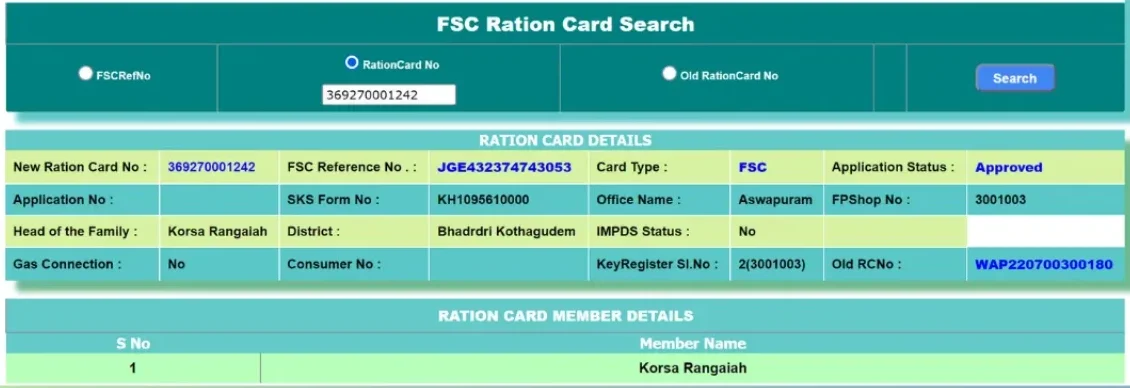
FSC Application Rejected – Complete Resolution Guide
If your FSC application shows “Rejected” status, don’t worry. Most rejections can be resolved by understanding the specific reason and taking corrective action. Here’s a comprehensive guide to handle rejected applications.
Step 1: Check Specific Rejection Reason
- Log into EPDS portal and perform application search using your Aadhaar or application number
- Click on the status details or “View More” link to see complete rejection information
- Note down the exact rejection reason code and description
- Take screenshot for reference when visiting MeeSeva center
Step 2: Understand Rejection Categories
- Aadhaar Mismatch: Name, date of birth, or address in Aadhaar doesn’t match application
- Duplicate FSC Found: Applicant or family member already holds active FSC
- Incorrect Personal Details: Errors in name spelling, age, gender, or relationship
- Missing Documents: Required documents not submitted even after reminder
- Income Above Threshold: Family income exceeds eligibility limit for NFSA
- Address Verification Failed: Inspector couldn’t verify residence or address proof inadequate
- Aadhaar Not Seeded: Aadhaar authentication with UIDAI database failed
- Ineligible Category: Doesn’t meet criteria for PHH or AAY card types
- Previous FSC Cancelled: Earlier ration card was cancelled due to violations
- Moved Out of State: Address shows different state, not Telangana resident
- Aadhaar Mismatch: Update Aadhaar at enrollment center or update application details to match Aadhaar exactly
- Duplicate FSC: Cancel old FSC first, submit surrender certificate, then reapply
- Incorrect Details: Visit MeeSeva with correct documents, submit modification request, reapply after correction
- Missing Documents: Gather all required documents from official list, submit at MeeSeva, reapply
- High Income: If income certificate was incorrect, get revised certificate. If genuinely above threshold, you’re not eligible for subsidized FSC
- Address Verification: Get proper address proof (electricity bill, rent agreement, property documents) showing Telangana address
- Aadhaar Seeding: Visit Aadhaar center to update mobile and ensure Aadhaar is active. See Aadhaar linking guide
- Ineligibility: Understand eligibility criteria, gather proof of economic status, reapply with supporting documents
- Cancelled FSC: Understand why previous card was cancelled, resolve those issues, apply for fresh FSC
- Non-Resident: If you’ve genuinely moved to Telangana, submit domicile certificate and other residence proof
Step 3: Visit MeeSeva Center for Clarification
Explain your situation to the MeeSeva operator. They can access detailed rejection notes in the system and guide you on specific corrections needed. Don’t hesitate to ask questions about eligibility or documentation requirements.
Step 4: Correct Issues & Reapply
- Gather all corrected documents based on rejection feedback
- Ensure Aadhaar details are accurate and updated
- If duplicate FSC was the issue, cancel the old card officially
- Submit fresh FSC application at MeeSeva center with all correct information
- Double-check all details before final submission
- Get new application receipt and note the reference number
- Track new application status after 3-5 days
Step 5: Escalate if Rejection Seems Wrong
If you believe your application was wrongly rejected:
- Contact Civil Supplies Department helpline at 1967 or 1800-4250-0333
- Submit grievance through official EPDS portal grievance section
- Visit District Civil Supplies Officer with all documents for manual review
- Request written explanation of rejection if verbal clarification is unclear
- Check district-wise status guidelines at Ration Card Status Telangana District Wise
Information Available in FSC Application Search Results
When you successfully search for your FSC application, the EPDS portal displays comprehensive information to help you understand your application’s current state:
📋 Application Details
- Application reference number or ID
- Date of application submission
- Application type (new/modification)
- MeeSeva transaction number (if applicable)
- District and mandal information
👤 Applicant Information
- Name of head of family
- Aadhaar number (masked for privacy)
- Complete registered address
- Mobile number (if provided)
- Number of family members
📊 Status Information
- Current application status (approved/pending/rejected)
- Last updated date and time
- Processing stage details
- Pending actions or documents needed
- Estimated completion timeline (if available)
✅ Post-Approval Details
- FSC card number (once approved)
- Card type – PHH or AAY (see card types)
- Assigned Fair Price Shop details
- Download link for digital ration card
- Collection point for physical card
Common FSC Application Search Problems & Solutions
Troubleshooting Application Search Issues
❌ Problem: “No Records Found” Message
Possible Causes: Aadhaar number typed incorrectly, wrong district selected, application not yet entered in system (very recent submission), using different family member’s Aadhaar than was used in application, or application was rejected and removed from active database.
Solutions: Double-check Aadhaar number for typos, verify correct district is selected, wait 24-48 hours if application was just submitted, try MeeSeva application number instead, or visit MeeSeva center with receipt for manual check.
⚠️ Problem: Status Not Updating for Long Time
When It Happens: Status shows same message for more than 15-20 days without change, especially if stuck at “Under Review” or “Field Verification Pending”.
Solutions: Contact Civil Supplies helpline 1967, visit district Civil Supplies office to inquire about delay, submit reminder through EPDS grievance portal, or check if additional documents were requested but notification wasn’t received.
🔍 Problem: Portal Not Working or Loading Slowly
Common Causes: Server overload during peak hours, browser compatibility issues, poor internet connection, or temporary maintenance.
Solutions: Try during off-peak hours (early morning or late evening), clear browser cache and cookies, use different browser (Chrome, Firefox recommended), check internet connectivity, or wait 1-2 hours and try again. For persistent issues, see FSC Search Not Working guide.
✅ Problem: Approved But Can’t Download Card
Why This Happens: Card generation in progress, browser blocking download, PDF viewer not installed, or digital copy not yet uploaded to portal.
Solutions: Wait 2-3 days after approval for digital copy to be available, enable pop-ups in browser, install PDF reader (Adobe Reader), try downloading from different device, or visit MeeSeva to get printed copy. Full guide at How to Download Ration Card Telangana.
For comprehensive troubleshooting of all FSC search related issues, visit FSC Search Problems Telangana guide.
Documents Required for FSC Application in Telangana
Before applying for FSC or checking application status, ensure you have the following documents ready. Incomplete documentation is a leading cause of application rejection.
📄 Mandatory Documents (All Applicants)
- Aadhaar Cards: Original Aadhaar cards of all family members to be included in FSC
- Proof of Residence: Recent electricity bill, water bill, or house tax receipt showing Telangana address (not older than 3 months)
- Passport Photos: Recent passport-size photographs of all family members (2 copies each)
- Mobile Number: Active mobile number for receiving SMS updates and OTP verification
- Address Proof: Any government-issued document showing current Telangana residence
📋 Additional Documents (If Applicable)
- Income Certificate: Recent income certificate from Tahsildar or competent authority (for priority household category)
- Ration Card Surrender: If migrating from another state, surrender certificate of old ration card
- Relationship Proof: Marriage certificate (for spouse), birth certificates (for children)
- Domicile Certificate: If recently moved to Telangana, proof of Telangana domicile
- BPL Certificate: Below Poverty Line certificate if applying for AAY category
Eligibility Criteria for FSC in Telangana
Before applying, verify you meet the eligibility criteria. Ineligible applications are automatically rejected, wasting time and effort.
✅ Who is Eligible for FSC in Telangana
- Permanent Residents: Must be a bona fide resident of Telangana with valid address proof
- No Existing FSC: Applicant and family members should not hold any active Food Security Card in Telangana or any other state
- Income Criteria: Family income should be below the threshold specified for Priority Household (PHH) or Antyodaya Anna Yojana (AAY) categories
- New Families: Newly married couples are eligible to apply for separate FSC card
- Separated Families: Adult children who’ve separated from parents’ household can apply independently with proper documentation
- Economically Weaker Sections: Families with limited income and resources receive priority
❌ Who is NOT Eligible
- Government employees with regular salary (Central/State)
- Income tax payers
- Families owning motorized four-wheeler vehicles
- Owners of agricultural land above specified limit
- Professional tax payers
- Families with annual income exceeding eligibility threshold
For detailed eligibility criteria and exceptions, visit Who is Eligible for FSC Card in Telangana comprehensive guide.
After FSC Approval – Download & Collection Process
Once your application status shows “Approved”, follow these steps to obtain your Food Security Card:
📥 Digital FSC Card Download
- Visit EPDS Telangana portal and perform FSC application search using your Aadhaar or application number
- Click on “Download FSC Card” or “Download Ration Card” link shown in approved application details
- Your FSC card will download as a PDF file containing family member details, FSC number, and assigned Fair Price Shop
- Save this PDF on your device and take printouts for use at Fair Price Shops
- Digital FSC card is legally valid and can be used immediately for ration collection
Complete download instructions available at Ration Card Download Telangana.
🏛️ Physical FSC Card Collection
- Wait for SMS notification about physical card availability (usually 5-10 days after approval)
- Visit the designated MeeSeva center or collection point mentioned in notification
- Carry original Aadhaar card of head of family and one photocopy
- Provide application reference number or MeeSeva receipt
- Verify all details on physical card before leaving the center
- Sign the acknowledgment register after receiving card
Benefits of Food Security Card in Telangana
Subsidized Food Grains
Access to rice, wheat, and other essential commodities at ₹1 per kg from designated Fair Price Shops
Monthly Quota
Regular monthly allocation based on family size and card type (PHH or AAY)
NFSA Coverage
Benefits under National Food Security Act ensuring food security for eligible families
Valid ID Proof
FSC serves as government-recognized identity and address proof for various purposes
Transparent System
Online tracking of ration distribution and balance through ePOS Telangana
FPS Network
Access to wide network of Fair Price Shops across Telangana for convenient ration collection
Card Type Specific Benefits
- PHH Cards (Pink Card): 5-6 kg rice per person per month. Learn more at PHH Ration Card Benefits
- AAY Cards (Yellow Card): 35 kg food grains per family per month for poorest households
- One Nation One Ration Card: Portability to collect rations from any FPS across India
For comprehensive comparison of all card types, visit Types of Ration Cards in Telangana.
FSC Application Help & Support
📞 Civil Supplies Department Helpline – Telangana
📧 Email: civilsupplies.telangana@gov.in
🌐 Official Website: epds.telangana.gov.in
📍 District-Level Support
For location-specific assistance, contact your district Civil Supplies office:
- Hyderabad District: Dedicated support for capital city residents – see FSC Search Hyderabad guide
- Other Districts: Check Ration Card Status District Wise for district-specific contact information
- MeeSeva Centers: Visit nearest MeeSeva FSC center for in-person assistance
Related FSC & Ration Card Services
Frequently Asked Questions (FAQ)
Check Your FSC Application Status Now
Use the official EPDS Telangana portal to track your Food Security Card application in real-time. Get instant updates on approval, pending documents, or rejection status.
About This Information Resource
Research-Based Content
All information is based on publicly available data from the official EPDS Telangana portal and Civil Supplies Department resources. No speculative or invented information.
Accuracy First
We do not fabricate statistics, processing times, or government policies. When specific information is uncertain or unavailable, we omit it rather than guess or assume.
No Data Collection
This website does not collect, store, or process any Aadhaar numbers, MeeSeva numbers, or personal application details. All searches happen directly on the official government portal.
Regularly Updated
Content is periodically reviewed and updated to reflect current information available from official government sources and policy changes announced by Civil Supplies Department.
Official Source Links
All action-oriented links direct users exclusively to the official EPDS Telangana (.gov.in) portal ensuring access to accurate, government-verified, real-time data.
Editorial Policy
Content is written to help users understand government services and processes — not to replace official sources, provide legal advice, or offer application processing services.
Content Standards
- Government Source Priority: Information cross-referenced with official EPDS portal and Civil Supplies Department notifications
- No Service Claims: We do not claim to offer application services, expedited processing, or official FSC issuance
- Transparency: Clear disclosure that this is an independent informational resource, not a government website
- User Focus: Content designed to answer common questions and help users navigate official government services
- No Guarantees: Processing times and outcomes are determined solely by government authorities, not by this website
This is an independent informational website created to help users understand the FSC application search process in Telangana. We are not affiliated with, endorsed by, or connected to the Government of Telangana, the Food, Civil Supplies and Consumer Affairs Department, EPDS Telangana, or any government agency.
We do not: Access government databases, process FSC applications, guarantee application approval, store or collect Aadhaar/personal data, issue Food Security Cards, or provide official government services of any kind.
Official Actions: All official services including FSC application submission, status verification, document submission, card download, and grievance filing must be completed through the official EPDS Telangana portal at epds.telangana.gov.in or at authorized MeeSeva service centers.
Information Accuracy: While we strive for accuracy, information presented here is based on publicly available resources and may be subject to change without notice. Processing times, eligibility criteria, and procedures are determined solely by the Government of Telangana. Users should always verify current information through official government sources before making decisions or taking action.
For official support, contact Civil Supplies Department helpline: 1967 or 1800-4250-0333