
FSC Search by UID in Telangana – Food Security Card UID Number Search Guide 2026
Last Updated: June 25, 2026
Information Source: Based on publicly available information from the official EPDS Telangana (.gov.in) portal and Government of Telangana Food & Civil Supplies Department.
Find your Food Security Card details using UID number on EPDS Telangana — step-by-step guide, where UID is printed, UID vs Aadhaar comparison, troubleshooting, lost card recovery, and FAQs.
🎯 Quick Answer
FSC Search by UID in Telangana allows residents to check their Food Security Card (FSC) details using a UID (Unique Identification) number through the official EPDS Telangana portal at epds.telangana.gov.in.
Your UID number is a unique code assigned to your ration card by the Civil Supplies Department — printed directly on your physical FSC card. It is different from Aadhaar and can be used to verify FSC status, family member details, Fair Price Shop assignment, and application status online without visiting any government office.
📋 Table of Contents
- What is UID Number in FSC / Ration Card?
- Where is UID Printed on Ration Card? (Visual Guide)
- UID vs Aadhaar — Key Differences
- How to Do FSC Search by UID Online — Step-by-Step
- Understanding Your Search Results
- Lost Ration Card? How to Recover UID
- Troubleshooting — UID Search Not Working
- How to Link UID with FSC Card
- Offline UID Search Options
- Frequently Asked Questions
FSC Search by UID Telangana is one of the most useful methods to verify your Food Security Card details without needing to remember your FSC card number. Whether your card is misplaced, damaged, or you simply forgot your FSC number, your UID number printed on the card can retrieve all your records instantly through the EPDS Telangana portal.
This guide explains exactly where to find your UID, how it differs from Aadhaar, how to search FSC details step-by-step, what the results mean, and what to do when the search is not working — all in simple, clear language.
For other search methods, see: FSC Search by Aadhaar | FSC Search by Mobile Number | MeeSeva FSC Search.
What is UID Number in FSC / Ration Card?
UID stands for Unique Identification — a system-generated unique numeric code assigned to each Food Security Card (FSC) or ration card in Telangana by the Department of Food, Civil Supplies & Consumer Affairs.
🔑 5 Key Facts About UID Number
- UID ≠ Aadhaar: UID is specific to your ration card. Aadhaar is your national biometric ID — they are completely different numbers
- One UID per FSC card: Every ration card has its own unique UID — no two cards share the same number
- Printed on card: Your UID is printed directly on your physical FSC ration card (front or back)
- Database identifier: EPDS Telangana uses UID internally to link your card to family records, FPS allocation, and ration entitlement
- Search alternative: When you don’t know your FSC card number, UID lets you retrieve all your card details online
What Information is Linked to Your UID?
Your UID in the EPDS database is connected to:
Personal Records
- Head of family name
- All family members list
- Registered residential address
- District and mandal details
Card Records
- FSC card number
- Card category (PHH / AAY)
- Card status (active/inactive)
- Application status
Ration Records
- Assigned Fair Price Shop (FPS)
- Monthly entitlement quantity
- Distribution transaction history
- EPOS authentication records
For understanding card categories, visit Types of Ration Cards in Telangana. To check your Fair Price Shop linked to UID, see FPS Search Telangana.
Where is UID Printed on Ration Card? — Visual Guide
Many residents are unsure where to look for their UID on the ration card. Here is a clear visual guide:
Head of Family: [Cardholder Name]
Illustrative sample — actual card layout may vary. UID is typically shown as above near the top or middle section.
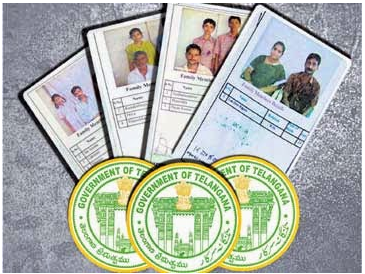
All Places Where You Can Find Your UID Number
📄 Physical FSC / Ration Card
- Check front of card near family name
- Check back of card in details section
- Look for label “UID”, “Unique ID”, or “Card UID”
- Usually a numeric code near the top
💻 Digital Ration Card PDF
- Downloaded PDF from EPDS portal
- UID visible in card details section
- Also shown in beneficiary information area
- Download via Ration Card Download
🏢 MeeSeva Application Receipt
- FSC application acknowledgment slip
- UID mentioned in reference details
- Application confirmation documents
- Available from MeeSeva center
🏪 Fair Price Shop Records
- Ask your FPS dealer to check EPOS
- Transaction receipt may show UID
- Dealer can verify from EPOS system
- Find your FPS via FPS Search
Can’t find UID anywhere? If your card is lost or UID is not visible, see the Lost Ration Card section below for step-by-step recovery. You can also use FSC Search by Aadhaar to retrieve your card details and UID.
UID vs Aadhaar — Key Differences Explained
This is the most common confusion among Telangana ration card holders. Here is the complete comparison:
| Aspect | UID Number (Ration Card) | Aadhaar Number |
|---|---|---|
| Full Form | Unique Identification (for FSC/ration card) | Aadhaar (biometric national identity) |
| Issued By | Dept. of Food & Civil Supplies, Telangana | UIDAI — Government of India |
| Purpose | Identify FSC/ration card records in EPDS | Universal national identity for all services |
| Number Format | Numeric code (system-assigned, varies) | Fixed 12-digit number |
| Scope | Telangana ration card system only | All of India — multiple services |
| Biometric Link | No biometric data | Linked to fingerprint and iris scan |
| One Per | One UID per FSC card | One Aadhaar per individual person |
| Used For Search | FSC search by UID on EPDS portal | FSC search by Aadhaar on EPDS portal |
| Printed On | Physical FSC/ration card | Aadhaar card / eAadhaar PDF |
| Can Be Changed? | System-assigned, not changed by user | Demographic details updatable via UIDAI |
🤔 Which Should I Use for FSC Search?
Use UID search when: You have your ration card and can see the UID printed on it, but don’t remember your FSC card number.
Use Aadhaar search when: You know your 12-digit Aadhaar number and it is linked to your FSC — this is the more commonly available option. Guide: FSC Search by Aadhaar Number.
Aadhaar not linked? Fix it first: Aadhaar Not Linked with Ration Card — Fix Guide.
How to Do FSC Search by UID in Telangana — Step-by-Step
Follow these steps carefully. Correct district selection and exact UID entry are critical for successful results.
-
Open Official EPDS Telangana Portal
Go to epds.telangana.gov.in in your browser. Verify the URL ends with .gov.in — this confirms you are on the official government website and not a fake site.
-
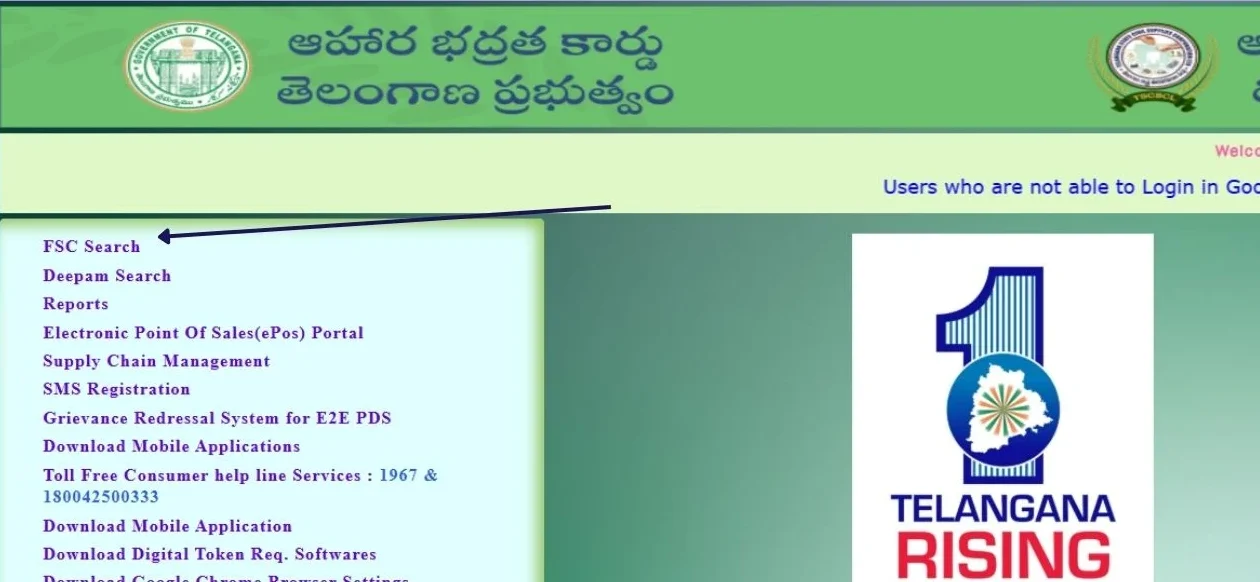
Locate the FSC Search Section
On the EPDS homepage, look for “FSC Search”, “Food Security Card Search”, or “Beneficiary Search” option in the menu or main section.
-
Select “Search by UID” Option
From the search type dropdown or options, select “UID Number” or “Search by UID” as your search method. Do not select Aadhaar or mobile if you are searching by UID.
-
Select Your Registered District
From the district dropdown, choose the district where your FSC ration card was originally registered and issued. This is critical — selecting the wrong district will show “no records found” even if your UID is correct.
-
Enter Your UID Number
Type your UID number exactly as printed on your ration card. Check carefully for typos. Do not add spaces, dashes, or extra characters. Enter only the number.
-
Complete Security Captcha (if shown)
If a captcha or security verification code appears on screen, enter it correctly before submitting. This is a standard security measure on the government portal.
-
Click the Search / Submit Button
Press the Search or Submit button. Wait a few seconds for the portal to retrieve your records from the database.
-
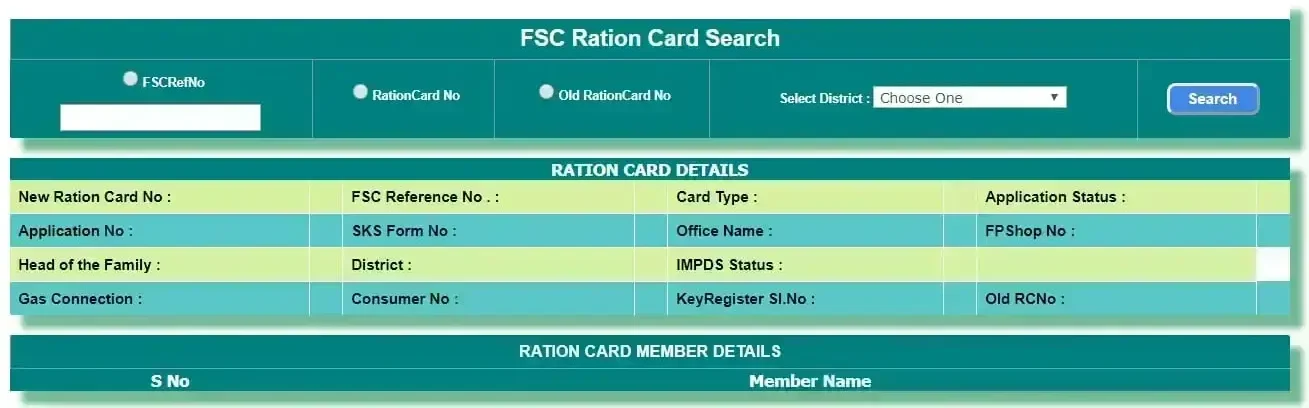
View and Verify Your FSC Details
Your complete FSC information will appear on screen — family members, FPS shop, card status, and ration entitlement. Verify all details for accuracy.
Important: If results don’t appear, do not retry immediately. Verify UID number accuracy and district selection first. If issue persists, see the Troubleshooting section below or use FSC Search by Aadhaar as an alternative method.
Understanding Your FSC Search Results
After a successful UID search, the EPDS portal displays several pieces of information. Here is what each result means:
Information Shown in UID Search Results
| Field | What It Means | What to Verify |
|---|---|---|
| FSC / Card Number | Your official ration card reference number | Note this — useful for future searches |
| Head of Family | Primary cardholder name | Confirm correct spelling |
| Family Members | All beneficiaries listed on the card | All members present and names correct |
| Registered Address | Address on record in EPDS | Matches your actual address |
| District & Mandal | Administrative location | Correct district/mandal shown |
| FPS Details | Assigned Fair Price Shop number & name | Verify via FPS Search |
| Card Category | PHH (Priority Household) or AAY | See card types guide |
| FSC Status | Active, Inactive, or Pending | Should be Active to collect ration |
What Does Each Card Status Mean?
Active
Card is approved and valid. You can collect monthly rations from your FPS using biometric authentication.
Pending
Application under review. Check application status or visit MeeSeva.
Inactive
Card suspended. May be due to verification issues. Visit MeeSeva for clarification and reactivation.
No Records Found
UID not linked in database. Check UID accuracy or use Aadhaar search. May need UID linking.
If Your Details Show Errors
If the search results show incorrect name, address, or missing family members, you need to file a correction request. Visit your nearest MeeSeva center with supporting documents. See FSC Search Problems & Solutions for detailed steps. Also check How to Check Ration Card Status Online for status verification steps.
Lost Ration Card? How to Recover Your UID Number
If your physical FSC ration card is lost, misplaced, or damaged and you don’t know your UID, you have several recovery options. You do not need to reapply from scratch.
🚨 Don’t Panic — Here’s What To Do
Losing your ration card does not cancel your FSC or ration entitlement. Your records remain active in the EPDS database. You just need to retrieve your card details using an alternative method.
Method 1: Use Aadhaar to Find UID (Easiest)
-
Search FSC by Aadhaar Number
Visit EPDS Telangana portal and use FSC Search by Aadhaar. Enter your 12-digit Aadhaar linked to the FSC card.
-
Note Down Your UID from Results
Your FSC search results will display the UID number along with all card details. Note it down for future use.
-
Download Your Ration Card
Once you have FSC details, download a copy via Ration Card Download Telangana.
Method 2: Visit MeeSeva Center
-
Go to Nearest MeeSeva Center
Visit your local MeeSeva FSC service center with your Aadhaar card.
-
Request UID and Card Details
Inform the operator your card is lost and provide Aadhaar number. They will retrieve your FSC details from EPDS database and provide UID.
-
Request Duplicate Card or PDF
Ask for a printed copy or duplicate FSC card. MeeSeva operators can assist with this service.
Method 3: Call Civil Supplies Helpline
Call 1967 or 1800-4250-0333 (toll-free) during working hours. Provide your name, Aadhaar number, and district. Helpline staff can assist in retrieving your FSC details and UID number over the phone.
✅ Good News: Your ration entitlement is never lost when the card is misplaced. The records exist in EPDS. Recovery only requires Aadhaar for identity verification.
Troubleshooting — FSC UID Search Not Working
If your UID search on EPDS Telangana is not returning results or showing errors, check the following common causes and solutions:
❌ Issue 1: “No Records Found”
Cause: UID not linked in EPDS database, wrong UID entered, or wrong district selected.
Fix: Double-check UID number from physical card. Reselect correct registered district. Try Aadhaar search as alternative.
❌ Issue 2: Wrong District Selected
Cause: Selecting current location instead of card-registered district.
Fix: Always select the district where the card was originally issued — check your old application receipt or physical card for district name.
❌ Issue 3: EPDS Portal Not Loading
Cause: Server maintenance, peak hours, or browser compatibility.
Fix: Try Chrome browser, clear cache, attempt early morning. See FSC Search Not Working guide for detailed steps.
❌ Issue 4: UID Format Not Accepted
Cause: Extra spaces, dashes, or characters in UID input.
Fix: Enter UID as numbers only — no spaces, no dashes. Copy the exact number from your card carefully.
❌ Issue 5: UID Not Linked to FSC
Cause: UID has not been mapped to your FSC record in the EPDS database.
Fix: Visit MeeSeva center with your ration card and Aadhaar. Request UID-FSC linking. See UID Linking section below.
❌ Issue 6: Incorrect Details in Results
Cause: Database errors, outdated records, or data entry mistakes.
Fix: File correction request at MeeSeva with proper documents. See FSC Search Problems for complete correction process.
Still not working? Call Civil Supplies helpline at 1967 with your UID details, or check FSC Search Problems & Solutions for more troubleshooting help. Also check EPOS Telangana Closing Balance if you need to verify distribution records separately.
How to Link UID with FSC Card in Telangana
If your UID is not linked with your FSC record and UID-based search is returning no results, you need to get it linked through an authorized channel. This is a simple offline process.
-
Gather Your Documents
Keep ready: physical FSC ration card (or its number), Aadhaar card, any MeeSeva receipts related to FSC application, and a mobile number for OTP if required.
-
Visit Nearest MeeSeva Center or FPS Dealer
Both MeeSeva centers and Fair Price Shop dealers (with EPOS access) can assist with UID linking in the EPDS database. MeeSeva is preferred for complex issues.
-
Submit UID Linking Request
Inform the operator you need your UID linked with your FSC card number. Provide both numbers — the UID from your card and the FSC card number.
-
Identity Verification
The operator will verify your identity using Aadhaar before making any database changes. This is mandatory to prevent unauthorized changes.
-
Confirmation and Testing
After linking, wait 24–48 hours for database synchronization. Then test UID search on EPDS portal to confirm it is working correctly.
💡 UID Linking vs Aadhaar Linking — Different Things
UID linking connects your ration card’s internal UID number to your FSC record in EPDS. Aadhaar linking is a separate process that connects your national Aadhaar identity to your FSC for biometric ration collection. Both may be needed for full functionality. For Aadhaar linking, see: Aadhaar Not Linked with Ration Card Telangana.
Offline Options for FSC Search by UID
No internet access? Several offline options are available for UID-based FSC verification across Telangana:
🏪 Fair Price Shop (FPS)
Your assigned FPS dealer can check your FSC records using UID through their EPOS machine. Provide your UID number and they can verify your card details, status, and entitlement on the spot.
Find your FPS: FPS Search Telangana
🏢 MeeSeva Centers
MeeSeva operators can perform UID-based FSC searches, print card details, and assist with corrections. Service is available at all MeeSeva centers across Telangana.
Details: MeeSeva FSC Search
📞 Civil Supplies Helpline
Call 1967 (toll-free) or 1800-4250-0333 during office hours. Staff can assist with UID-based queries, card status verification, and general FSC information over phone.
🏛️ Civil Supplies Office
Visit your local Food & Civil Supplies district office with UID details and Aadhaar card for manual verification and assistance with complex issues that cannot be resolved at MeeSeva.
For district-wise ration card status information, see: Ration Card Status Telangana District Wise. For Hyderabad-specific queries, visit FSC Search Hyderabad.
Who Can Use FSC Search by UID in Telangana?
✅ Existing Cardholders
- Current FSC/ration card holders
- Beneficiaries verifying card details
- Cardholders confirming FPS assignment
✅ New Applicants
- Applied for new FSC card
- Tracking application status
- Waiting for approval
✅ Lost Card Cases
- Card misplaced or damaged
- FSC number forgotten
- Need to retrieve card details
✅ Verification Needs
- Confirming family member details
- Checking EPOS/ration history
- Verifying before visiting FPS
For eligibility to apply for a new FSC card, see: Who is Eligible for FSC Card in Telangana. For PHH and other card categories, see PHH Ration Card Telangana, White Ration Card Benefits, and Pink Ration Card Benefits.
📚 Related FSC Search Methods & Guides
Frequently Asked Questions (FAQs)
UID (Unique Identification) is a unique numeric code assigned to each Food Security Card (FSC) or ration card by the Telangana Department of Food & Civil Supplies. It is specific to your ration card record in the EPDS Telangana system and is different from your Aadhaar number. The UID is used to identify and retrieve your specific card record online when you don’t know your FSC number.
The UID number is printed on the front or back of your physical FSC ration card, typically near the cardholder’s name or in the card details section. Look for a label that says “UID”, “Unique ID”, or “Card UID”. It is also available in downloaded digital ration card PDFs from the EPDS portal and in MeeSeva application receipts.
Visit epds.telangana.gov.in, click on FSC Search or Beneficiary Search, choose “Search by UID” as the method, select your registered district from the dropdown, enter your UID number exactly as printed on the card, complete captcha if required, and click Search. Your FSC card details will appear if the UID is correctly linked in the EPDS database.
No, UID and Aadhaar are completely different numbers. UID is assigned by the Telangana Civil Supplies Department specifically for your ration card and is only used in the EPDS ration card system. Aadhaar is a 12-digit biometric national identity issued by UIDAI and used across all government services in India. Both can be used for FSC search on EPDS Telangana but serve different purposes.
First verify you entered the UID number exactly as printed — no extra spaces or characters. Second, confirm you selected the district where your card was originally registered, not your current location. If still showing no records, your UID may not be linked in the EPDS database. Visit MeeSeva center with your ration card and Aadhaar for UID linking, or use FSC Search by Aadhaar as an alternative.
Yes. If you lost your ration card, use FSC Search by Aadhaar on the EPDS Telangana portal — the results will show your FSC details including UID number. Alternatively, visit your nearest MeeSeva center with your Aadhaar card and they will retrieve your card details and UID from the database. Your ration entitlement is not lost when the physical card is misplaced.
Always select the district where your ration card was originally registered and issued — not your current residential district. This is the most common mistake that causes “no records found” errors. If you are unsure, check your old FSC application receipt or physical card for the registered district. Alternatively, your FPS dealer or MeeSeva operator can confirm which district your card belongs to.
Visit your nearest MeeSeva center or Fair Price Shop dealer with your physical FSC ration card, UID number, and Aadhaar card. Request the operator to link your UID with your FSC record in the EPDS database. After identity verification, the linking is completed and usually takes 24–48 hours to reflect in the system. Then test the UID search to confirm it is working.
Yes. Offline FSC UID search is possible at Fair Price Shops where dealers can check EPOS records, at MeeSeva centers where operators can search and print card details, or by calling the Civil Supplies helpline at 1967. All these options can retrieve your FSC details using your UID without needing personal internet access.
Yes, UID-based FSC search is available for all 33 districts of Telangana through the EPDS Telangana portal. All districts are covered under the same centralized database managed by the Department of Food, Civil Supplies & Consumer Affairs, Government of Telangana.
Yes. You can track your FSC application status using UID or application number through the EPDS Telangana portal’s application status section. The status will show as Pending (under review), Approved (card active), or Rejected (not approved). For complete details on checking application status, see the FSC Application Search Telangana guide.
EPOS closing balance (remaining ration entitlement) is typically checked through FSC number or Aadhaar on the EPDS portal rather than UID directly. However, once you retrieve your FSC details using UID search, you will have your FSC card number which can then be used to check the EPOS closing balance. See the EPOS Telangana Closing Balance guide for complete steps.
UID search results show: FSC/ration card number, head of family name, complete family members list, registered address, district and mandal, Fair Price Shop number and name, card category (PHH or AAY), FSC status (active/inactive/pending), and UID linkage confirmation. This gives you a complete picture of your ration card and entitlement details.
UID linking at MeeSeva is usually done immediately in the system, but database synchronization across EPDS may take 24 to 48 hours. After requesting linking, wait one to two days and then test the UID search on the EPDS portal to confirm successful update. If still not working after 48 hours, revisit the MeeSeva center with your acknowledgment receipt.
Both are equally valid for FSC search. Aadhaar search is more commonly used because most people know their 12-digit Aadhaar number without needing the physical card. UID search is useful when you have the physical card available but don’t know the FSC card number. Use whichever number you have available — both retrieve the same FSC records from the EPDS database.
Official References & Support Contacts
🌐 EPDS Telangana Portal
Website: epds.telangana.gov.in
Official portal for UID-based FSC search, application status, ration card download, and EPDS services in Telangana.
🏛️ Department of Food & Civil Supplies
Authority: Government of Telangana
Issues UID numbers, manages FSC database, UID linking, and Civil Supplies administration across all 33 districts.
📞 Civil Supplies Helpline
Toll-Free: 1967
Alternate: 1800-4250-0333
For UID queries, FSC search support, technical issues, and complaint registration.
🏢 MeeSeva Centers
Service: Offline UID search & linking
For assisted FSC UID search, corrections, UID-FSC linking, and beneficiary support across Telangana.
Verification Note: Always verify FSC and UID information through the official EPDS Telangana portal (epds.telangana.gov.in). This website provides informational guidance only and does not replace official government sources.
Why Trust This Information?
✓ Official Source Based
All information is based on publicly available data from the official EPDS Telangana portal and Government of Telangana Food & Civil Supplies Department. No claims are made without reference to official sources.
✓ Regularly Updated
Content is reviewed and updated to reflect current UID search procedures, EPDS portal features, and system functionality. Last reviewed June 2026.
✓ User-Focused Guidance
Written in simple, clear language to help all Telangana residents understand UID-based FSC search — regardless of technical comfort level.
✓ No Misleading Claims
We provide factual information without exaggeration or speculation. Users are always directed to verify through official government portals and helplines.
⚠️ Important Disclaimer
This is an independent informational website created to help Telangana residents understand the FSC search by UID process. We are not affiliated with the Government of Telangana, EPDS Telangana, or the Department of Food & Civil Supplies.
We do not access government databases, process FSC applications, manage UID linking, or provide official ration cards. All information is based on publicly available data as of June 2026. Procedures and portal features may change — always verify current information through the official EPDS Telangana portal at epds.telangana.gov.in or contact Civil Supplies helpline at 1967.
Ready to Search Your FSC Using UID?
Use your UID number to check FSC details, verify family information, and confirm your ration card status online.
Visit Official EPDS Portal Try Search by Aadhaar FSC Search Home