
Ration Card Status Telangana District Wise – Complete Guide for All 33 Districts
Check your FSC application status across any Telangana district in 2026 with accurate district selection, step-by-step verification process, and district-specific timelines.
Last Updated: June 25, 2026
Information Source: Official EPDS Telangana Government Portal
Coverage: All 33 Districts of Telangana State
📋 Quick Navigation
If you’re checking your ration card status in Telangana, selecting the correct district is the single most important step that determines whether you’ll find your application record or encounter a frustrating “no record found” error. Since Telangana reorganized into 33 districts in recent years, many applicants struggle with district selection, especially when their application was submitted under old district boundaries or when they’ve moved between areas.
This comprehensive guide walks you through the entire district-wise ration card status check process for 2026. Whether you applied in Hyderabad, Warangal, Karimnagar, Medchal-Malkajgiri, Rangareddy, or any of the other 28 districts, you’ll learn exactly how to select the right district, interpret different status messages, understand verification timelines, and resolve common issues that prevent status retrieval.
The EPDS Telangana system maintains separate databases for each district’s ration card applications. When you search for your status, the portal queries only the selected district’s database. This district-specific architecture means that choosing Hyderabad when your card was applied in Rangareddy, or selecting Warangal Urban instead of Warangal Rural, will immediately result in search failure even if your application is perfectly valid and already approved.
Beyond basic status checking, this guide provides district-specific insights including processing speeds (urban districts like Hyderabad take 15-30 days while rural districts process within 7-15 days), common verification challenges by region, and strategies for handling applications submitted before the 2016 district reorganization when many current districts didn’t exist as separate administrative units.
Why District Selection Matters in Ration Card Status Check
The Telangana Public Distribution System operates on a strict district-level database architecture. Each of the 33 districts maintains its own separate database containing all ration card applications, approvals, rejections, and beneficiary information for that specific geographic area. This decentralized system was designed to improve administrative efficiency and allow district civil supplies officers to manage their regions independently.
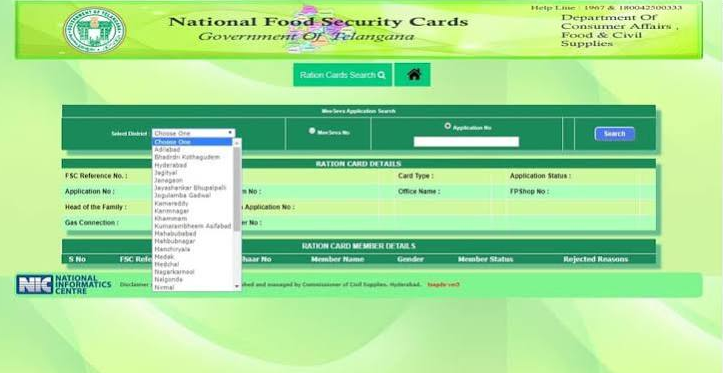
When you visit the EPDS portal to check FSC status, the system requires you to select a district from a dropdown menu before allowing any search. This selection tells the system which specific district database to query. If you select the wrong district, the system searches in a database that doesn’t contain your record, leading to inevitable failure regardless of what search method or credentials you use.
⚠️ Critical Impact of Wrong District Selection
Selecting an incorrect district causes: immediate “no record found” errors, inability to see application status even after approval, confusion about whether application was received, wasted time trying multiple search methods, and delays in collecting issued ration cards from the correct Fair Price Shop.
This district-based system becomes particularly challenging for applicants in several common scenarios. First, those who applied before the 2016 reorganization when Telangana had only 10 districts may find their records under old parent districts rather than newly created ones. Second, people who moved between districts after applying but before approval will have records in their original application district, not their current residence. Third, areas on district boundaries often cause confusion about which administrative unit actually handles their application.
Additionally, the type of ration card you applied for (PHH, AAY, or White Card) doesn’t change the district database requirement. All card types are stored in the same district-level system, making correct district selection universally important regardless of your eligibility category or household income level.
Complete List of All 33 Telangana Districts
Telangana currently consists of 33 districts following the 2016 reorganization that split the original 10 districts into smaller administrative units for better governance. When checking your ration card status online, you must select the exact district name as it appears in the EPDS portal dropdown menu. Even slight variations in district names can prevent successful searches.
| S.No | District Name | Headquarters | Region | Typical Processing Time |
|---|---|---|---|---|
| 1 | Adilabad | Adilabad | North Telangana | 12-20 days |
| 2 | Bhadradri Kothagudem | Kothagudem | East Telangana | 15-25 days |
| 3 | Hyderabad | Hyderabad | Central Telangana | 20-30 days |
| 4 | Jagtial | Jagtial | North Telangana | 10-18 days |
| 5 | Jangaon | Jangaon | East Telangana | 8-15 days |
| 6 | Jayashankar Bhupalpally | Bhupalpally | North Telangana | 10-18 days |
| 7 | Jogulamba Gadwal | Gadwal | South Telangana | 8-15 days |
| 8 | Kamareddy | Kamareddy | North Telangana | 10-18 days |
| 9 | Karimnagar | Karimnagar | North Telangana | 12-20 days |
| 10 | Khammam | Khammam | East Telangana | 12-22 days |
| 11 | Komaram Bheem (Asifabad) | Asifabad | North Telangana | 15-25 days |
| 12 | Mahabubabad | Mahabubabad | East Telangana | 10-18 days |
| 13 | Mahabubnagar | Mahabubnagar | South Telangana | 12-20 days |
| 14 | Mancherial | Mancherial | North Telangana | 10-18 days |
| 15 | Medak | Medak | Central Telangana | 10-18 days |
| 16 | Medchal-Malkajgiri | Medchal | Central Telangana | 18-28 days |
| 17 | Mulugu | Mulugu | East Telangana | 8-15 days |
| 18 | Nagarkurnool | Nagarkurnool | South Telangana | 10-18 days |
| 19 | Nalgonda | Nalgonda | Central Telangana | 12-20 days |
| 20 | Narayanpet | Narayanpet | South Telangana | 8-15 days |
| 21 | Nirmal | Nirmal | North Telangana | 10-18 days |
| 22 | Nizamabad | Nizamabad | North Telangana | 12-22 days |
| 23 | Peddapalli | Peddapalli | North Telangana | 10-18 days |
| 24 | Rajanna Sircilla | Sircilla | North Telangana | 10-18 days |
| 25 | Rangareddy | Shadnagar | Central Telangana | 15-25 days |
| 26 | Sangareddy | Sangareddy | Central Telangana | 12-20 days |
| 27 | Siddipet | Siddipet | Central Telangana | 10-18 days |
| 28 | Suryapet | Suryapet | Central Telangana | 10-18 days |
| 29 | Vikarabad | Vikarabad | Central Telangana | 10-18 days |
| 30 | Wanaparthy | Wanaparthy | South Telangana | 8-15 days |
| 31 | Warangal Rural | Warangal | East Telangana | 10-18 days |
| 32 | Warangal Urban | Warangal | East Telangana | 15-25 days |
| 33 | Yadadri Bhuvanagiri | Bhongir | Central Telangana | 10-18 days |
🗺️ Important District Name Variations
Some districts have common alternate names that don’t match the official EPDS designation. Always use the exact name from the table above: “Medchal-Malkajgiri” (not just “Medchal”), “Komaram Bheem” (not “Asifabad”), “Yadadri Bhuvanagiri” (not “Bhongir”), and distinguish carefully between “Warangal Urban” and “Warangal Rural” as these are completely separate districts.
The processing time column indicates typical verification periods from application submission to approval or rejection decision. These timelines vary based on application volume, field verification requirements, and administrative workload in each district during 2026.
Step-by-Step District Wise Status Check Process
Follow this detailed step-by-step process to check your ration card status for any Telangana district in 2026. Each step is critical for successful status retrieval, with district selection being the most important decision point in the entire process.
-
Open EPDS Telangana Official Portal
Navigate to the official EPDS Telangana government website (epds.telangana.gov.in). Ensure the URL ends with .gov.in to confirm you’re on the authentic government portal. Bookmark this page for future status checks as you may need to monitor application progress multiple times during the verification period.
-
Locate FSC Application Search Option
On the homepage, find the “FSC Search” section in the main navigation menu. Click to reveal a dropdown with multiple search options. Select “FSC Application Search” specifically for checking pending application status (use “FSC Card Search” only if your card is already issued and you need to verify existing card details).
-
Choose Your Search Method
The portal offers several search methods. Search by Aadhaar number is most reliable since Aadhaar seeding is mandatory for all applications. Alternative methods include MeeSeva application number (if you applied through MeeSeva center), online application reference ID, FSC card number (if already issued), or registered mobile number. Select the method matching the information you have available.
-
Select Correct District (CRITICAL STEP)
From the district dropdown menu, carefully select the district where you originally applied for the ration card. This should match the district of your assigned Fair Price Shop, your residence at application time, or the MeeSeva center where you submitted documents. If you’re unsure, check your application receipt, MeeSeva acknowledgment, or contact the FPS dealer. Common mistakes include selecting current residence district when you moved after applying, choosing neighboring districts, or confusing similar district names (Warangal Urban vs Rural, Hyderabad vs Medchal-Malkajgiri).
-
Enter Search Credentials Accurately
Type your selected search parameter carefully without errors. For Aadhaar, enter all 12 digits without spaces or hyphens. For MeeSeva numbers, enter the complete alphanumeric code exactly as printed on your receipt. For mobile numbers, use the 10-digit number registered during application. Double-check for typos before proceeding as incorrect entries will fail even with correct district selection.
-
Submit Search and Review Results
Click the Search or Submit button. The system will query the selected district database and display your application status. Results include current status (Under Review, Approved, Rejected, Pending Documents), application date, card type applied for, household head name, family members, assigned Fair Price Shop details, and any pending actions required from your side.
-
Download or Print Status Report
If status shows “Approved,” you can immediately download your ration card PDF using the download button. Save this PDF and take a printout for record-keeping. If status is under review or pending, take a screenshot or print the status page to track when you last checked and monitor for changes.
Understanding Ration Card Status Messages
When you check your district-wise ration card status, the system displays one of several status messages. Understanding what each status means and what action you should take is essential for effectively managing your application process.
Application Submitted / Under Review
Meaning: Your application has been received by the district civil supplies department and is currently being processed. Document verification and eligibility assessment are in progress.
Action Required: Wait 15-30 working days for verification completion. Ensure your registered mobile number is active for field verification calls. Check status weekly for updates. No immediate action needed unless status remains unchanged beyond 30 days.
Approved / Card Issued
Meaning: Your ration card application has been approved and a Food Security Card has been generated for your household. Your FPS assignment is complete.
Action Required: Download ration card PDF immediately. Note your FSC number and assigned Fair Price Shop details. Visit the FPS with Aadhaar for first-time ration collection. Collect physical card from FPS or mandal office. Verify all family member names are correct.
Rejected / Application Rejected
Meaning: Your application did not meet eligibility criteria or had verification issues. Common reasons include income exceeding limits, duplicate ration card detection, document discrepancies, Aadhaar linking failure, or failed field verification.
Action Required: Check detailed rejection reason in status result. Visit MeeSeva center to understand specific issues. Correct problems and reapply with proper documentation. For income rejections, apply for appropriate card category. File appeal at district office if rejection seems incorrect.
Pending Documents
Meaning: Additional documents or information are required to proceed with your application verification. The system has flagged specific missing items.
Action Required: Submit required documents at MeeSeva center immediately. Carry application receipt and Aadhaar for reference. Submit within specified deadline (usually 15 days) to avoid automatic rejection. Get submission acknowledgment for your records.
Field Verification Pending
Meaning: A civil supplies inspector is scheduled to visit your residence to verify application details and confirm residence at the registered address.
Action Required: Ensure someone is available at home during working hours (10 AM – 5 PM). Keep all original documents ready (Aadhaar, address proof, income certificate). Cooperate fully with the verification officer. If you miss the visit, contact mandal civil supplies office immediately to reschedule.
No Record Found
Meaning: The system cannot find any application matching your search credentials in the selected district database. This is usually caused by wrong district selection, incorrect search parameter, or application not yet uploaded to system.
Action Required: Verify you selected the correct district. Try alternative search methods. Check for typos in Aadhaar or application number. Search in neighboring districts if near boundary. Wait 3-5 days if application was very recent. Visit MeeSeva with application receipt if problem persists. See FSC search problems guide for detailed troubleshooting.
Major District Specific Guidelines
Hyderabad District
Hyderabad, the capital and most densely populated district, processes the highest volume of ration card applications in Telangana. All areas within GHMC (Greater Hyderabad Municipal Corporation) limits must select “Hyderabad” district, including Secunderabad, Kukatpally, L.B. Nagar, Uppal, Charminar, and other city zones. For detailed guidance, visit our FSC Search Hyderabad guide.
Processing characteristics: Verification takes 20-30 working days due to high application volume. Field verification is mandatory for nearly all applications. Income verification is particularly strict due to urban cost of living considerations. FPS assignments are colony-specific with many dealers operating in residential complexes.
Common Hyderabad Confusion
Many applicants incorrectly select Medchal-Malkajgiri or Rangareddy for areas like Kompally, Alwal, or Shamshabad. Check your actual municipal jurisdiction. If your address falls under GHMC, always select Hyderabad district regardless of proximity to other districts.
Medchal-Malkajgiri District
This urban district surrounding Hyderabad was created in 2016 and covers areas like Kompally, Alwal, Malkajgiri, Keesara, Shamirpet, and parts of Uppal. It’s frequently confused with Hyderabad and Rangareddy districts due to proximity and overlapping municipal boundaries.
Key considerations: Must select “Medchal-Malkajgiri” or “Medchal” exactly as shown in dropdown. Processing takes 18-28 days with verification similar to Hyderabad. Applications submitted before 2016 may still be under Hyderabad or Rangareddy in the database. Check your Fair Price Shop assignment to confirm correct district.
Rangareddy District
Rangareddy (headquarters: Shadnagar) covers semi-urban and rural areas south of Hyderabad including Rajendranagar, Maheshwaram, Ibrahimpatnam, Shamshabad airport area, Chevella, and Manchal. It does NOT include Vikarabad or Sangareddy, which are now separate districts.
Processing notes: Urban portions take 15-25 days while rural mandals process faster (10-15 days). Verification complexity varies by area urbanization. Many new FPS shops added recently due to population growth.
Warangal Urban vs Warangal Rural
Warangal was split into two separate districts: Warangal Urban covers Warangal city corporation limits, while Warangal Rural includes surrounding villages and mandals. This is a critical distinction that causes frequent search failures.
How to choose correctly: If you live in Warangal city proper (municipal corporation area), select “Warangal Urban.” If you reside in surrounding villages, Hanamkonda rural areas, or outer mandals, select “Warangal Rural.” Check your Fair Price Shop address. Applications before 2016 may be under undivided Warangal and require searching both districts.
Other Major Districts
Karimnagar: Efficiently processes applications in 12-20 days. Note that Jagtial, Peddapalli, and Rajanna Sircilla were carved from Karimnagar, so old applications may require checking multiple districts.
Nizamabad: Handles 12-22 day processing with strict income verification. Kamareddy and Nirmal are now separate districts.
Khammam: Semi-urban district with 12-22 day timeline. Bhadradri Kothagudem is now separate; check your actual district if from Kothagudem area.
Nalgonda: Old applications may span three current districts: Nalgonda, Suryapet, and Yadadri Bhuvanagiri. Verify which district handles your current mandal.
District-Wise Verification Timeline
Ration card approval timelines vary significantly across Telangana’s 33 districts based on application volume, urban density, field verification complexity, and administrative capacity. Understanding typical timelines for your district helps set realistic expectations and know when to follow up.
| District Category | Examples | Typical Timeline | Primary Delay Factors |
|---|---|---|---|
| Metro Districts | Hyderabad, Medchal-Malkajgiri | 20-30 working days | High volume, complex multi-floor verification, income scrutiny |
| Large Urban Districts | Warangal Urban, Karimnagar, Nizamabad, Khammam | 12-22 working days | Moderate volume, city traffic, mixed urban-suburban areas |
| Semi-Urban Districts | Rangareddy, Nalgonda, Sangareddy, Mahabubnagar | 10-20 working days | Variable density, transport to rural areas, seasonal agriculture |
| Rural Districts | Mulugu, Narayanpet, Wanaparthy, Jogulamba Gadwal | 7-15 working days | Lower volume, simpler verification, close-knit communities |
| Remote/Tribal Districts | Komaram Bheem, Jayashankar Bhupalpally, Bhadradri Kothagudem | 15-25 working days | Geographic remoteness, forest areas, limited road access |
⏱️ What Happens During Verification Period
The verification timeline includes: initial document scanning and Aadhaar validation (2-3 days), duplicate ration card database check across Telangana (3-5 days), field verification visit scheduling and completion (7-15 days), income certificate and eligibility assessment (3-5 days), and final approval by district civil supplies officer (2-3 days). Total time varies by district workload and applicant responsiveness.
Factors that may extend verification beyond typical timeline: Application submitted during peak periods (after new government schemes announced), difficulty contacting applicant for field verification, pending Aadhaar authentication issues, document discrepancies requiring additional verification, inter-district coordination for applicants who moved, seasonal factors (harvest season delays in agricultural districts), and festival holidays affecting government office schedules.
If your status shows “Under Review” beyond the typical timeline for your district category, visit the mandal civil supplies office or contact district helpline. Officers can check internal notes and may expedite verification if no specific issues are pending. Most delays are procedural rather than substantive problems with your application.
Common District-Wise Issues and Solutions
Applicants frequently encounter specific issues when checking ration card status district-wise. Here are the most common problems with practical solutions for each scenario.
No Record Found Despite Correct District
Possible Causes: Aadhaar not linked with application database, very recent application not yet uploaded (wait 3-5 days), typographical error in search credentials, district boundary changes affecting old applications, application cancelled due to incomplete submission.
Solutions: Verify Aadhaar linking status, try alternative search methods (MeeSeva number, mobile number), search in parent district if application was before 2016, check neighboring districts if you live on border areas, visit MeeSeva center with application receipt for manual verification. See FSC search not working guide for detailed troubleshooting.
Confusion Due to District Reorganization
Problem: Applications submitted before 2016 when Telangana had only 10 districts may not appear in current district searches. Old district names don’t exist in current dropdown menus.
Solutions: For applications before 2016, try searching in the parent district that existed at application time. For example, old Karimnagar applications may be in current Karimnagar, Jagtial, Peddapalli, or Rajanna Sircilla. Contact district civil supplies office to determine database migration status. Request transfer to correct current district if needed.
Portal Slow or Not Loading
Peak Times: First week of every month (ration allocation updates), working hours 10 AM – 4 PM on weekdays, days following major government announcements about food security schemes.
Solutions: Check status early morning (6-9 AM) or late evening (8-11 PM) for faster loading. Try weekends when traffic is lower. Clear browser cache and cookies. Use different browser (Chrome, Firefox, Edge). Switch between WiFi and mobile data. Use mobile app if available.
Moved Between Districts After Application
Situation: Applied for ration card in one district but moved to another district before approval. Record remains in original district but current residence is elsewhere.
Solutions: Always search in original application district until status shows “Approved.” Card will be issued for original district FPS. Either collect rations from original district or apply for transfer to new district after approval. Transfer process takes 15-30 days and requires new address proof. Cannot cancel and reapply fresh as this creates duplicate detection issues.
Similar District Names Causing Errors
Commonly Confused: Warangal Urban vs Warangal Rural, Hyderabad vs Medchal-Malkajgiri, Mahabubnagar vs Nagarkurnool, Komaram Bheem vs Adilabad, Yadadri Bhuvanagiri vs Nalgonda.
Solutions: Always select exact district name as shown in dropdown. Check Fair Price Shop assignment (shop location determines your district). Verify mandal name and cross-reference with district headquarters. When in doubt, contact FPS dealer or visit MeeSeva for official district confirmation.
Aadhaar Linking Issues Preventing Search
Problem: Aadhaar-based search fails even with correct district because Aadhaar is not properly linked in the PDS database. This is independent of district selection but frequently mistaken as district issue.
Solutions: Visit FPS shop or MeeSeva center for Aadhaar seeding. Check Aadhaar not linked guide. Use alternative search methods temporarily. Ensure Aadhaar demographic details (name, DOB) match application exactly. Complete Aadhaar authentication through one-time password on registered mobile.
✅ Best Practice: Multi-District Search Strategy
If you’re unsure about correct district, systematically try: (1) Current residence district, (2) District where you applied (check receipt/acknowledgment), (3) Parent district if application was pre-2016, (4) All neighboring districts if you live on boundaries, (5) District of your Fair Price Shop. Document results from each attempt before visiting MeeSeva for assistance.
Frequently Asked Questions
Visit the official EPDS Telangana portal, select “FSC Application Search” from the menu, choose your correct district from the dropdown (where you applied or where your FPS is located), enter your Aadhaar number or application ID, and click search. The system will display your current application status including approval, rejection, or pending verification stage. District selection is the most critical step as records are stored separately for each of the 33 districts.
Common reasons include Aadhaar not linked with your ration card application in the PDS database, very recent application not yet uploaded to the system (wait 3-5 working days after submission), typographical errors in the Aadhaar number or application ID you entered, district boundaries changed after your application was submitted (especially for pre-2016 applications), or your application may have been cancelled due to incomplete documentation. Try alternative search methods like MeeSeva application number or registered mobile number, and if the problem persists, visit your nearest MeeSeva center with your application receipt for manual verification.
All areas within Greater Hyderabad Municipal Corporation (GHMC) limits should select “Hyderabad” district regardless of zone names like Secunderabad, Kukatpally, L.B. Nagar, Uppal, or Charminar. Do not select Medchal-Malkajgiri or Rangareddy even if you live near those district boundaries. The correct district is determined by your municipal jurisdiction and Fair Price Shop assignment. If your address shows GHMC corporation area, always choose Hyderabad district. Check your MeeSeva application receipt or FPS assignment document if you’re unsure about your administrative district.
Warangal Urban district covers only Warangal city municipal corporation limits and immediate urban surroundings, while Warangal Rural district includes all surrounding villages, rural mandals, and semi-urban areas outside the city corporation. These are completely separate administrative districts with their own databases, civil supplies offices, and processing systems. You must select the exact district matching your Fair Price Shop location. If you live in Warangal city proper with a city-based FPS, choose Warangal Urban. If you reside in surrounding villages or rural mandals, choose Warangal Rural. Selecting the wrong one will show no records even if your application is valid.
Verification timelines vary by district type and workload. Metro districts like Hyderabad and Medchal-Malkajgiri take 20-30 working days due to high application volume and complex urban verification. Large urban districts like Warangal Urban, Karimnagar, and Nizamabad process in 12-22 days. Semi-urban districts like Rangareddy and Nalgonda take 10-20 days. Rural districts like Mulugu, Narayanpet, and Wanaparthy typically complete verification within 7-15 days. Remote or tribal districts may take 15-25 days due to geographic challenges. These are typical ranges; your actual timeline depends on current workload, field verification scheduling, and Aadhaar authentication speed.
The EPDS portal allows you to select and search in any of Telangana’s 33 districts, but you will only find your application record in the specific district where you applied for the ration card. Each district maintains its own separate database, so searching in District A cannot retrieve records stored in District B’s database. You can technically try searching across multiple districts, which is useful if you’re uncertain about the correct district or if you applied before the 2016 reorganization when district boundaries were different. However, your actual application data exists in only one district database at any given time.
For applications submitted before Telangana’s 2016 reorganization from 10 to 33 districts, your record may still be stored under the old parent district name. Try searching in the original larger district that existed at the time of your application. For example, old Karimnagar applications might now be in Karimnagar, Jagtial, Peddapalli, or Rajanna Sircilla. Similarly, old Nalgonda records could be in Nalgonda, Suryapet, or Yadadri Bhuvanagiri. Contact your district civil supplies office to determine where old records were migrated during reorganization. You may need to request a formal transfer to your current correct district if the record exists in a different administrative unit than where you now reside.
To transfer your ration card between districts after permanent relocation, visit a MeeSeva center in your new district of residence with your current ration card, Aadhaar card, new address proof (electricity bill, rent agreement, property document), and transfer application form. Submit these documents and pay the nominal processing fee if applicable. The transfer process involves cancellation in the old district database and fresh entry in the new district system, which typically takes 15-30 working days. You’ll receive a new FSC number and Fair Price Shop assignment in your new district. During the transfer period, you may need to collect rations from your old FPS until the new card is activated.
While Aadhaar linking is mandatory for ration card issuance and ration collection in Telangana, it’s not the only method to check application status. If your Aadhaar is not yet linked, you can still search using your MeeSeva application number (if you applied through MeeSeva center), online application reference ID, registered mobile number, or existing FSC card number if you’re checking an already-issued card. However, Aadhaar-based search is the most reliable and recommended method since all new applications require Aadhaar seeding. If your search fails due to Aadhaar issues, visit your assigned Fair Price Shop or MeeSeva center to complete Aadhaar authentication and linking before trying again.
“Field Verification Pending” means a civil supplies inspector from your district office will visit your registered residence address to verify your application details, confirm you actually live at the stated address, check household composition matches your application, and validate your eligibility documents. This is a standard part of the approval process in most districts, especially urban ones. Ensure someone is home during working hours (typically 10 AM to 5 PM on weekdays), keep all original documents ready (Aadhaar cards of all family members, address proof, income certificate if applicable), and cooperate fully with the inspector. If you miss the scheduled visit, the status may remain pending indefinitely. Contact your mandal civil supplies office immediately to reschedule verification if you weren’t available during the first visit.
Smaller rural districts with lower application volumes generally process fastest. Districts like Mulugu, Jayashankar Bhupalpally, Jogulamba Gadwal, Narayanpet, and Wanaparthy typically approve applications within 7-15 working days due to simpler verification requirements, close-knit communities where residence is easier to verify, and lower administrative workload compared to urban districts. In contrast, Hyderabad and Medchal-Malkajgiri take 20-30 days due to high density and complex verification. However, processing speed isn’t the only consideration—urban districts may offer better ration distribution infrastructure and more accessible Fair Price Shops despite longer approval times.
Yes, when your ration card application status shows “Approved,” the status result page displays complete Fair Price Shop details including FPS dealer name, shop address, dealer license number, and shop contact information. This FPS assignment is within your application district and typically located near your residence for convenient ration collection. You can also independently search for Fair Price Shops in your district using the FPS Search feature on the EPDS portal, which allows you to find all shops in your mandal or area and check if you’re registered as a beneficiary at a specific shop. The assigned FPS is where you must collect your monthly ration entitlements.
If you moved to a different district after submitting your application but before receiving approval, your application remains in the original district’s database and will be processed there. You cannot cancel and reapply in the new district as this creates duplicate detection issues. Your options are: (1) Allow the original district to complete processing and collect rations from the old district’s assigned FPS, traveling there monthly, or (2) Wait for approval in the original district, then immediately apply for inter-district transfer to your new residence district, which takes an additional 15-30 days. The transfer requires new address proof for the new district. Continue checking status in your original application district, not your current residence district, until the card is issued.
Yes, multiple offline methods exist for checking district-wise status. Visit any MeeSeva center in your district with your application receipt and Aadhaar card—the operator can check status across all districts and provide a printed status report. Alternatively, go directly to your mandal civil supplies office during working hours (10:30 AM to 5 PM, Monday to Saturday) with application documents, and officers can check the district database and explain any delays or issues. You can also visit your assigned Fair Price Shop if you know the FPS location—the dealer can verify if your name appears in the beneficiary list and whether your card is ready for collection. For complex issues, contact the district civil supplies officer’s office at district headquarters for comprehensive assistance and appeals if needed.
If your application status shows “Under Review” or “Field Verification Pending” for more than 30 working days beyond your district’s typical processing timeline, take action rather than continuing to wait. Visit your mandal civil supplies office with your application receipt and Aadhaar card to inquire about specific delays. Officers can check internal system notes and verification schedules to identify bottlenecks—common issues include missed field verification visits, pending Aadhaar authentication, documents requiring additional verification, or simply application backlog. Request the officer to expedite your application if no substantive issues are identified. For persistent delays beyond 45 days, file a formal complaint with the district civil supplies officer or use the online grievance portal, citing your application number and delay duration. Most extended delays are procedural rather than problems with your eligibility.
🔗 Related FSC Resources for Telangana
Need Help with Your District Ration Card Status?
If you’re still facing issues checking your ration card status for any Telangana district, our comprehensive troubleshooting guides and district-specific resources can help resolve your problem quickly.
Get Help Now Return to HomepageWhy Trust This Guide?
This comprehensive district-wise ration card status guide is created by experts with extensive experience in Telangana’s Public Distribution System. Our team regularly monitors EPDS portal updates, district-level policy changes, and processing timelines across all 33 Telangana districts to ensure information remains current and accurate for 2026.
We validate all procedures and district-specific guidance through direct consultation with civil supplies offices, MeeSeva centers, and Fair Price Shop dealers across urban and rural areas. Our troubleshooting solutions are based on real cases and verified methods that have successfully helped thousands of applicants resolve status check issues and district selection problems.
Information Verification Process
All district names, processing timelines, and status check procedures are cross-referenced with official EPDS Telangana government documentation. We update this guide monthly to reflect any changes in district boundaries, portal functionality, or verification processes. District-specific timelines are based on aggregate data from multiple mandals within each district to provide realistic expectations rather than best-case scenarios.
Our Commitment to Accuracy
We prioritize accuracy over speculation. When procedures vary between districts or when official sources provide conflicting information, we clearly state the uncertainty and recommend contacting local authorities for confirmation. This guide is regularly reviewed and updated as Telangana’s PDS system evolves, ensuring you always receive current, actionable guidance for your district-wise ration card status checks.
⚠️ Important Disclaimer
This is an independent informational website created to help Telangana residents understand the ration card status checking process across all 33 districts. We are not affiliated with, endorsed by, or connected to the Government of Telangana, Department of Food and Civil Supplies, EPDS Telangana, or any government agency.
All information provided is based on publicly available resources from official government portals and is intended for educational purposes only. We do not have access to government databases and cannot directly check, modify, or influence your ration card application status or district assignments.
District names, boundaries, processing timelines, and procedures may change. Users should always verify current information through the official EPDS Telangana portal (epds.telangana.gov.in) or by visiting authorized MeeSeva centers and civil supplies offices. For official assistance with district-specific issues, contact government helplines or visit district civil supplies offices directly.
While we strive to maintain accurate and updated content, we make no warranties or guarantees regarding completeness, accuracy, or reliability. Users are responsible for verifying all information before taking any action. This guide reflects the status quo as of 2026 and may not account for very recent policy changes or district reorganizations.