
Aadhaar Not Linked with Ration Card Telangana – Complete Fix & Linking Guide
Last Updated: June 25, 2026
Information Source: Based on publicly available information from the official EPDS Telangana (.gov.in) portal.
🎯 Quick Solution: What To Do If Aadhaar Not Linked
If you’re seeing “Aadhaar not linked” error, follow these immediate steps:
- Visit nearest MeeSeva center with Aadhaar card and ration card details
- Submit Aadhaar linking request with biometric verification
- Collect acknowledgment receipt
- Check status after 3-7 working days on EPDS portal
- If issue persists after 10 days, contact Civil Supplies office
If you are seeing an error that Aadhaar is not linked with your ration card in Telangana, you are not alone. Many beneficiaries face this issue while trying to check FSC details, collect ration from Fair Price Shops, or verify application status on the EPDS Telangana portal.
Aadhaar linkage is mandatory for Food Security Card services in Telangana. Without proper linkage, biometric authentication may fail and FSC search may not show correct details.
This comprehensive guide explains why Aadhaar is not linked, complete troubleshooting steps, verification methods, correction processes, required documents, resolution timelines, and escalation options.
Why Aadhaar Linking Is Important for Ration Card in Telangana
The Government of Telangana has integrated Aadhaar with the Public Distribution System to ensure:
Eliminate Duplicates
Prevents multiple ration cards for same family through unique Aadhaar identification
Biometric Authentication
Ensures only genuine beneficiaries collect ration at Fair Price Shops
Transparency
Digital tracking of food grain distribution reduces leakage and corruption
Portability
Supports One Nation One Ration Card for collecting ration anywhere in India
⚠️ Important
Without proper Aadhaar linkage, the EPDS system cannot verify identity during ration distribution. This may result in denial of ration benefits or errors during FSC search.
Common Error Messages & Their Meanings
Understanding error messages helps identify the exact problem and appropriate solution:
Complete List of Reasons: Why Aadhaar Not Linked with Ration Card
Understanding the exact cause helps resolve the issue faster. Here are all possible reasons:
1. Aadhaar Not Submitted During Application
Some applicants did not provide Aadhaar details when applying for a ration card. Old FSCs issued before Aadhaar integration may remain unlinked.
Solution: Submit Aadhaar linking request at MeeSeva center
2. Incorrect Aadhaar Number Entered
Even a single-digit mistake in Aadhaar number entry prevents linkage. The EPDS database cannot match incorrect numbers with UIDAI records.
Solution: Visit MeeSeva with correct Aadhaar card for correction
3. Aadhaar Update Pending in System
Recently submitted Aadhaar linking requests take 3-7 working days to reflect in EPDS database. Server synchronization delays can occur.
Solution: Wait 7-10 days and recheck FSC search
4. Biometric Verification Failure
During linking process, fingerprint authentication may fail due to poor fingerprint quality, injury, or outdated biometric data in Aadhaar database.
Solution: Update biometrics at Aadhaar enrollment center first
5. Duplicate Aadhaar Linked to Another FSC
If the same Aadhaar is already linked with another ration card (perhaps old address or joint family card), the system rejects new linking request.
Solution: Contact Civil Supplies office for unlinking and relinking
6. Name Mismatch Between Aadhaar and Ration Card
Spelling differences, initials mismatch, or name order differences prevent automatic linkage. System requires exact name matching.
Solution: Correct name in Aadhaar or ration card to match exactly
7. Mobile Number Not Linked or Inactive
Some linking processes require OTP verification. If mobile number is not linked with Aadhaar or inactive, verification fails.
Solution: Update mobile number at Aadhaar enrollment center
8. Address Mismatch Issues
Significant address differences between Aadhaar and ration card may cause verification problems during manual review.
Solution: Update address in either document to match current residence
9. Technical Errors in EPDS Portal
Temporary server issues, database errors, or portal maintenance can prevent linkage status from displaying correctly.
Solution: Clear browser cache, try different browser, or check after few hours
10. District Migration Issues
If you moved from one district to another and applied for new ration card, old Aadhaar linkage may interfere with new card linkage.
Solution: Surrender old ration card officially before linking Aadhaar with new card
How to Check If Aadhaar Is Linked with Ration Card
Verify Aadhaar linkage status through EPDS Telangana portal:
Visit EPDS Telangana Portal
Go to official EPDS Telangana website (epds.telangana.gov.in)
Click FSC Search Option
Select “Search Food Security Card” from main menu
Enter Aadhaar Number
Input 12-digit Aadhaar number carefully
Select District
Choose your current district from dropdown
Click Search
Submit the search query
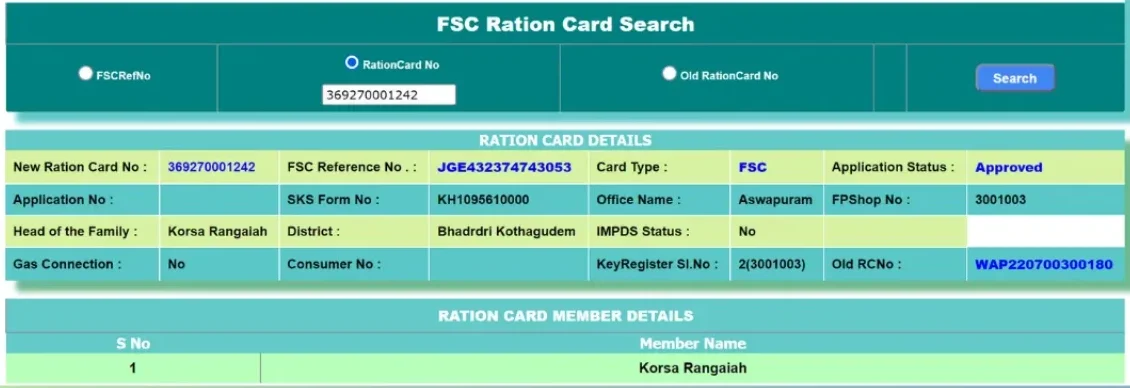
✅ If Aadhaar Is Linked
Your FSC details will appear immediately showing card number, family members, Fair Price Shop details, and commodity entitlement.
❌ If Aadhaar Is Not Linked
You will see “No records found” or “Aadhaar not linked” error message. This confirms linkage is pending or failed.
Complete MeeSeva Aadhaar Linking Process – Step-by-Step Guide
MeeSeva is the most reliable method for Aadhaar linking. Here’s the complete offline process:
✅ Before Visiting MeeSeva Center
Proper preparation ensures smooth processing and avoids repeat visits.
1. Document Preparation Checklist:
- Aadhaar Cards: Original Aadhaar card of ALL family members (head and dependents)
- Ration Card Details: Existing ration card or application acknowledgment receipt
- Mobile Number: Ensure mobile linked with Aadhaar is active and receiving SMS
- Additional Documents: Address proof, identity proof for corrections if needed
2. Pre-Visit Verification:
- Check if all Aadhaar numbers are correct (12 digits each)
- Verify names match exactly between Aadhaar and ration card
- Confirm MeeSeva center location and working hours
- Check for any pending name/address corrections in Aadhaar
3. Timing Tips:
- Best Time: Visit early morning (9:30-11:00 AM) to avoid crowds
- Avoid Days: Mondays, festival days, and month-end when offices are busier
- Family Presence: All family members should be present for biometric verification
📍 At the MeeSeva Center
Token Collection & Queue
Collect service token for “Aadhaar Seeding” or “FSC Aadhaar Linking”. Wait for your turn in designated area.
Document Submission
Hand over all Aadhaar cards and ration card details to MeeSeva operator. Operator will verify document authenticity.
Data Entry & Verification
Operator enters Aadhaar numbers and personal details in system. Carefully verify each entry on screen before confirming.
Biometric Authentication
Each family member provides fingerprint scan on biometric device. If fingerprint fails, iris scan or OTP may be used.
System Processing
System validates data with UIDAI database. This may take 2-5 minutes. Wait patiently during processing.
Acknowledgment Receipt
Collect printed receipt with request ID, submission date, and expected completion date. Keep this safe for tracking.
Service Fee Payment
Pay nominal service fee as per government rates (usually ₹20-30). Collect payment receipt along with acknowledgment.
🔍 What Operator Verifies
- Aadhaar number authenticity through UIDAI verification
- Name matching between documents
- Biometric authentication success for all family members
- Check for existing Aadhaar linkage with other FSCs
- Family composition consistency
⚠️ Common Issues During Processing
- Fingerprint Recognition Failure: Clean fingers, try different finger, or use alternative authentication
- Network Connectivity Issues: Wait for connection restoration or visit later
- Duplicate Aadhaar Alert: Requires additional verification and possible unlinking from old card
- Name Mismatch Rejection: Submit correction request first before attempting linking
Alternative Offline Linking Methods When MeeSeva Unavailable
If MeeSeva centers are non-functional or unavailable, these alternative offline methods may help:
Fair Price Shop Linking
When Available: Some FPS dealers have Aadhaar linking facility
Process: Visit your designated FPS with documents, request linking assistance
Limitation: Not all shops have this facility
Village Revenue Officer
For Rural Areas: VRO may assist with Aadhaar linking in villages
Process: Contact VRO during village visits or at Mandal office
Note: Depends on VRO’s system access
Common Service Centers
Alternative Facility: Some CSCs provide Aadhaar linking services
Process: Locate nearest CSC, inquire about EPDS services
Verify: Ensure CSC is authorized for these services
Mobile Camp Linking Drives
Government occasionally organizes special Aadhaar linking camps in localities. These drives are announced through:
- Local Announcements: Village/ward secretariat notifications
- FPS Notices: Information boards at Fair Price Shops
- Media Coverage: Local newspapers and TV channels
- SMS Alerts: Messages sent to registered mobile numbers
🚐 Camp Advantages
Mobile camps often handle complex cases, provide on-spot corrections, and process large numbers efficiently. No service fee usually charged during such camps.
Complete Aadhaar Linking Timeline & Status Tracking Guide
Understanding precise timelines and tracking methods helps manage expectations and plan follow-ups:
| Timeline Phase | Duration | What Happens | Action Required |
|---|---|---|---|
| Day 0 – Submission | Same day | Request submitted, biometric verified, receipt generated | Collect and safely store acknowledgment receipt |
| Day 1-2 – Initial Processing | 1-2 working days | Data enters queue for UIDAI verification and database update | No action needed, system processing |
| Day 3-5 – Database Update | 3-5 working days | EPDS system updated with new Aadhaar linkage | Begin checking FSC search daily |
| Day 6-7 – Verification | 6-7 working days | Final verification, linkage becomes active | Verify linkage through FSC search |
| Day 8-10 – Grace Period | 8-10 working days | Buffer time for any system delays | If still not linked, visit MeeSeva for status check |
| Day 11+ – Escalation | Beyond 10 days | Issue requires investigation or resubmission | Contact Civil Supplies office with receipt |
Multiple Tracking Methods
1. Online Tracking via EPDS Portal:
- Visit EPDS Telangana website daily after Day 3
- Use FSC search by Aadhaar number
- Check if your details appear in search results
- Verify all family members are listed correctly
2. Fair Price Shop Verification:
- Visit your designated Fair Price Shop
- Request FPS dealer to check your card status in PoS system
- Attempt biometric authentication for ration collection
- Successful authentication confirms linkage completion
3. MeeSeva Status Inquiry:
- Return to same MeeSeva center after Day 10
- Provide acknowledgment receipt to operator
- Request status check using receipt number
- Get clarification on any processing delays
4. SMS/Mobile Notifications:
Some districts send SMS confirmation when Aadhaar linking is successful. Check mobile registered with Aadhaar for any government notifications.
⏰ Factors Affecting Timeline
- High Volume Periods: Mass linking drives or deadline rushes cause delays
- Technical Issues: Server problems, network outages extend processing time
- Document Issues: Name mismatches, duplicate linkages require manual verification
- Holiday Periods: Government offices closed, processing suspended
- System Maintenance: Regular database updates may cause temporary delays
Common Verification Issues & Solutions
| Verification Issue | Cause | Solution |
|---|---|---|
| Fingerprint not matching | Poor fingerprint quality, cuts, faded prints | Update biometrics at Aadhaar center or request OTP authentication |
| OTP not received | Mobile number not linked or changed | Update mobile in Aadhaar database first |
| Iris scan failure | Eye problems, contact lenses, lighting issues | Remove lenses, try in better lighting, or use alternative method |
| Face authentication fails | Photo mismatch, aging, glasses | Update Aadhaar photo if significantly aged |
| Portal shows error | Server issues, maintenance | Try after few hours or contact helpdesk |
Name Mismatch Problems & Step-by-Step Solutions
Name discrepancies are one of the most common reasons for Aadhaar linking failure. Here’s how to fix them:
Spelling Differences
Problem: “Mohammad” in Aadhaar vs “Mohammed” in ration card
Fix: Correct spelling in ration card at MeeSeva to match Aadhaar exactly
Initial Mismatch
Problem: “K. Ramesh” in Aadhaar vs “Ramesh Kumar” in ration card
Fix: Expand initials or match format in both documents
Surname Order
Problem: “Lakshmi Devi Sharma” vs “Sharma Lakshmi Devi”
Fix: Update name order in ration card database through correction request
📋 Documents Needed for Name Correction
- Original Aadhaar card (as proof of correct name)
- Current ration card
- Alternative ID proof if name correction needed in Aadhaar
- Affidavit if major name change required
Where to Request Name Correction
- For Aadhaar name correction: Visit Aadhaar enrollment center with supporting documents
- For Ration card name correction: Visit MeeSeva center or Civil Supplies office
- Processing time: 7-15 working days after submission
- Always keep acknowledgment receipt
Mobile Number Verification Issues & Fixes
Why Mobile Number Matters for Aadhaar Linking
Some Fair Price Shops and verification processes use OTP-based authentication when biometric fails. Mobile number must be active and linked with Aadhaar.
Issue: Mobile Not Linked
How to Check: Send SMS “UID STATUS” to 51969
Solution: Visit Aadhaar enrollment center to link mobile number
Issue: Mobile Number Changed
Problem: Old number registered, new SIM not linked
Solution: Update mobile at Aadhaar center with identity proof and new number
Issue: OTP Not Received
Causes: Network issues, DND activation, incorrect number
Solution: Check network, disable DND, or use alternative authentication
Complete Aadhaar Linking Methods – Step-by-Step Guide
Choose the most convenient method based on your situation:
✅ Method 1: Link Aadhaar at MeeSeva Center (Recommended)
Best for: New linking requests, corrections, failed verifications
Complete Process:
- Locate nearest MeeSeva center using official website or local inquiry
- Visit during working hours (usually 9:30 AM to 5:00 PM on weekdays)
- Carry required documents:
- Original Aadhaar card of all family members
- Ration card or acknowledgment receipt if new application
- Mobile number linked with Aadhaar
- Submit linking request to MeeSeva operator
- Complete biometric verification (fingerprint scan of all family members)
- Verify details displayed on operator’s screen before confirmation
- Collect acknowledgment receipt with request ID
- Note expected completion date (usually 3-7 working days)
💡 MeeSeva Tips
Visit early morning to avoid crowds. Keep acknowledgment receipt safe for tracking. Small service charge may apply. No agent needed – direct submission recommended.
Method 2: Link Aadhaar at Fair Price Shop
Best for: Quick linking during ration collection
Process:
- Visit your designated Fair Price Shop
- Inform FPS dealer about Aadhaar linking requirement
- Provide Aadhaar number of all family members
- Complete biometric authentication on PoS device
- Dealer updates linkage in system (if facility available)
- Confirm update and collect ration
⚠️ Limitation
Not all FPS dealers have authority to link Aadhaar. This method works only if dealer has access to update system. For corrections and complex issues, MeeSeva is more reliable.
Method 3: Through Civil Supplies Office
Best for: Rejections, duplicate linkage issues, escalations
When to Choose This Method:
- MeeSeva linking request was rejected
- Aadhaar already linked with another FSC
- Complex name or address mismatch issues
- Biometric verification repeatedly fails
- Need manual intervention from officials
Process:
- Visit Mandal Civil Supplies Officer or District office
- Carry all documents: Aadhaar, ration card, address proof, ID proof
- Explain issue with previous linking attempts
- Submit written application if required
- Officials manually verify and update linkage
- Collect receipt and follow up after specified period
Complete Documents Checklist for Aadhaar Linking
Mandatory Documents
- Aadhaar card (original) of all family members
- Ration card or application acknowledgment
- Mobile number linked with Aadhaar
For Corrections
- Address proof if address mismatch
- ID proof for name verification
- Previous linking rejection receipt (if any)
Good to Carry
- Passport size photos
- Bank passbook copy
- Any previous correspondence documents
🔍 Important Verification Points
- Ensure names in Aadhaar and ration card match exactly (including spelling and order)
- Mobile number must be active and receiving SMS
- Carry original documents – photocopies may be rejected
- If family member is minor without Aadhaar, inform official beforehand
Aadhaar Linking Timeline – When Will It Reflect?
Understanding processing timelines helps manage expectations:
| Submission Method | Normal Processing Time | Maximum Time | What to Do After |
|---|---|---|---|
| MeeSeva Center | 3-7 working days | 10 working days | Revisit with receipt if not updated |
| Fair Price Shop | 1-3 working days | 7 working days | Contact FPS dealer or visit MeeSeva |
| Civil Supplies Office | 7-15 working days | 30 working days | Follow up with concerned officer |
| Name Correction | 15-30 working days | 45 working days | Track correction status separately |
How to Track Linking Status
- Online Check: Use FSC search on EPDS portal with Aadhaar number
- At Fair Price Shop: Request FPS dealer to check your card status
- MeeSeva Follow-up: Visit with acknowledgment receipt to check progress
- Helpline: Contact EPDS helpline with request ID (if available)
⏰ Processing Delays May Occur During:
- Public holidays and festival periods
- Mass Aadhaar linking drives (high volume)
- Government portal maintenance or updates
- Election periods when staff is deployed for other duties
Complete Troubleshooting Workflow – Decision Tree
Follow This Step-by-Step Troubleshooting Path:
Check Current Linkage Status
Search FSC on EPDS portal using Aadhaar. If details appear, Aadhaar is already linked. If “No records found”, proceed to next step.
Verify Aadhaar Details
Double-check Aadhaar number for typos. Ensure you’re searching in correct district. Try clearing browser cache and searching again.
Check for Recent Submission
If you submitted linking request recently, wait 3-7 working days. Portal updates are not instant. Check again after waiting period.
Visit MeeSeva for New Linking
If never linked before, visit MeeSeva with documents. Complete biometric verification. Collect acknowledgment receipt.
Address Name/Detail Mismatch
If linking rejected due to name difference, submit correction request. Update either Aadhaar or ration card to match exactly.
Resolve Biometric Issues
If fingerprint fails repeatedly, visit Aadhaar enrollment center to update biometrics. Ensure clean, dry fingers during scan.
Escalate to Civil Supplies Office
If issue persists after 10 working days or MeeSeva couldn’t resolve, visit Mandal/District Civil Supplies office with all documents.
File Written Complaint if Needed
For unresolved cases, submit written application to District Civil Supplies Officer explaining timeline and previous attempts.
Aadhaar Linked But Still Not Showing in FSC Search
Sometimes Aadhaar linking is successful, but FSC search still fails to display details. This can be frustrating but usually has simple fixes.
Possible Reasons & Solutions:
District Mismatch
Issue: Searching in wrong district
Fix: Verify your actual FSC district and search again in correct district dropdown
Portal Server Delay
Issue: Database synchronization pending
Fix: Wait 24-48 hours after linking confirmation and search again
Recent Update Not Reflected
Issue: System update in progress
Fix: Backend updates take time. Recheck after 2-3 days
Browser Cache Issue
Issue: Old cached data showing
Fix: Clear browser cache, try incognito mode, or use different browser
🔍 Advanced Troubleshooting
Try searching using different parameters: use FSC number instead of Aadhaar, try ration card holder name, or visit FPS dealer to check card status directly in their system.
Aadhaar Biometric Not Matching at Fair Price Shop
Biometric authentication failure during ration collection is common. This doesn’t always mean Aadhaar is unlinked.
Common Causes of Biometric Failure:
Poor Fingerprint Quality
- Faded fingerprints (laborers, elderly)
- Cuts or injuries on fingers
- Dry or very oily skin
- Worn out prints due to age
Device Issues
- Dirty biometric scanner
- Poor internet connectivity
- Malfunctioning PoS device
- Server downtime
Data Mismatch
- Biometrics not updated in Aadhaar
- Wrong finger being scanned
- Recent Aadhaar biometric update pending
Solutions for Biometric Authentication Failure
- Update Biometric Data: Visit Aadhaar enrollment center to update fingerprints and iris scan
- Clean Fingers: Wash hands, dry completely, remove any dirt or oil before scanning
- Try Different Fingers: If one finger fails, try all other fingers registered in Aadhaar
- Request OTP Authentication: If available, ask FPS dealer for OTP-based verification
- Use Iris Scanner: Some PoS devices support iris authentication as alternative
- Report Device Issue: If scanner appears dirty or malfunctioning, ask dealer to clean or restart device
- Visit During Off-Peak Hours: Server load is less, authentication success rate higher
🚨 Emergency Ration Collection
If biometric repeatedly fails and you urgently need ration, some FPS dealers may allow alternative verification (Aadhaar card + ration card + local verification). However, permanent biometric update is strongly recommended for future smooth collection.
What If Aadhaar Is Linked to Wrong Ration Card?
If your Aadhaar is mistakenly linked to another family member’s card, old address card, or duplicate FSC, follow this correction process:
Identify Wrong Linkage
Search your Aadhaar on EPDS portal. Note down the FSC number that appears. Verify if it’s the correct card or wrong one.
Gather Documents
Collect: Your Aadhaar card, correct ration card details, proof of address, identity proof, and any old ration card surrender proof if applicable.
Visit Civil Supplies Office
MeeSeva cannot handle unlinking. Must visit Mandal or District Civil Supplies office directly.
Submit Unlinking Request
Explain situation to officer. Request Aadhaar unlinking from wrong FSC. Provide all supporting documents.
Wait for Unlinking Confirmation
Officer processes request. May take 7-15 working days. Track status with application receipt.
Link to Correct Ration Card
Once unlinking confirmed, visit MeeSeva to link Aadhaar with correct FSC. Complete biometric verification.
📌 Important Notes
- One Aadhaar can be linked with only one active ration card at a time
- If old ration card still active, must surrender it officially before relinking
- Duplicate card linkage issues require manual intervention – online methods won’t work
- Keep all receipts and communication records for reference
Escalation Process – When Normal Methods Fail
If you’ve tried MeeSeva, Fair Price Shop, and Civil Supplies office without resolution, use this escalation hierarchy:
| Level | Authority | When to Approach | What to Submit |
|---|---|---|---|
| Level 1 | Mandal Civil Supplies Officer | After 10 days of MeeSeva submission with no result | MeeSeva receipt, Aadhaar, ration card, written application |
| Level 2 | District Civil Supplies Officer | If Mandal officer doesn’t resolve within 15 days | All previous receipts, timeline of attempts, complaint letter |
| Level 3 | EPDS Helpline / Grievance Portal | For tracking and online complaint registration | Register complaint online with details and documents |
| Level 4 | Food & Civil Supplies Department (State Level) | If no resolution after 30 days from district office | Complete case history, all correspondence, formal complaint |
How to Write Effective Complaint
Include these essential details in your written application:
- Your full name, Aadhaar number, FSC number (if available)
- Contact details: mobile number, address
- Clear description of problem
- Timeline of all previous attempts with dates
- Copies of all receipts and acknowledgments
- What action you’re requesting
- Date and signature
💡 Escalation Tips
Be polite but firm. Maintain written records of all interactions. Note officer names and dates. Follow up every 7 days. If officials are unresponsive, mention that you’ll approach higher authorities – this often prompts action.
Can Ration Be Collected Without Aadhaar Linking?
This is a common concern for beneficiaries facing persistent linking issues.
⚠️ Official Position
Aadhaar authentication is mandatory for ration collection in Telangana. Without successful biometric verification, FPS dealers are technically not authorized to distribute ration.
Exceptions & Alternative Arrangements
In rare circumstances, these alternatives may be available:
- OTP-Based Authentication: If biometric fails, some FPS devices support mobile OTP verification
- Temporary Manual Verification: In case of technical failures, local identification may be accepted temporarily
- Officer Authorization: Civil Supplies officer may provide temporary collection permission while linkage is being processed
- Exemption Cases: Very elderly, differently-abled, or those with medical conditions preventing biometric may get special exemptions
✅ Best Practice
Don’t rely on temporary solutions. Complete permanent Aadhaar linking as soon as possible through MeeSeva to ensure uninterrupted ration benefits. Temporary arrangements are not guaranteed and may cause future complications.
What to Do in Emergency
If you urgently need ration but Aadhaar linking is pending:
- Carry Aadhaar card, ration card, and MeeSeva receipt (if available)
- Explain linking attempt and pending status to FPS dealer
- Request OTP authentication if available
- If dealer refuses, immediately contact Mandal Civil Supplies Officer
- Simultaneously expedite linking process at MeeSeva
Common Mistakes to Avoid During Aadhaar Linking
Submitting Duplicate Requests
Don’t submit multiple linking requests at different centers simultaneously. This creates database conflicts. Wait for first request to process.
Sharing Details on Unofficial Sites
Never enter Aadhaar or ration card details on third-party websites claiming to link Aadhaar. Only use official EPDS portal for checking, not linking.
Ignoring Name Spelling
Exact spelling match is crucial. Don’t assume small differences will be ignored. Verify spelling before submission.
Not Keeping Receipts
Always keep MeeSeva acknowledgment receipts. Without receipt, tracking becomes impossible and you have no proof of submission.
Using Agents Unnecessarily
Aadhaar linking is straightforward. Don’t pay agents when you can do it yourself at MeeSeva. Agents may charge unnecessarily.
Delaying Biometric Updates
If fingerprints are faded, don’t delay Aadhaar biometric update. Problem will persist until biometrics are refreshed.
✅ Best Practices Checklist
- ✓ Verify all details before submission
- ✓ Keep copies of all documents
- ✓ Note down MeeSeva operator name and date
- ✓ Check linking status after 7 days
- ✓ Follow up promptly if delayed
- ✓ Maintain mobile number linked with Aadhaar
- ✓ Update address if you’ve relocated
Frequently Asked Questions (FAQs)
About This Resource
This comprehensive troubleshooting guide is created to help Telangana residents resolve Aadhaar linking issues with ration cards.
📚 Information Sources
Content based on official EPDS Telangana portal guidelines, MeeSeva process documentation, and publicly available government notifications regarding Aadhaar-FSC integration.
🎯 Purpose
Created as independent informational resource to explain troubleshooting steps, verification methods, correction processes, and escalation options for common Aadhaar linking problems.
✓ Content Accuracy
Information compiled from official government sources and practical process knowledge. Updated regularly to reflect current procedures. Users advised to verify critical details through official channels.
🔄 Regular Updates
This guide is reviewed periodically to ensure accuracy. Last update date displayed at top. Government processes may change – always confirm latest requirements at official offices.
💡 User-First Approach
This guide prioritizes practical solutions over theoretical information. Step-by-step workflows, troubleshooting decision trees, and real-scenario solutions help users resolve issues efficiently without visiting multiple sources.
Important Disclaimer
This is an independent informational website created to help users understand the Aadhaar linking process for ration cards in Telangana. We are not affiliated with or endorsed by the Government of Telangana, EPDS Telangana, Civil Supplies Department, or any government authority.
This website does not access government databases, process Aadhaar linking requests, or provide official services. All linking requests must be submitted through authorized channels: MeeSeva centers, Fair Price Shops, or Civil Supplies offices.
Information provided is based on publicly available guidelines and is intended for educational purposes. Users should verify all critical details, eligibility criteria, document requirements, and procedures through official EPDS Telangana portal (epds.telangana.gov.in) or authorized government offices before taking action.
We do not guarantee resolution of linking issues or accept liability for decisions made based on this content. For official assistance, contact authorized government departments directly.