
How to Check FSC Status in Telangana Online – Complete Guide 2026
Last Updated: June 25, 2026
Information Source: Official EPDS Telangana Government Portal and Civil Supplies Department Guidelines
Guide Type: Step-by-step FSC status verification tutorial for all search methods
Quick Answer: How to Check FSC Status Telangana
To check your FSC status in Telangana online, follow these steps:
- Visit the official EPDS Telangana portal at epds.telangana.gov.in
- Click on “FSC Search” or “FSC Application Search” from the homepage
- Select your search method: Aadhaar Number, FSC UID, or Application Number
- Enter the required details along with your district selection
- Click “Search” to view your complete FSC status and application details
📌 Processing Timeline
FSC applications typically take 15-30 working days for approval. Status updates appear online as verification progresses through document verification, field inspection, and final approval stages.
Checking your Food Security Card (FSC) status in Telangana is essential for tracking your application progress, verifying approval, and ensuring continuous access to subsidized rations through the Public Distribution System. Whether you’ve recently applied for a new FSC card, updated your existing card details, or want to verify your current eligibility status, the EPDS Telangana portal provides convenient online status checking facilities.
This comprehensive guide covers all methods to check FSC status in Telangana—including verification by Aadhaar number, FSC UID number, and MeeSeva application number. You’ll learn exactly what each status message means, how long processing takes, what to do if status shows as rejected or pending, and troubleshooting steps for common issues.
Approximately 2.87 crore beneficiaries in Telangana depend on the FSC system for essential food grains. Knowing how to check your status empowers you to resolve issues proactively, avoid ration distribution disruptions, and exercise your rights under the National Food Security Act (NFSA).
What is FSC Status in Telangana?
FSC Status refers to the current state of your Food Security Card application or existing card record in the Telangana government’s EPDS database. It tells you whether your application has been received, is under verification, approved and active, rejected, or requires additional documentation.
Application Tracking
Monitor where your new FSC application stands in the multi-stage verification and approval process
Approval Verification
Confirm whether your FSC has been officially approved, card category assigned, and linked to Fair Price Shop
Issue Detection
Identify problems such as document rejections, Aadhaar linking errors, duplicate entries, or eligibility issues early
Timeline Estimation
Understand how long verification will take and when you can expect final approval or card generation
💡 Why FSC Status Checking Matters
Regular status verification helps you avoid last-minute surprises during ration distribution periods. If your status shows “Under Review” for an unusually long time or displays error messages, you can visit MeeSeva centers or Civil Supplies offices promptly to resolve issues before they affect your ration entitlements. Proactive status checking also prevents duplicate applications and ensures accurate family data in government records.
3 Official Methods to Check FSC Status in Telangana
The EPDS Telangana portal offers three distinct search methods depending on what information you have available. All methods access the same official database and display identical status information.
Method 1: Check FSC Status Using Aadhaar Number
When to use this method: If your Aadhaar number is linked with your FSC application or existing ration card, this is the quickest verification method. Works for both new applications and existing cardholders.
Access EPDS Portal
Open your web browser and navigate to the official EPDS Telangana website: epds.telangana.gov.in. Ensure you’re on the authentic government portal (look for .gov.in domain).
Locate FSC Search Option
On the homepage, find and click on “FSC Search” or “Food Security Card Search” link. This is typically displayed prominently in the main menu or citizen services section.
Select Search by Aadhaar
From available search options, choose “Search by Aadhaar Number” or “Search by UID”. Both terms refer to the same Aadhaar-based search method.
Enter Aadhaar Number
Input your complete 12-digit Aadhaar number in the designated field. Enter numbers without spaces, dashes, or special characters. Double-check for typing errors.
Select District
Choose the district where your FSC application was submitted or where you’re currently registered. Incorrect district selection is the most common reason for “status not found” errors.
View Complete Status
Click the “Search” or “Submit” button. Your FSC status will be displayed showing application stage, approval status, family members, card category (PHH/AAY), assigned FPS, and any pending actions.
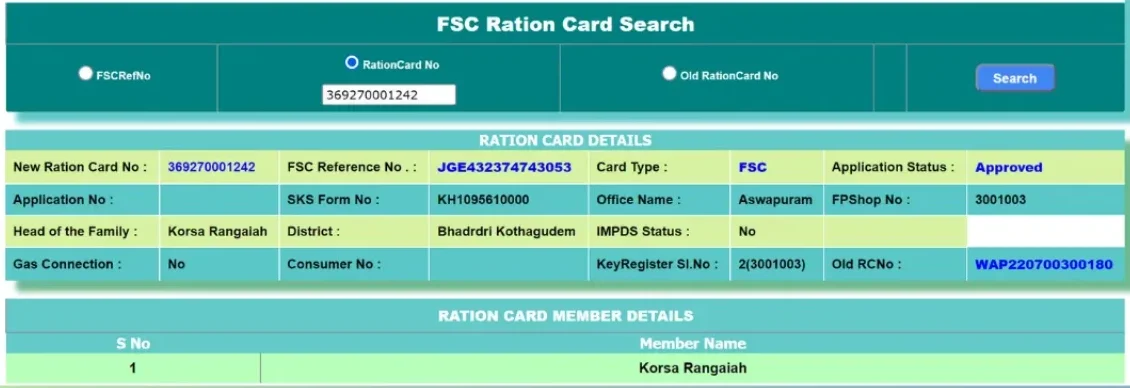
📖 Detailed Aadhaar Search Tutorial
For comprehensive step-by-step instructions with annotated screenshots and troubleshooting tips, see our complete guide: FSC Search by Aadhaar Number in Telangana
⚠️ Common Aadhaar Search Issues
If status doesn’t appear:
- Verify Aadhaar number is correctly entered (12 digits, no spaces)
- Try selecting different districts if you’ve recently moved
- Confirm Aadhaar is linked—visit Aadhaar linking guide if needed
- Wait 3-5 business days if application was recently submitted
Method 2: Check FSC Status Using FSC UID Number
When to use this method: If you already have an FSC card and want to verify its current status, check family member details, confirm assigned Fair Price Shop, or validate card type (PHH/AAY), use the FSC UID search method.
Find Your FSC UID Number
Locate the FSC UID number (also called Food Security Card Number) printed on your physical ration card. It’s typically a unique alphanumeric identifier displayed prominently on the card front.
Navigate to FSC Search
Visit epds.telangana.gov.in and click on “FSC Search” or “Search Food Security Card” option from the main menu or services section.
Choose UID Search Option
Select “Search by FSC UID” or “Search by Card Number” from available search methods. This option specifically searches using the Food Security Card identification number.
Enter FSC UID & District
Input your complete FSC UID number exactly as printed on your card. Select the district where your card is registered from the dropdown menu.
View Card Status & Details
Click “Search” to display comprehensive FSC information including card status (Active/Inactive), all family members, head of household, card category, commodity entitlements, and assigned Fair Price Shop name and location.
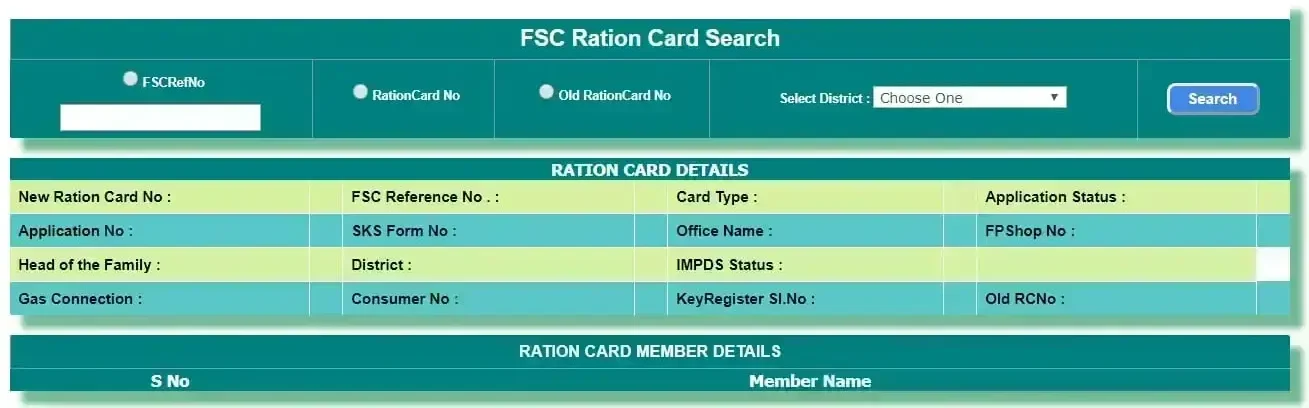
📖 Complete FSC UID Search Guide
For detailed instructions on using UID search, understanding displayed information, and verifying card types, visit: FSC Search by UID in Telangana
✅ What UID Search Reveals
FSC UID search provides the most comprehensive information: complete family composition, individual Aadhaar linkage status for each member, monthly rice entitlement based on family size, card category (PHH Priority Household or AAY Antyodaya Anna Yojana), assigned FPS dealer name and location, and card activation status. This makes it ideal for existing cardholders wanting full visibility into their FSC record.
Method 3: Check FSC Status Using Application Number
When to use this method: If you recently applied for a new FSC card or submitted updates at a MeeSeva center and received an application acknowledgment receipt, use the Application Number search to track processing status.
Locate Application Acknowledgment
Find the acknowledgment receipt or slip you received when submitting your FSC application at the MeeSeva center. The Application Number (also called Token Number or Reference Number) is printed on this receipt.
Open EPDS Portal
Navigate to epds.telangana.gov.in using any web browser. Click on “FSC Application Search” or “Application Status” from the homepage menu.
Select Application Number Search
Choose “Search by Application Number” or “Search by MeeSeva Number” option. Both refer to the same application tracking method.
Enter Application Details
Input the complete Application Number exactly as shown on your MeeSeva receipt. Select the district where the application was submitted and the application date if required.
Check Processing Status
Click “Search” or “Check Status” to view current application stage: Data Entry Complete, Document Verification Pending, Field Verification In Progress, Under Officer Review, Approved, or Rejected with specific reasons.
📖 Application Status Tracking Guide
For comprehensive application tracking information including typical processing timelines and next steps: FSC Application Search Telangana
⏱️ Application Processing Timeline
New FSC applications follow a structured verification process: Data entry and initial validation (1-3 days) → Document verification by Civil Supplies staff (4-7 days) → Field verification visit to verify residence and family details (8-15 days) → Mandal or District officer review and approval decision (16-30 days). Total processing typically takes 15-30 working days, though complex cases or high application volumes may extend timelines to 45 days.
Understanding FSC Status Messages & What They Mean
When you check FSC status online, the system displays specific status messages indicating your application or card’s current state. Understanding these messages helps you know what action to take next.
Approved / Active
What it means: Your FSC application has been fully verified, approved by authorities, and card is active for ration collection.
Visit your assigned Fair Price Shop during distribution days to collect subsidized rice and commodities. You can download your FSC details as digital proof.
Under Review / Processing
What it means: Your application is currently being processed. Documents are under verification, field visit may be pending, or awaiting officer approval.
No immediate action required. Wait for verification completion. Normal processing takes 15-30 working days. If status unchanged beyond 30 days, contact MeeSeva center or Civil Supplies office.
Pending Documents
What it means: Your application is incomplete due to missing documents, invalid certificates, or information requiring clarification from you.
Visit the MeeSeva center where you applied with the specific documents mentioned in status details. Submit required documents promptly to resume processing.
Rejected / Cancelled
What it means: Your application was rejected due to eligibility issues, duplicate cards, document problems, or failed verification. Specific rejection reason should be displayed.
Read the rejection reason carefully. If you disagree or can rectify the issue, visit Civil Supplies office to discuss appeal options or apply fresh with corrected documentation.
Field Verification Scheduled
What it means: Document verification completed successfully. Field officer visit to your residence is scheduled or in progress to verify physical address and family composition.
Ensure someone from your family is available at home during typical office hours. Keep original documents ready for field officer inspection if requested.
Data Entry Complete
What it means: Your application details have been entered into the EPDS system. Document and field verification stages are yet to begin.
Wait for verification process to start. This usually begins within 3-7 days after data entry. Continue checking status regularly for updates.
🔍 Common Rejection Reasons & Solutions
1. Income Above Eligibility Limit: If your family income exceeds the state-defined threshold for NFSA eligibility. Solution: If income assessment was incorrect, submit updated income certificate with supporting documents.
2. Duplicate FSC Found: Another FSC already exists for a family member at the same or different address. Solution: Surrender the duplicate card at Civil Supplies office before reapplying.
3. Aadhaar Linking Failed: Aadhaar number provided doesn’t match government records or failed UIDAI verification. Solution: Visit Aadhaar linking guide to resolve authentication issues.
4. Address Verification Failed: Field officer couldn’t verify your residence or found family not living at declared address. Solution: Ensure valid address proof and family presence during verification visits.
Complete FSC Application Verification Process
What Happens After You Submit FSC Application
Understanding each verification stage helps you anticipate processing time and know when to check status updates.
Application Submission at MeeSeva
You submit FSC application with required documents (Aadhaar, address proof, income certificate, family photos) at MeeSeva center. Operator issues acknowledgment receipt with unique Application Number. Application fee (if any) collected and receipt provided.
Day 0 – Application DateData Entry & System Registration
MeeSeva operator enters your family details, member names, Aadhaar numbers, income information, and address into EPDS system. Application record created and assigned unique tracking ID. Status becomes searchable online as “Data Entry Complete” or “Application Registered”.
Day 1-3Document Verification Stage
Civil Supplies department staff verify submitted documents for authenticity: Aadhaar validation through UIDAI database, income certificate verification with issuing authority, address proof cross-checking, duplicate FSC detection across state database. Status updates to “Under Document Verification”.
Day 4-7Field Verification Visit
Designated field officer visits your residence to physically verify: family actually residing at declared address, number of family members matches application, living conditions align with income category, no duplicate members in other FSC cards. Officer records observations in verification report. Status shows “Field Verification In Progress”.
Day 8-15Eligibility Assessment & Officer Review
Mandal Revenue Officer (MRO) or District Civil Supplies Officer reviews complete application file including verification reports. Assesses eligibility under NFSA criteria, income limits, residence proof, family composition. Decides card category (PHH or AAY) if approved. Status updates to “Under Officer Review”.
Day 16-25Final Approval or Rejection Decision
Officer marks application as “Approved” or “Rejected” with specific reasons. If approved: FSC UID generated, family members linked with Aadhaar, card category assigned, Fair Price Shop allocation completed. If rejected: Rejection reason recorded in system. Status becomes “Approved” or “Rejected” with details visible online.
Day 26-30FSC Card Generation & Activation
For approved applications: Digital FSC record created in EPDS database, physical card printing initiated (if still issued), Aadhaar-based authentication enabled at FPS, monthly commodity allocation calculated based on family size. Card status changes to “Active”. Beneficiary can start collecting rations and download digital FSC.
Day 31-35⏰ Processing Time Variations
While standard processing takes 15-30 working days, actual timelines vary based on district workload, application complexity, verification challenges, and seasonal factors. Urban areas like Hyderabad may process faster due to better infrastructure, while remote mandals may take longer for field verification. Applications during NFSA enrollment drives or census updates may experience delays due to high volume. Check status regularly and contact authorities if processing exceeds 45 days without updates.
Troubleshooting FSC Status Check Issues
Facing problems while checking FSC status online? Here are solutions to the most common issues:
Status Not Found Error
Problem: Search returns “No records found” or “Status not available” message.
Solutions:
- Verify you selected correct district where application was submitted
- Check for typing errors in Aadhaar/UID/Application number
- Try searching in neighboring districts if recently relocated
- Wait 3-5 business days if application submitted very recently
- Visit MeeSeva center to confirm application was properly registered
Aadhaar Not Linked Error
Problem: System shows “Aadhaar not linked” or cannot find FSC using Aadhaar search.
Solutions:
- Visit MeeSeva center with Aadhaar card to initiate linking process
- Check if Aadhaar details in FSC match exactly with UIDAI records
- Use FSC UID or Application Number search as alternative
- Follow complete linking guide: Aadhaar Linking Process
EPDS Portal Not Loading
Problem: Website not opening, showing errors, or timing out during search.
Solutions:
- Access during non-peak hours (avoid month-end ration distribution days)
- Clear browser cache and cookies, then reload
- Try different browser (Chrome, Firefox, Edge) or device
- Check if official portal URL is correct: epds.telangana.gov.in
- Wait during scheduled maintenance periods (usually announced)
Status Unchanged for Long Time
Problem: FSC status showing same message (like “Under Review”) for over 30 days.
Solutions:
- Visit MeeSeva center with application receipt for detailed inquiry
- Contact Mandal or District Civil Supplies office directly
- Check if field verification was attempted but family unavailable
- Verify no document-related queries pending your response
- File formal status inquiry if processing exceeds 45 days
Wrong or Incomplete Family Data
Problem: Status shows incorrect family members, names misspelled, or members missing.
Solutions:
- Visit MeeSeva center immediately with correct documents
- Submit formal correction request with proof (birth certificates, etc.)
- Ensure corrections made before final approval to avoid rejection
- Check district-specific correction procedures at Civil Supplies office
Mobile Browser Issues
Problem: Portal not displaying properly on mobile phone or search not working.
Solutions:
- Use desktop/landscape mode for better visibility
- Ensure stable internet connection (minimum 1 Mbps speed)
- Update mobile browser to latest version
- Try mobile data if WiFi causing issues, or vice versa
- Access from desktop computer if mobile consistently fails
🆘 Still Unable to Check Status?
If you’ve tried all troubleshooting steps and still cannot check FSC status online, visit your nearest MeeSeva center or District Civil Supplies office in person with your application receipt and Aadhaar card. Officials can directly check status in internal systems and provide written status confirmation. For persistent technical issues, see: FSC Search Problems & Solutions
How to Check FSC Status Offline (Without Internet)
Don’t have internet access or facing persistent portal issues? Use these offline verification methods:
Visit MeeSeva Center
What to bring: Aadhaar card or application acknowledgment receipt
What they’ll do: MeeSeva operator can check your FSC status directly in official EPDS system, print status details if needed, explain processing stage and expected timeline, help resolve data errors or linking issues immediately.
Typical service time: 5-10 minutes
Check at Fair Price Shop
What to bring: Aadhaar card or existing FSC card
What they’ll do: FPS dealer can verify if your FSC is active in their Point of Sale (PoS) system, show family members linked to your card, confirm monthly commodity allocation, check Aadhaar authentication status for ration collection.
Limitation: Can only check active cards, not pending applications
Visit Civil Supplies Office
Which office: Mandal Revenue Office or District Civil Supplies Office based on application location
What to bring: Application receipt, Aadhaar card, and any relevant documents
What they’ll do: Officials can check detailed application status including verification reports, provide reasons for delays or rejections, issue written status certificates if needed for official purposes, escalate stuck applications to senior officers.
Best for: Applications delayed beyond normal processing time
Call Helpline Numbers
Toll-free numbers:
- 1967 – State Food & Civil Supplies helpline
- 1800-4250-0333 – EPDS Telangana support
Information needed: Aadhaar number or Application number, district name, applicant name
What they’ll help with: Check basic status, provide general guidance, direct you to appropriate office for complex issues
Limitation: Cannot resolve technical issues or process corrections over phone
💡 Best Offline Option
For most citizens, visiting a MeeSeva center is the most efficient offline method. MeeSeva operators have direct EPDS system access with same information available online, can print status documents immediately, and assist with corrections or linking issues on the spot. MeeSeva centers typically have shorter wait times than Civil Supplies offices and are more widely distributed across mandals.
FSC Status Check: District-Specific Information
Telangana has 33 districts, each with its own Civil Supplies administration. While the EPDS portal and status check process is standardized statewide, processing times and office contact details vary by district.
📍 District-Wise FSC Status & Offices
For comprehensive district-specific information including office addresses, contact numbers, typical processing times, and local procedures, visit: Ration Card Status Telangana District-Wise Guide
Major urban districts like Hyderabad, Rangareddy, and Medchal-Malkajgiri typically process FSC applications faster (15-25 days) due to better digital infrastructure and higher staff deployment. Rural and newly formed districts may take 30-45 days due to larger geographical coverage for field verification and fewer processing staff.
Important: Always select the correct district during online FSC status search. Selecting wrong district is the most common reason for “status not found” errors. If you’re unsure which district your application was registered in, check your MeeSeva acknowledgment receipt or contact the center where you applied.
Frequently Asked Questions About FSC Status Check
About This FSC Status Checking Guide
Comprehensive resource helping Telangana residents check FSC application status through all official methods and understand what each status means.
📚 Information Sources
Content compiled from official EPDS Telangana portal documentation, Civil Supplies Department FSC verification process guidelines, public MeeSeva procedures, and NFSA implementation standards in Telangana. All search methods verified against current portal functionality as of 2026.
🎯 Guide Purpose
Created to provide step-by-step instructions for all three FSC status search methods (Aadhaar, UID, Application number), explain status message meanings, outline verification timelines, troubleshoot common checking issues, and empower citizens with knowledge to track applications independently.
✓ Content Accuracy
Status checking procedures verified against active EPDS portal as of guide publication date. Processing timelines based on documented government standards and typical district-level experiences. Screenshots represent actual portal interfaces. Users advised to verify critical information through official EPDS portal or Civil Supplies authorities.
🔄 Regular Updates
Guide updated when EPDS portal interface changes, new status categories introduced, or verification procedures modified. Last update date displayed at top of page. For latest portal features and any policy changes, always refer to official epds.telangana.gov.in website directly.
💡 User-Centric Approach
This guide prioritizes practical how-to instructions over generic information. Each status checking method includes complete workflows from portal access to result interpretation. Troubleshooting section addresses real problems citizens face. All advice based on helping users successfully check FSC status independently without requiring external assistance or multiple website visits.
Important Disclaimer
This is an independent informational website created to help Telangana residents understand how to check FSC status online through official government portals. We are not affiliated with, endorsed by, or connected to the Government of Telangana, EPDS Telangana, Civil Supplies Department, Food & Consumer Affairs, or any government authority.
This website does not access government databases, process FSC applications, update status information, or provide official status certificates. All FSC status checks must be performed through the official EPDS Telangana portal at epds.telangana.gov.in or authorized MeeSeva centers.
Information provided is based on publicly available government guidelines, portal functionality, and documented procedures as of publication date. It is intended for educational purposes to help citizens understand the status checking process. Users should verify all critical information, status meanings, processing timelines, and procedures through official EPDS portal or Civil Supplies offices before making decisions.
We do not guarantee accuracy of information, status interpretation, or processing timelines mentioned. We accept no liability for actions taken based on this content. For authoritative status verification, official eligibility determination, and binding decisions, contact the Telangana Civil Supplies Department directly.
Official Contact: For official FSC status inquiries, call 1967 (toll-free) or visit epds.telangana.gov.in